

Pozn. přek.: autor článku — Erkan Erol, inženýr ze SAP — sdílí své zkoumání mechanismů fungování týmu kubectl exec, tolik známého všem, kdo pracují s Kubernetes. Celý algoritmus doprovází výpisy zdrojového kódu Kubernetes (a souvisejících projektů), které umožňují situaci rozebrat natolik do hloubky, jak je to potřeba.
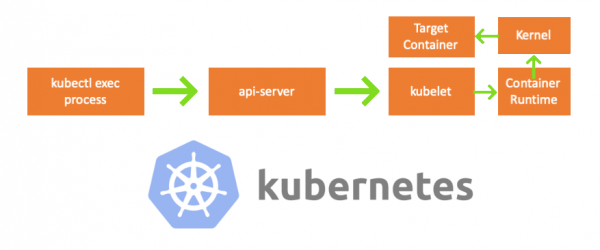
Jednoho pátku ke mně přistoupil kolega a zeptal se, jak provést příkaz v podu pomocí . Nedokázal jsem mu odpovědět a najednou jsem si uvědomil, že vůbec nic nevím o mechanismu fungování kubectl exec. Ano, měla jsem určité představy o jeho sestavení, ale nebyl jsem si 100% jistý jejich správností, a proto jsem se rozhodl se tímto tématem zabývat. Po prostudování blogů, dokumentace a zdrojového kódu jsem se naučil mnoho nového, a v tomto článku chci sdílet svá zjištění a porozumění. Pokud je něco špatně, prosím, obraťte se na mě na .
Příprava
Abych vytvořil cluster na MacBooku, zklonoval jsem . Poté jsem upravil IP adresy uzlů v konfiguraci kubeletu, protože výchozí nastavení neumožňovalo provádět kubectl exec. Více o hlavní příčině lze přečíst .
- Jakýkoliv stroj = můj MacBook
- IP master-uzlu = 192.168.205.10
- IP worker-uzlu = 192.168.205.11
- port API serveru = 6443
Komponenty
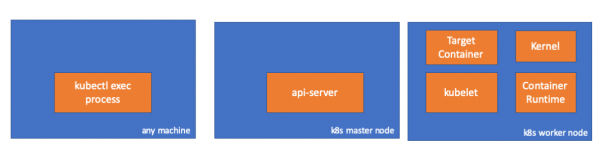
- kubectl exec proces: když použijeme „kubectl exec ...“, spustí se proces. To lze provést na jakémkoliv stroji s přístupem k API serveru K8s. Pozn. překl.: Dále v konzolových výpisech autor používá komentář „jakýkoliv stroj“, upozorňující na to, že další příkazy lze vykonávat na všech takových strojích s přístupem k Kubernetes.
- : komponenta na master uzlu, poskytující přístup k API Kubernetes. To je frontend pro control plane v Kubernetes.
- : agent, který běží na každém uzlu v clusteru. Zajišťuje provoz kontejnerů v podu.
- (spustitelná prostředí kontejneru): software, který se stará o provoz kontejnerů. Příklady: Docker, CRI-O, containerd…
- kernel: jádro OS na pracovním uzlu; odpovídá za řízení procesů.
- target (cílový) container: kontejner, který je součástí podu a funguje na jednom z pracovních uzlů.
Co jsem objevil
1. Aktivita na straně klienta
Vytváříme pod v názvovém prostoru default:
// any machine
$ kubectl run exec-test-nginx --image=nginx
Pak provádíme příkaz exec a čekáme 5000 sekund na další pozorování:
// any machine
$ kubectl exec -it exec-test-nginx-6558988d5-fgxgg -- sh
# sleep 5000
Objevuje se proces kubectl (s pid=8507 v našem případě):
// any machine
$ ps -ef |grep kubectl
501  8507  8409   0  7:19PM ttys000    0:00.13 kubectl exec -it exec-test-nginx-6558988d5-fgxgg -- sh
Pokud zkontrolujeme síťovou aktivitu procesu, zjistíme, že má připojení k api-serveru (192.168.205.10.6443):
// any machine
$ netstat -atnv |grep 8507
tcp4       0      0  192.168.205.1.51673    192.168.205.10.6443    ESTABLISHED 131072 131768   8507      0 0x0102 0x00000020
tcp4       0      0  192.168.205.1.51672    192.168.205.10.6443    ESTABLISHED 131072 131768   8507      0 0x0102 0x00000028
Podívejme se na kód. Kubectl vytváří POST požadavek se subresursem exec a posílá REST požadavek:
              req := restClient.Post().
                        Resource("pods").
                        Name(pod.Name).
                        Namespace(pod.Namespace).
                        SubResource("exec")
                req.VersionedParams(&corev1.PodExecOptions{
                        Container: containerName,
                        Command:   p.Command,
                        Stdin:     p.Stdin,
                        Stdout:    p.Out != nil,
                        Stderr:    p.ErrOut != nil,
                        TTY:       t.Raw,
                }, scheme.ParameterCodec)

return p.Executor.Execute("POST", req.URL(), p.Config, p.In, p.Out, p.ErrOut, t.Raw, sizeQueue)()
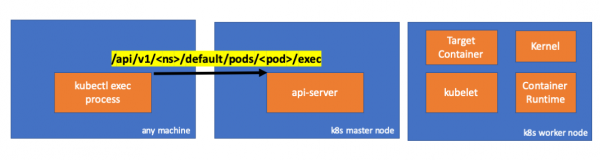
2. Aktivita na straně master uzlu
Můžeme také pozorovat požadavek na straně api-serveru:
handler.go:143] kube-apiserver: POST "/api/v1/namespaces/default/pods/exec-test-nginx-6558988d5-fgxgg/exec" splněno pomocí gorestful s webservice /api/v1
upgradeaware.go:261] Připojuji se k backendovému proxy (zachytávám přesměrování) https://192.168.205.11:10250/exec/default/exec-test-nginx-6558988d5-fgxgg/exec-test-nginx?command=sh&input=1&output=1&tty=1
Headers: map[Connection:[Upgrade] Content-Length:[0] Upgrade:[SPDY/3.1] User-Agent:[kubectl/v1.12.10 (darwin/amd64) kubernetes/e3c1340] X-Forwarded-For:[192.168.205.1] X-Stream-Protocol-Version:[v4.channel.k8s.io v3.channel.k8s.io v2.channel.k8s.io channel.k8s.io]]
Všimněte si, že HTTP požadavek zahrnuje požadavek na změnu protokolu. umožňuje multiplexovat jednotlivé "proudy" stdin/stdout/stderr/spdy-error přes jedno TCP spojení.
API-server přijímá požadavek a převádí ho na PodExecOptions:
// PodExecOptions is the query options to a Pod's remote exec call
type PodExecOptions struct {
        metav1.TypeMeta

        // Stdin if true indicates that stdin is to be redirected for the exec call
        Stdin bool

        // Stdout if true indicates that stdout is to be redirected for the exec call
        Stdout bool

        // Stderr if true indicates that stderr is to be redirected for the exec call
        Stderr bool

        // TTY if true indicates that a tty will be allocated for the exec call
        TTY bool

        // Container in which to execute the command.
        Container string

        // Command is the remote command to execute; argv array; not executed within a shell.
        Command []string
}()
Aby mohl api-server provést požadované akce, musí vědět, s jakým podem se má spojit:
// ExecLocation returns the exec URL for a pod container. If opts.Container is blank
// and only one container is present in the pod, that container is used.
func ExecLocation(
        getter ResourceGetter,
        connInfo client.ConnectionInfoGetter,
        ctx context.Context,
        name string,
        opts *api.PodExecOptions,
) (*url.URL, http.RoundTripper, error) {
        return streamLocation(getter, connInfo, ctx, name, opts, opts.Container, "exec")
}()
Samozřejmě, údaje o endpointu jsou brány z informací o uzlu:
        nodeName := types.NodeName(pod.Spec.NodeName)
        if len(nodeName) == 0 {
                // Pokud pod nebyl přidělen hostiteli, vrátí prázdnou lokaci
                return nil, nil, errors.NewBadRequest(fmt.Sprintf("pod %s nemá přiřazeného hostitele", name))
        }
nodeInfo, err := connInfo.GetConnectionInfo(ctx, nodeName)()
Hurá! K kubeletovi je nyní port (node.Status.DaemonEndpoints.KubeletEndpoint.Port), ke kterému se může připojit API-server:
// GetConnectionInfo retrieves connection info from the status of a Node API object.
func (k *NodeConnectionInfoGetter) GetConnectionInfo(ctx context.Context, nodeName types.NodeName) (*ConnectionInfo, error) {
        node, err := k.nodes.Get(ctx, string(nodeName), metav1.GetOptions{})
        if err != nil {
                return nil, err
        }

        // Find a kubelet-reported address, using preferred address type
        host, err := nodeutil.GetPreferredNodeAddress(node, k.preferredAddressTypes)
        if err != nil {
                return nil, err
        }

        // Use the kubelet-reported port, if present
        port := int(node.Status.DaemonEndpoints.KubeletEndpoint.Port)
        if port <= 0 {
                port = k.defaultPort
        }

        return &ConnectionInfo{
                Scheme:    k.scheme,
                Hostname:  host,
                Port:      strconv.Itoa(port),
                Transport: k.transport,
        }, nil
}()
Z dokumentace :
Tato připojení se uzavírají na HTTPS endpointu kubeleta. Ve výchozím nastavení api-server neověřuje certifikát kubeleta, což činí spojení zranitelným vůči "útokům prostředníka" (MITM) a nebezpečným pro práci v nespolehlivých a/nebo veřejných sítích.
Nyní API-server ví o endpointu a navazuje spojení:
// Connect returns a handler for the pod exec proxy
func (r *ExecREST) Connect(ctx context.Context, name string, opts runtime.Object, responder rest.Responder) (http.Handler, error) {
        execOpts, ok := opts.(*api.PodExecOptions)
        if !ok {
                return nil, fmt.Errorf("invalid options object: %#v", opts)
        }
        location, transport, err := pod.ExecLocation(r.Store, r.KubeletConn, ctx, name, execOpts)
        if err != nil {
                return nil, err
        }
        return newThrottledUpgradeAwareProxyHandler(location, transport, false, true, true, responder), nil
}()
Podívejme se, co se děje na master uzlu.
Nejprve zjistíme IP pracovní uzlu. V našem případě je to 192.168.205.11:
// any machine
$ kubectl get nodes k8s-node-1 -o wide
NAME         STATUS   ROLES    AGE   VERSION   INTERNAL-IP      EXTERNAL-IP   OS-IMAGE             KERNEL-VERSION      CONTAINER-RUNTIME
k8s-node-1   Ready    <none>   9h    v1.15.3   192.168.205.11   <none>        Ubuntu 16.04.6 LTS   4.4.0-159-generic   docker://17.3.3
Pak nastavíme port kubeletu (10250 v našem případě):
// any machine
$ kubectl get nodes k8s-node-1 -o jsonpath='{.status.daemonEndpoints.kubeletEndpoint}'
map[Port:10250]
Teď je čas zkontrolovat síť. Je spojení s pracovním uzlem (192.168.205.11)? Ano, je! Pokud "zabijete" proces exec, zmizí, takže vím, že spojení bylo navázáno api-serverem na základě provedeného exec příkazu.
// master node
$ netstat -atn |grep 192.168.205.11
tcp        0      0 192.168.205.10:37870    192.168.205.11:10250    ESTABLISHED
… 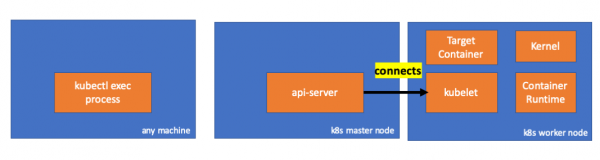
Spojení mezi kubectl a api-serverem je stále otevřené. Kromě toho existuje ještě jedno spojení mezi api-serverem a kubelet.
3. Aktivita na pracovním uzlu
Teď se připojíme k pracovnímu uzlu a podíváme se, co se na něm děje.
Na první pohled vidíme, že spojení s ním bylo také navázáno (druhý řádek); 192.168.205.10 je IP master uzlu:
 // worker node
  $ netstat -atn |grep 10250
  tcp6       0      0 :::10250                :::*                    LISTEN
  tcp6       0      0 192.168.205.11:10250    192.168.205.10:37870    ESTABLISHED
A co naše příkaz sleep? Ура, она тоже присутствует!
 // worker node
  $ ps -afx
  ...
  31463 ?        Sl     0:00      _ docker-containerd-shim 7d974065bbb3107074ce31c51f5ef40aea8dcd535ae11a7b8f2dd180b8ed583a /var/run/docker/libcontainerd/7d974065bbb3107074ce31c51
  31478 pts/0    Ss     0:00          _ sh
  31485 pts/0    S+     0:00              _ sleep 5000
  …
Ale počkejte: jak to kubelet provedl? V kubeletu je démon, který otevírá přístup k API přes port pro požadavky api-serveru:
// Server is the library interface to serve the stream requests.
type Server interface {
        http.Handler

        // Get the serving URL for the requests.
        // Requests must not be nil. Responses may be nil iff an error is returned.
        GetExec(*runtimeapi.ExecRequest) (*runtimeapi.ExecResponse, error)
        GetAttach(req *runtimeapi.AttachRequest) (*runtimeapi.AttachResponse, error)
        GetPortForward(*runtimeapi.PortForwardRequest) (*runtimeapi.PortForwardResponse, error)

        // Start the server.
        // addr is the address to serve on (address:port) stayUp indicates whether the server should
        // listen until Stop() is called, or automatically stop after all expected connections are
        // closed. Calling Get{Exec,Attach,PortForward} increments the expected connection count.
        // Function does not return until the server is stopped.
        Start(stayUp bool) error
        // Stop the server, and terminate any open connections.
        Stop() error
}()
Kubelet vypočítává odpovídající endpoint pro exec požadavky:
func (s *server) GetExec(req *runtimeapi.ExecRequest) (*runtimeapi.ExecResponse, error) {
        if err := validateExecRequest(req); err != nil {
                return nil, err
        }
        token, err := s.cache.Insert(req);
        if err != nil {
                return nil, err
        }
        return &runtimeapi.ExecResponse{
                Url: s.buildURL("exec", token),
        }, nil
}()
Nespleťte se. Nevrací výsledek příkazu, ale endpoint pro komunikaci:
type ExecResponse struct {
         Full-qualified URL of the exec streaming server.
        Url                  string   `protobuf:"bytes,1,opt,name=url,proto3" json:"url,omitempty"`
        XXX_NoUnkeyedLiteral struct{} `json:"-"`
        XXX_sizecache        int32    `json:"-"`
}()
Kubelet implementuje rozhraní RuntimeServiceClient, které je součástí Container Runtime Interface (o něm jsme psali, například, — pozn. překl.):
Dlouhý výpis z cri-api v kubernetes/kubernetes
// For semantics around ctx use and closing/ending streaming RPCs, please refer to https://godoc.org/google.golang.org/grpc#ClientConn.NewStream.
type RuntimeServiceClient interface {
        // Version returns the runtime name, runtime version, and runtime API version.
        Version(ctx context.Context, in *VersionRequest, opts ...grpc.CallOption) (*VersionResponse, error)
        // RunPodSandbox creates and starts a pod-level sandbox. Runtimes must ensure
        // the sandbox is in the ready state on success.
        RunPodSandbox(ctx context.Context, in *RunPodSandboxRequest, opts ...grpc.CallOption) (*RunPodSandboxResponse, error)
        // StopPodSandbox stops any running process that is part of the sandbox and
        // reclaims network resources (e.g., IP addresses) allocated to the sandbox.
        // If there are any running containers in the sandbox, they must be forcibly
        // terminated.
        // This call is idempotent, and must not return an error if all relevant
        // resources have already been reclaimed. kubelet will call StopPodSandbox
        // at least once before calling RemovePodSandbox. It will also attempt to
        // reclaim resources eagerly, as soon as a sandbox is not needed. Hence,
        // multiple StopPodSandbox calls are expected.
        StopPodSandbox(ctx context.Context, in *StopPodSandboxRequest, opts ...grpc.CallOption) (*StopPodSandboxResponse, error)
        // RemovePodSandbox removes the sandbox. If there are any running containers
        // in the sandbox, they must be forcibly terminated and removed.
        // This call is idempotent, and must not return an error if the sandbox has
        // already been removed.
        RemovePodSandbox(ctx context.Context, in *RemovePodSandboxRequest, opts ...grpc.CallOption) (*RemovePodSandboxResponse, error)
        // PodSandboxStatus returns the status of the PodSandbox. If the PodSandbox is not
        // present, returns an error.
        PodSandboxStatus(ctx context.Context, in *PodSandboxStatusRequest, opts ...grpc.CallOption) (*PodSandboxStatusResponse, error)
        // ListPodSandbox returns a list of PodSandboxes.
        ListPodSandbox(ctx context.Context, in *ListPodSandboxRequest, opts ...grpc.CallOption) (*ListPodSandboxResponse, error)
        // CreateContainer creates a new container in specified PodSandbox
        CreateContainer(ctx context.Context, in *CreateContainerRequest, opts ...grpc.CallOption) (*CreateContainerResponse, error)
        // StartContainer starts the container.
        StartContainer(ctx context.Context, in *StartContainerRequest, opts ...grpc.CallOption) (*StartContainerResponse, error)
        // StopContainer stops a running container with a grace period (i.e., timeout).
        // This call is idempotent, and must not return an error if the container has
        // already been stopped.
        // TODO: what must the runtime do after the grace period is reached?
        StopContainer(ctx context.Context, in *StopContainerRequest, opts ...grpc.CallOption) (*StopContainerResponse, error)
        // RemoveContainer removes the container. If the container is running, the
        // container must be forcibly removed.
        // This call is idempotent, and must not return an error if the container has
        // already been removed.
        RemoveContainer(ctx context.Context, in *RemoveContainerRequest, opts ...grpc.CallOption) (*RemoveContainerResponse, error)
        // ListContainers lists all containers by filters.
        ListContainers(ctx context.Context, in *ListContainersRequest, opts ...grpc.CallOption) (*ListContainersResponse, error)
        // ContainerStatus returns status of the container. If the container is not
        // present, returns an error.
        ContainerStatus(ctx context.Context, in *ContainerStatusRequest, opts ...grpc.CallOption) (*ContainerStatusResponse, error)
        // UpdateContainerResources updates ContainerConfig of the container.
        UpdateContainerResources(ctx context.Context, in *UpdateContainerResourcesRequest, opts ...grpc.CallOption) (*UpdateContainerResourcesResponse, error)
        // ReopenContainerLog asks runtime to reopen the stdout/stderr log file
        // for the container. This is often called after the log file has been
        // rotated. If the container is not running, container runtime can choose
        // to either create a new log file and return nil, or return an error.
        // Once it returns error, new container log file MUST NOT be created.
        ReopenContainerLog(ctx context.Context, in *ReopenContainerLogRequest, opts ...grpc.CallOption) (*ReopenContainerLogResponse, error)
        // ExecSync runs a command in a container synchronously.
        ExecSync(ctx context.Context, in *ExecSyncRequest, opts ...grpc.CallOption) (*ExecSyncResponse, error)
        // Exec prepares a streaming endpoint to execute a command in the container.
        Exec(ctx context.Context, in *ExecRequest, opts ...grpc.CallOption) (*ExecResponse, error)
        // Attach prepares a streaming endpoint to attach to a running container.
        Attach(ctx context.Context, in *AttachRequest, opts ...grpc.CallOption) (*AttachResponse, error)
        // PortForward prepares a streaming endpoint to forward ports from a PodSandbox.
        PortForward(ctx context.Context, in *PortForwardRequest, opts ...grpc.CallOption) (*PortForwardResponse, error)
        // ContainerStats returns stats of the container. If the container does not
        // exist, the call returns an error.
        ContainerStats(ctx context.Context, in *ContainerStatsRequest, opts ...grpc.CallOption) (*ContainerStatsResponse, error)
        // ListContainerStats returns stats of all running containers.
        ListContainerStats(ctx context.Context, in *ListContainerStatsRequest, opts ...grpc.CallOption) (*ListContainerStatsResponse, error)
        // UpdateRuntimeConfig updates the runtime configuration based on the given request.
        UpdateRuntimeConfig(ctx context.Context, in *UpdateRuntimeConfigRequest, opts ...grpc.CallOption) (*UpdateRuntimeConfigResponse, error)
        // Status returns the status of the runtime.
        Status(ctx context.Context, in *StatusRequest, opts ...grpc.CallOption) (*StatusResponse, error)
} ()
Jednoduše používá gRPC k volání metody přes Container Runtime Interface:
type runtimeServiceClient struct {
        cc *grpc.ClientConn
}()
func (c *runtimeServiceClient) Exec(ctx context.Context, in *ExecRequest, opts ...grpc.CallOption) (*ExecResponse, error) {
        out := new(ExecResponse)
        err := c.cc.Invoke(ctx, "/runtime.v1alpha2.RuntimeService/Exec", in, out, opts...)
        if err != nil {
                return nil, err
        }
        return out, nil
}()
Container Runtime odpovídá za implementaci RuntimeServiceServer:
Dlouhý výpis z cri-api v kubernetes/kubernetes
// RuntimeServiceServer is the server API for RuntimeService service.
type RuntimeServiceServer interface {
        // Version returns the runtime name, runtime version, and runtime API version.
        Version(context.Context, *VersionRequest) (*VersionResponse, error)
        // RunPodSandbox creates and starts a pod-level sandbox. Runtimes must ensure
        // the sandbox is in the ready state on success.
        RunPodSandbox(context.Context, *RunPodSandboxRequest) (*RunPodSandboxResponse, error)
        // StopPodSandbox stops any running process that is part of the sandbox and
        // reclaims network resources (e.g., IP addresses) allocated to the sandbox.
        // If there are any running containers in the sandbox, they must be forcibly
        // terminated.
        // This call is idempotent, and must not return an error if all relevant
        // resources have already been reclaimed. kubelet will call StopPodSandbox
        // at least once before calling RemovePodSandbox. It will also attempt to
        // reclaim resources eagerly, as soon as a sandbox is not needed. Hence,
        // multiple StopPodSandbox calls are expected.
        StopPodSandbox(context.Context, *StopPodSandboxRequest) (*StopPodSandboxResponse, error)
        // RemovePodSandbox removes the sandbox. If there are any running containers
        // in the sandbox, they must be forcibly terminated and removed.
        // This call is idempotent, and must not return an error if the sandbox has
        // already been removed.
        RemovePodSandbox(context.Context, *RemovePodSandboxRequest) (*RemovePodSandboxResponse, error)
        // PodSandboxStatus returns the status of the PodSandbox. If the PodSandbox is not
        // present, returns an error.
        PodSandboxStatus(context.Context, *PodSandboxStatusRequest) (*PodSandboxStatusResponse, error)
        // ListPodSandbox returns a list of PodSandboxes.
        ListPodSandbox(context.Context, *ListPodSandboxRequest) (*ListPodSandboxResponse, error)
        // CreateContainer creates a new container in specified PodSandbox
        CreateContainer(context.Context, *CreateContainerRequest) (*CreateContainerResponse, error)
        // StartContainer starts the container.
        StartContainer(context.Context, *StartContainerRequest) (*StartContainerResponse, error)
        // StopContainer stops a running container with a grace period (i.e., timeout).
        // This call is idempotent, and must not return an error if the container has
        // already been stopped.
        // TODO: what must the runtime do after the grace period is reached?
        StopContainer(context.Context, *StopContainerRequest) (*StopContainerResponse, error)
        // RemoveContainer removes the container. If the container is running, the
        // container must be forcibly removed.
        // This call is idempotent, and must not return an error if the container has
        // already been removed.
        RemoveContainer(context.Context, *RemoveContainerRequest) (*RemoveContainerResponse, error)
        // ListContainers lists all containers by filters.
        ListContainers(context.Context, *ListContainersRequest) (*ListContainersResponse, error)
        // ContainerStatus returns status of the container. If the container is not
        // present, returns an error.
        ContainerStatus(context.Context, *ContainerStatusRequest) (*ContainerStatusResponse, error)
        // UpdateContainerResources updates ContainerConfig of the container.
        UpdateContainerResources(context.Context, *UpdateContainerResourcesRequest) (*UpdateContainerResourcesResponse, error)
        // ReopenContainerLog asks runtime to reopen the stdout/stderr log file
        // for the container. This is often called after the log file has been
        // rotated. If the container is not running, container runtime can choose
        // to either create a new log file and return nil, or return an error.
        // Once it returns error, new container log file MUST NOT be created.
        ReopenContainerLog(context.Context, *ReopenContainerLogRequest) (*ReopenContainerLogResponse, error)
        // ExecSync runs a command in a container synchronously.
        ExecSync(context.Context, *ExecSyncRequest) (*ExecSyncResponse, error)
        // Exec prepares a streaming endpoint to execute a command in the container.
        Exec(context.Context, *ExecRequest) (*ExecResponse, error)
        // Attach prepares a streaming endpoint to attach to a running container.
        Attach(context.Context, *AttachRequest) (*AttachResponse, error)
        // PortForward prepares a streaming endpoint to forward ports from a PodSandbox.
        PortForward(context.Context, *PortForwardRequest) (*PortForwardResponse, error)
        // ContainerStats returns stats of the container. If the container does not
        // exist, the call returns an error.
        ContainerStats(context.Context, *ContainerStatsRequest) (*ContainerStatsResponse, error)
        // ListContainerStats returns stats of all running containers.
        ListContainerStats(context.Context, *ListContainerStatsRequest) (*ListContainerStatsResponse, error)
        // UpdateRuntimeConfig updates the runtime configuration based on the given request.
        UpdateRuntimeConfig(context.Context, *UpdateRuntimeConfigRequest) (*UpdateRuntimeConfigResponse, error)
        // Status returns the status of the runtime.
        Status(context.Context, *StatusRequest) (*StatusResponse, error)
} ()
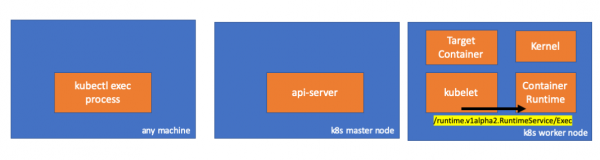
Pokud je to tak, měli bychom vidět spojení mezi kubelet a vykonávací prostředí kontejneru, že? Pojďme se podívat.
Proveďte tento příkaz před a po exec příkazu a podívejte se na rozdíly. V mém případě je rozdíl následující:
// worker node
$ ss -a -p |grep kubelet
...
u_str  ESTAB      0      0       * 157937                * 157387                users:(("kubelet",pid=5714,fd=33))
...
Hmm… Nové spojení přes unixové sockety mezi kubelet (pid=5714) a něčím neznámým. Co by to mohlo být? Správně, je to Docker (pid=1186)!
// worker node
$ ss -a -p |grep 157387
...
u_str  ESTAB      0      0       * 157937                * 157387                users:(("kubelet",pid=5714,fd=33))
u_str  ESTAB      0      0      /var/run/docker.sock 157387                * 157937                users:(("dockerd",pid=1186,fd=14))
...
Jak si pamatujete, jedná se o proces démonu dockeru (pid=1186), který vykonává naši příkaz:
// worker node
$ ps -afx
...
 1186 ?        Ssl    0:55 /usr/bin/dockerd -H fd://
17784 ?        Sl     0:00      _ docker-containerd-shim 53a0a08547b2f95986402d7f3b3e78702516244df049ba6c5aa012e81264aa3c /var/run/docker/libcontainerd/53a0a08547b2f95986402d7f3
17801 pts/2    Ss     0:00          _ sh
17827 pts/2    S+     0:00              _ sleep 5000
...
4. Aktivita ve vykonávacím prostředí kontejneru
Pojďme prozkoumat zdrojový kód CRI-O, abychom pochopili, co se děje. V Dockeru je logika podobná.
Existuje server, který zajišťuje realizaci RuntimeServiceServer:
// Server implements the RuntimeService and ImageService
type Server struct {
        config          libconfig.Config
        seccompProfile  *seccomp.Seccomp
        stream          StreamService
        netPlugin       ocicni.CNIPlugin
        hostportManager hostport.HostPortManager

        appArmorProfile string
        hostIP          string
        bindAddress     string

        *lib.ContainerServer
        monitorsChan      chan struct{}
        defaultIDMappings *idtools.IDMappings
        systemContext     *types.SystemContext // Never nil

        updateLock sync.RWMutex

        seccompEnabled  bool
        appArmorEnabled bool
}()
// Exec prepares a streaming endpoint to execute a command in the container.
func (s *Server) Exec(ctx context.Context, req *pb.ExecRequest) (resp *pb.ExecResponse, err error) {
        const operation = "exec"
        defer func() {
                recordOperation(operation, time.Now())
                recordError(operation, err)
        }()

        resp, err = s.getExec(req)
        if err != nil {
                return nil, fmt.Errorf("unable to prepare exec endpoint: %v", err)
        }

        return resp, nil
}()
Na konci řetězce vykonávací prostředí kontejneru provádí příkaz na pracovní uzlu:
// ExecContainer prepares a streaming endpoint to execute a command in the container.
func (r *runtimeOCI) ExecContainer(c *Container, cmd []string, stdin io.Reader, stdout, stderr io.WriteCloser, tty bool, resize <-chan remotecommand.TerminalSize) error {
        processFile, err := prepareProcessExec(c, cmd, tty)
        if err != nil {
                return err
        }
        defer os.RemoveAll(processFile.Name())

        args := []string{rootFlag, r.root, "exec"}
        args = append(args, "--process", processFile.Name(), c.ID())
        execCmd := exec.Command(r.path, args...)
        if v, found := os.LookupEnv("XDG_RUNTIME_DIR"); found {
                execCmd.Env = append(execCmd.Env, fmt.Sprintf("XDG_RUNTIME_DIR=%s", v))
        }
        var cmdErr, copyError error
        if tty {
                cmdErr = ttyCmd(execCmd, stdin, stdout, resize)
        } else {
                if stdin != nil {
                        // Use an os.Pipe here as it returns true *os.File objects.
                        // This way, if you run 'kubectl exec <pod> -i bash' (no tty) and type 'exit',
                        // the call below to execCmd.Run() can unblock because its Stdin is the read half
                        // of the pipe.
                        r, w, err := os.Pipe()
                        if err != nil {
                                return err
                        }
                        go func() { _, copyError = pools.Copy(w, stdin) }()

                        execCmd.Stdin = r
                }
                if stdout != nil {
                        execCmd.Stdout = stdout
                }
                if stderr != nil {
                        execCmd.Stderr = stderr
                }

                cmdErr = execCmd.Run()
        }

        if copyError != nil {
                return copyError
        }
        if exitErr, ok := cmdErr.(*exec.ExitError); ok {
                return &utilexec.ExitErrorWrapper{ExitError: exitErr}
        }
        return cmdErr
}()
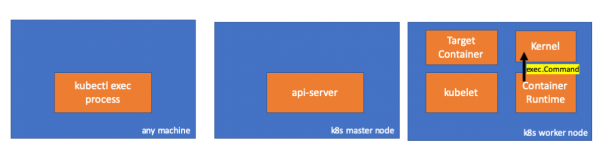
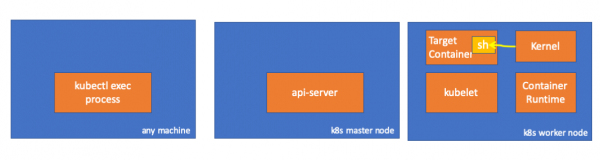
Nakonec jádro provádí příkazy:
Připomínky
- API Server také může inicializovat spojení s kubeletem.
- Následující spojení zůstávají až do ukončení interaktivní exec-seance:
- mezi kubectl a api-serverem;
- mezi api-serverem a kubectl;
- mezi kubeletem a vykonávacím prostředím kontejneru.
- Kubectl nebo api-server nemohou nic spouštět na pracovních uzlech. Kubelet může spouštět, ale k těmto akcím také interaguje s vykonávacím prostředím kontejneru.
Zdroje
- Diskuze „„ v kubernetes-dev;
- Článek „»;
- Diskuze „„ na Server Fault.
P.S. od překladatele
Přečtěte si také náš blog:
- „Co se děje v Kubernetes při spuštění kubectl run?“ a ;
- «»;
- «»;
- «».
Zdroj: habr.com
