

Technologie zvyšování výkonu založené na použití SSD, široce používané ve storage area networks (SÁN), byly již dávno vynalezeny. Především se jedná o používání SSD jako úložného prostoru, což je 100% efektivní, ale drahé. Proto se využívají technologie tieringu a cachingu, kde jsou SSD používány pouze pro nejžádanější („horká“) data. Tiering je dobrý pro scénáře dlouhodobého (dny-týdny) použití „horkých“ dat. Naopak caching je určen pro krátkodobé (minuty-hodiny) používání. Obě tyto varianty jsou realizovány ve SÁN. . V tomto článku se zaměříme na implementaci druhého algoritmu – .
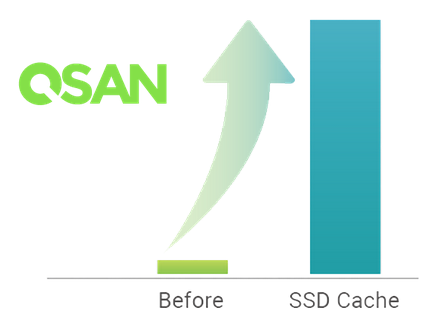
Podstatou technologie SSD cachingu je použití SSD jako mezikroku mezi pevnými disky a operační pamětí kontroléru. Výkon SSD je samozřejmě nižší než výkon vlastní cache kontroléru, ale objem je o řád vyšší. Proto získáváme jakýsi kompromis mezi rychlostí a objemem.
Indikace pro použití SSD cache na čtení:
- Převaha operací čtení nad operacemi zápisu (nejčastěji charakteristické pro databáze a webové aplikace);
- Existence úzkého místa v podobě výkonu pole pevných disků;
- Objem žádaných dat je menší než objem SSD cache.
Indikacemi pro použití SSD cache na čtení + zápis jsou ty samé důvody, s výjimkou charakteru operací – smíšený typ (například souborový server).
Většina dodavatelů SÁN používá ve svých produktech SSD cache pouze pro operace čtení. Principiálním rozdílem od nich je možnost používat cache také pro zápis. Pro aktivaci funkce SSD cachingu ve SÁN QSAN je třeba zakoupit samostatnou licenci (dodává se v elektronické podobě).
SSD cache in XCubeSAN is physically implemented as separate SSD cache pools. The system can have up to four such pools. Each pool uses its own set of SSDs. In the properties of the virtual disk, we determine whether it will use the cache pool and which one specifically. Enabling and disabling cache usage for volumes can be done online without stopping input/output. Additionally, SSDs can be added to or removed from the pool on the fly. When creating an SSD cache pool, it is necessary to select the mode in which it will operate: read-only or read+write. This affects its physical organization. Since there can be multiple cache pools, their functionality may vary (meaning the system may have both read-only and read+write cache pools simultaneously).
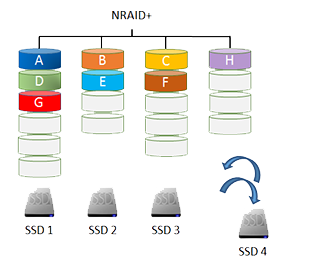
In case the cache pool is used only for reading, it can consist of 1-8 SSDs. The disks do not necessarily have to be of the same size or from the same vendor, as they are combined in an NRAID+ structure. All SSDs in the pool are used collectively. The system tries to parallelize incoming requests across all SSDs to achieve maximum performance. If one of the SSDs fails, nothing critical will happen: the cache contains just a copy of the data stored on the hard disk array. The available SSD cache space will just decrease (or become zero in the case of an initial SSD cache from a single drive).
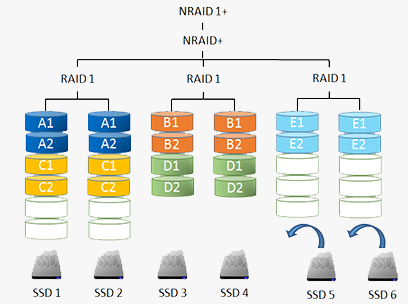
If the cache is used for read + write operations, the number of SSDs in the pool must be even since the contents are mirrored across pairs of drives (using an NRAID 1+ structure). Cache duplication is necessary because it may contain data that has not yet been written to the hard disks. In this case, if an SSD in the cache pool fails, it would lead to data loss. However, in an NRAID 1+ setup, the SSD failure will simply result in the cache operating in 'read-only' mode with unsaved data being flushed to the hard disk array. After replacing the faulty SSD, the cache will return to its original mode of operation. For added security, dedicated hot spares can be assigned to caches operating in read + write mode.
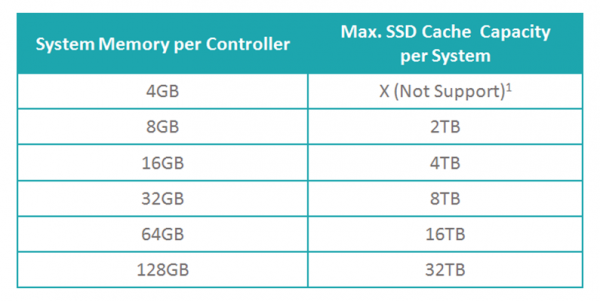
Při použití funkce SSD caching v XCubeSAN existuje řada požadavků na objem paměti ovladačů STHD: čím více systémové paměti, tím větší objem cache poolu bude k dispozici.
Na rozdíl od většiny výrobců STHD, kteří nabízejí pouze možnost zapnutí/vypnutí SSD cache, QSAN poskytuje širší možnosti. Konkrétně je možné vybrat režim práce cache v závislosti na povaze zátěže. Existují tři přednastavené šablony, které jsou nejblíže k odpovídajícím službám: databáze, souborový systém, webová služba. Kromě toho může správce vytvořit svůj vlastní profil s požadovanými hodnotami parametrů:
- Velikost bloku (Cache Block Size) – 1/2/4 MB
- Počet požadavků na čtení bloku, aby byl zkopírován do cache (Populate-on-Read Threshold) – 1..4
- Počet požadavků na zápis bloku, aby byl zkopírován do cache (Populate-on-Write Threshold) – 0..4
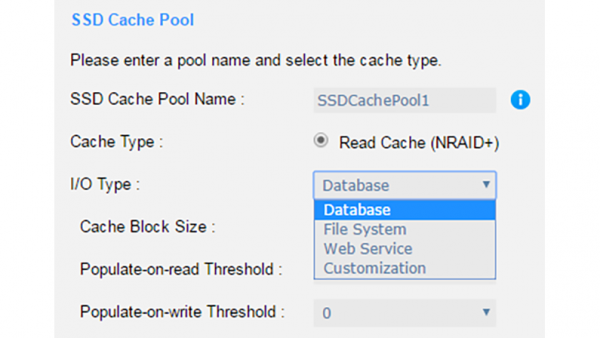
Profily lze měnit 'za chodu', ale samozřejmě s vymazáním obsahu cache a jejím novým 'nahřátím'.
Při zkoumání principu fungování SSD cache lze vyčlenit hlavní operace, které s ním souvisejí:
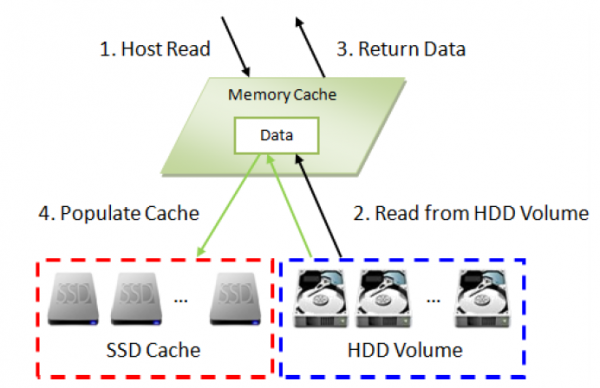
Čtení dat, když nejsou v cache
- Požadavek od hostitele přichází k řadiči;
- Jelikož požadovaná data nejsou v SSD cache, jsou načítána z pevných disků;
- Načtená data jsou odeslána hostiteli. Současně se probíhá kontrola, zda jsou tyto bloky 'horké';
- Pokud ano, jsou zkopírována do SSD cache pro budoucí použití.
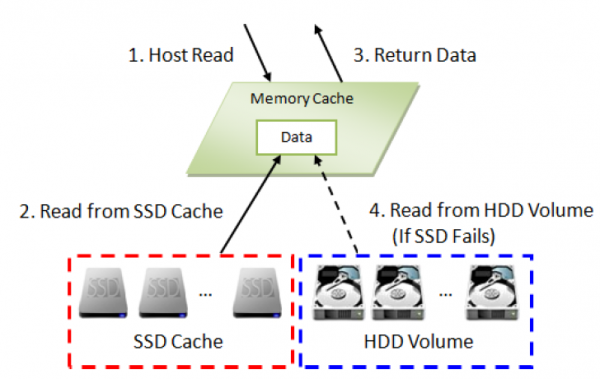
Čtení dat, když jsou přítomna v cache
- Požadavek od hostitele přichází k řadiči;
- Jelikož požadovaná data jsou v SSD cache, jsou načítána odtud;
- Načtená data jsou odeslána hostiteli.
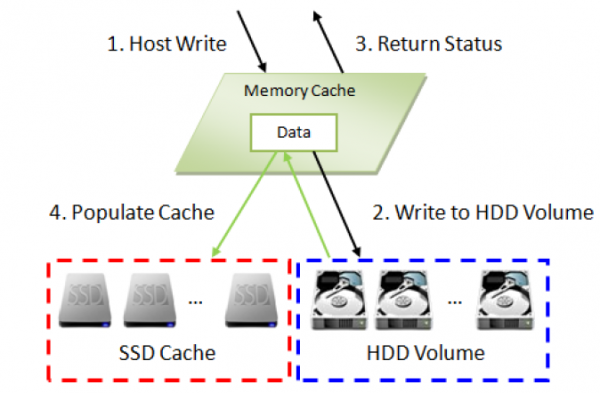
Zápis dat při použití cache pro čtení
- Žádost o zápis od hostitele přichází k řadiči;
- Data jsou zapisována na pevné disky;
- Hostiteli je zaslána odpověď o úspěšném zápisu;
- Současně se kontroluje, zda je blok 'horký' (srovnává se parametr Populate-on-Write Threshold). Pokud ano, je zkopírován do SSD cache pro následné použití.
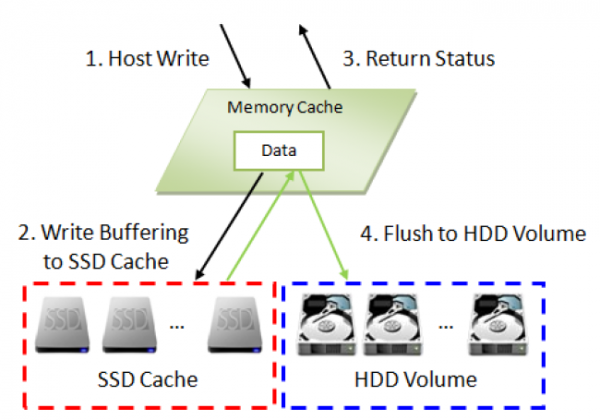
Zápis dat při použití cache pro čtení + zápis
- Žádost o zápis od hostitele přichází k řadiči;
- Data jsou zapisována do SSD cache;
- Hostiteli je zaslána odpověď o úspěšném zápisu;
- Data from SSD cache is written to hard disks in the background.
Check in progress
Testovací stanice
2 servers (CPU: 2 x Xeon E5-2620v3 2.4Hz / RAM: 32GB) are connected via two ports directly to the XCubeSAN XS5224D (16GB RAM/controller) through Fibre Channel 16G.
16 x Seagate Constellation ES, ST500NM0001, 500GB, SAS 6Gb/s were used, combined in RAID5 (15+1) for the data array and 8 x HGST Ultrastar SSD800MH.B, HUSMH8010BSS200, 100GB, SAS 12Gb/s as cache.
2 volumes were created: one for each server.
Test 1. SSD cache read-only with 1-8 SSDs
SSD Cache
- I/O Type: Customization
- Cache Block Size: 4MB
- Populate-on-read Threshold: 1
- Populate-on-write Threshold: 0
I/O Pattern
- Tool: IOmeter V1.1.0
- Workers: 1
- Outstanding (Queue Depth): 128
- Access Specifications: 4KB, 100% Read, 100% Random
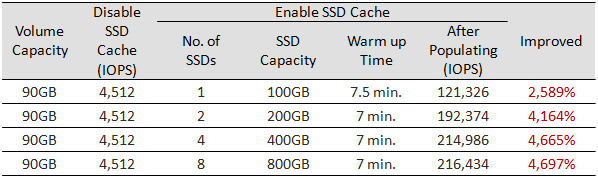
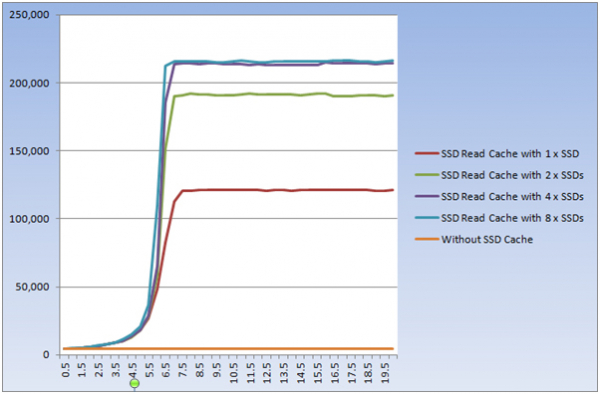
In theory, the more SSDs in the cache pool, the higher the performance. This has been confirmed in practice. The only significant increase in the number of SSDs with a small number of volumes does not lead to explosive effects.
Test 2. SSD cache in read + write mode with 2-8 SSDs
SSD Cache
- I/O Type: Customization
- Cache Block Size: 4MB
- Populate-on-read Threshold: 1
- Populate-on-write Threshold: 1
I/O Pattern
- Tool: IOmeter V1.1.0
- Workers: 1
- Outstanding (Queue Depth): 128
- Access Specifications: 4KB, 100% Write, 100% Random
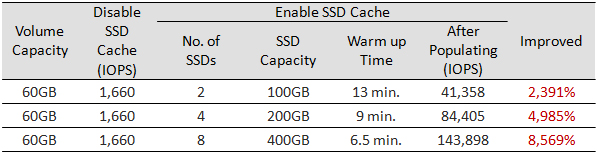
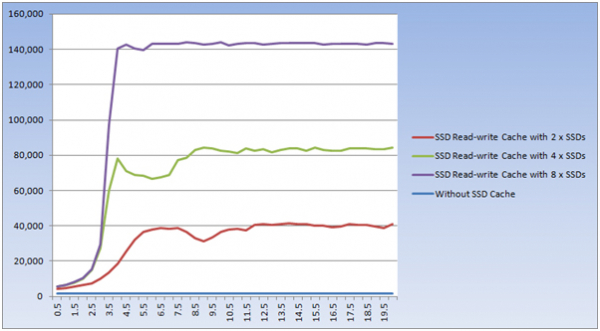
The same result: explosive performance growth and scaling with an increasing number of SSDs.
In both tests, the volume of working data was less than the total cache size. Therefore, over time, all blocks were copied to the cache. The work was essentially performed with SSDs, leaving hard disks practically untouched. The goal of these tests was to clearly demonstrate the efficiency of cache warming and scaling performance based on the number of SSDs.
Now let's return to reality and check a more realistic scenario where the volume of data exceeds the cache size. To complete the test in a reasonable time (the 'warming' period of the cache significantly increases with the size of the volume), we'll limit the volume size to 120GB.
Test 3. Emulation of database operation
SSD Cache
- I/O Type: Database
- Cache Block Size: 1MB
- Populate-on-read Threshold: 2
- Populate-on-write Threshold: 1
I/O Pattern
- Tool: IOmeter V1.1.0
- Workers: 1
- Outstanding (Queue Depth): 128
- Access Specifications: 8KB, 67% Read, 100% Random

Verdikt
An obvious conclusion is the good efficiency of using SSD cache to enhance the performance of any storage system. Toto tvrzení platí v plné míře: funkce SSD cachingu je realizována výborně. To se týká podpory režimů čtení a čtení + zápisu, flexibilního nastavení pro jakékoli scénáře používání a také celkové výkonu systému. Proto za velmi rozumnou cenu (cena licence odpovídá ceně 1-2 SSD) lze výrazně zvýšit celkový výkon.
Zdroj: habr.com
