

Udgivelsen af Omarchy 4.5 er offentliggjort, en distribution der har indsamlet over 23 millioner dollars til udvikling. Projektet ledes af David Heinemeier Hansson, skaberen af web-rammeværket Ruby on Rails, der forsøger at skabe det ideelle Linux-miljø for sig selv. Distributionen er skabt i henhold til princippet „Omakase Computing“, der antager, at de fleste brugere i begyndelsen af deres rejse ikke ved, hvad de virkelig ønsker, og at det derfor vil være bedre for dem at benytte et sæt værktøjer, forberedt af en, hvis kompetence og smag de stoler på. Projektets resultater distribueres under MIT-licensen. Størrelsen på ISO-billedet er 6,5 GB (x86_64, ARM64).
Omarchy er bygget på pakkegrundlaget Arch Linux, men tilbyder ikke blot et sæt forudinstallerede pakker; det prøver at tilbyde et miljø med sammenhængende applikationer, der er valgt med hensyn til æstetik og effektivitet i problemløsningen. Ifølge projektets skaber er motivation vigtig for høj produktivitet, og en del af denne motivation er et smukt og æstetisk miljø. Det grafiske miljø er baseret på den kompositoriske manager Hyprland.
Distributionen prøver ikke at ligne Windows eller macOS, at behage flertallet eller at virke bekendt for brugerne. I stedet for at orientere sig mod en hypotetisk gennemsnitsbruger tilbyder Omarchy kun de applikationer, som skaberen bruger dagligt – fra Neovim, Chromium og LibreOffice til Spotify, Omawrite, Foot og Zoom. Det antages, at det forberedte miljø, arbejdet med kode i Neovim, aktiv brug af terminalen og den mosaik-agtige vinduesopsætning vil virke uvant for mange, men dem, der tør at træde ud af deres komfortzone og lære noget nyt, vil kunne øge deres arbejdsproduktivitet.
Ændringer i Omarchy 4.5:
- For users experiencing difficulties with tiling window layouts after switching from Windows or macOS, support for classic floating windows and a taskbar has been provided. You can quickly switch between tiled, scrolling, and floating layouts using the keyboard shortcut "Super + L". The panel displays pinned shortcuts, running applications, and a button for navigating through installed programs. Windows can be minimized with the "Super + M" combination, configured through the context menu, and dragged with the mouse.
- Added support for systems based on the ARM64 architecture and the ability to install on Apple MacBook M1, M2, M3, and Neo devices using a specially prepared installer. The standard builds for ARM64 include support for workstations on NVIDIA DGX Spark chips and laptops on NVIDIA RTX Spark (N1X) chips, such as Dell XPS 16 Creator Edition and ASUS ProArt P14. Support for devices on Qualcomm Snapdragon chips is in development.
- Added support for 50 languages and 5 input methods. Switching between languages can be done through the configurator (Setup > Language) or by the command "omarchy language язык".
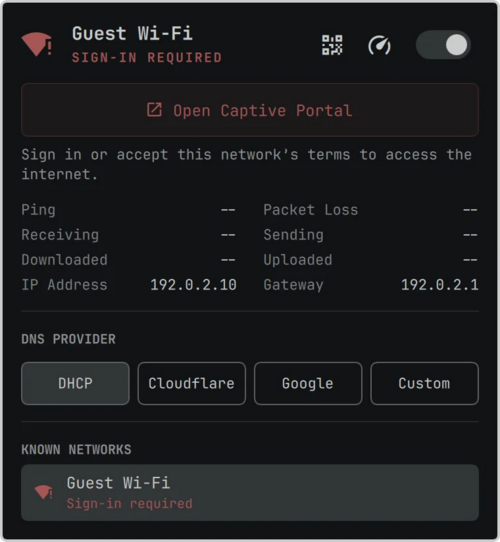
- Integrated the ability to activate access to wireless networks through captive portals. Such wireless networks with web interface authorization are automatically detected, and a special indicator is displayed for logging in.

- A new set of applications is available by default:
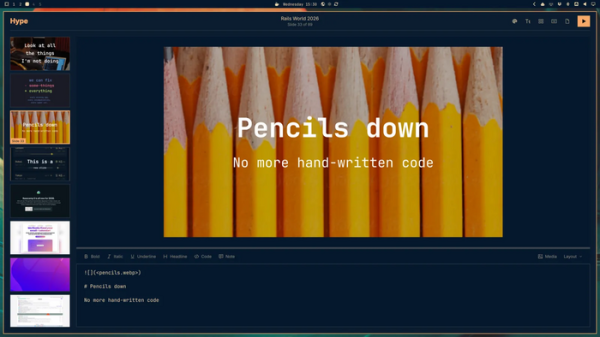
- Hype — a presentation creation program in Markdown format, allowing visual editing of slides and exporting to PDF or PPT (PowerPoint).

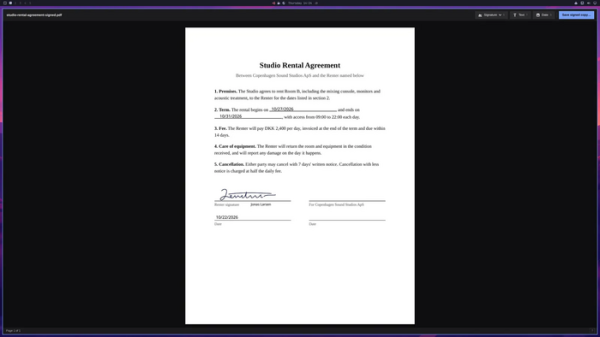
- Signed — viewing, signing, and editing PDF documents.
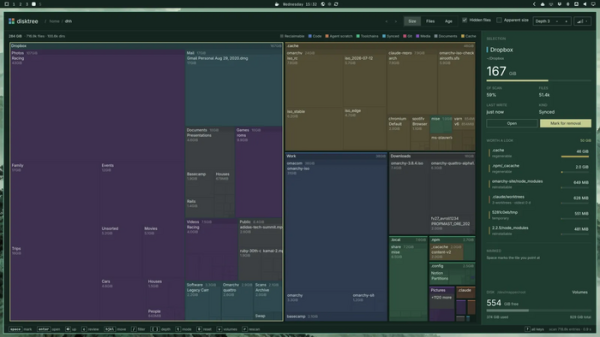
- Disktree — analysis of disk space usage.
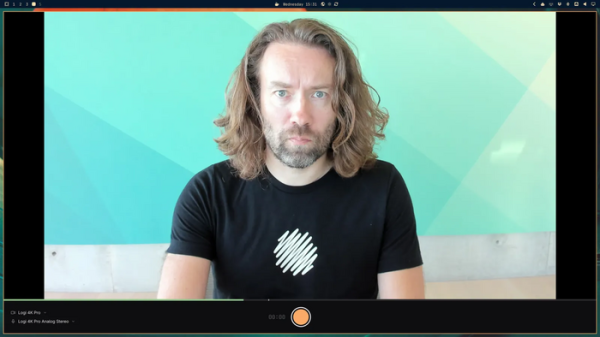
- Monologue — video recording from a camera.
- Gliff — access to remote desktop via SSH.
- OBS Studio, Kdenlive, and Lazydocker have been removed from the basic package.
For recording and trimming videos, Monologue and Omacut are offered, while Docker and Docker Compose are provided for working with Docker containers.
- Hype — a presentation creation program in Markdown format, allowing visual editing of slides and exporting to PDF or PPT (PowerPoint).
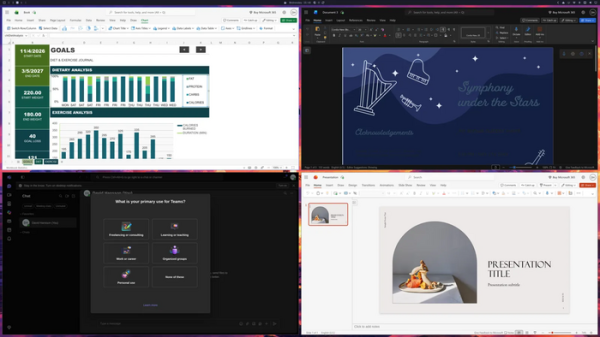
- Added the ability for quick installation of web applications from Microsoft 365 Outlook, Word, Excel, PowerPoint, Teams, and OneDrive through the menu "Install > Service > Microsoft". Each application opens in a separate window and is accessed via a shortcut in the menu similar to traditional programs.
- Standard er speech recognition engine Superwhisper activated, which lets you dictate text instead of typing. Voice input is activated with the key combination 'Alt + Space' or by holding the right Alt key. Both a locally running model and an external cloud service can be used for recognition (free for the first ten thousand words only). Voxtype support is left as an option.
- The new installer F1 unpacks a ready-made system image and adds only device-specific packages on top. Unlike the previously used method of separately copying and installing each package, the new installer deploys a ready-to-work system almost instantly — in one test, installation on a laptop with an AMD CPU took just 7 seconds.
- The boot process has been optimized, resulting in faster system loading and shutdown, elimination of delays before opening menus and panels via hotkeys, accelerated checks of Omarchy menu items (from 200 ms to 16 ms), and display.
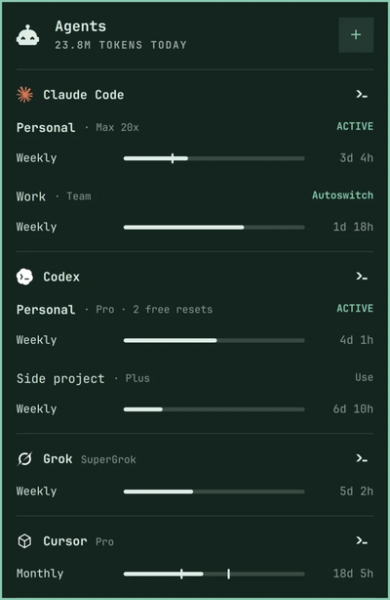
of the terminal emulator. The desktop has been switched to event-driven processing without periodic polling. - I kontrolpanelet AI agents now support 23 providers (up from 6), including Cursor, OpenCode, GitHub Copilot, Antigravity, Hermes, Amp, Kiro, Devin, Qwen, DeepSeek, OpenRouter, and Ollama. Statistics for tokens and limits are displayed. A pop-up window for interacting with the AI agent can be activated by pressing 'Super + ~' in the style of the Quake console. AI agents Kimi and Ori have been added, and Google Antigravity has replaced Gemini CLI. For those not satisfied with working with AI agents in the terminal, GUI applications Claude and Amp are provided.

- The notification output system now supports grouping notifications by sender, collapsing repeated messages, styling according to the current theme, and displaying links, confirmation codes, and buttons for quick action calls.
- New themes have been added: Jade Horse, styled in green tones, and Starship.
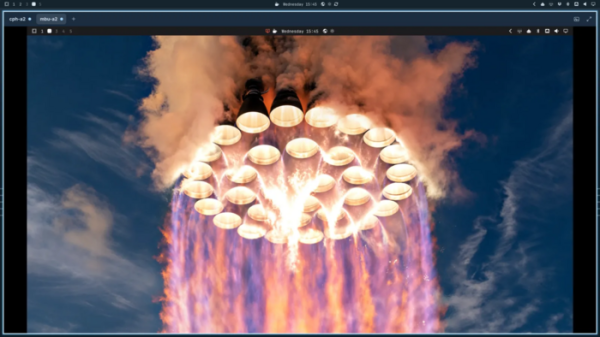
- Support for setting videos as desktop wallpapers has been added. Themes now include the ability to play short welcome videos upon system login or user switching.
- Som standard er opstartsmenuen skjult, og ventetiden for aktivering af Limine-opstartsmenuen er reduceret til 1 sekund (timeout kan ændres via /boot/limine.conf). Menuen vises ved at trykke på en hvilken som helst tast under opstart.
- Muligheden for at knytte separate sæt af virtuelle skriveborde til hver skærm er blevet tilføjet. Kombinationerne "Super + 1-0" bruges til at skifte mellem virtuelle skriveborde, mens "Super + cursor control keys" bruges til at skifte mellem skærme.
- Der er tilføjet et nyt menu til at tilpasse udseendet, vælge temaer og baggrunde til skrivebordet, samt tilpasse paneler og vinduer. Der er mulighed for at justere gennemsigtigheden for vinduernes baggrund. En animationsfri tilstand er blevet tilføjet (aktiveres som standard ved opstart i) virtuelle maskiner).
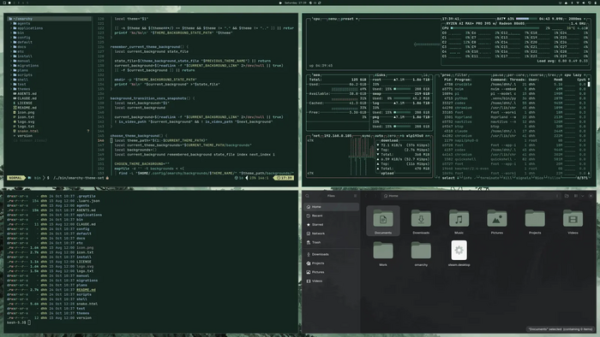
Kilde: opennet.ru

 Russian
 Italian
 German
 Polish
 Estonian
 Albanian
 Bulgarian
 Croatian
 Czech
 Danish
 Dutch
 English
 French
 Hungarian
 Latvian
 Lithuanian
 Norwegian
 Portuguese
 Romanian
 Slovak
 Slovenian
 Spanish
 Swedish