

Valve Company ny udgivelse af projektet , der er baseret på arbejde fra Wine-projektet og har til formål at sikre kørsel af spilapplikationer på Linux, der er designet til Windows og tilgængelige i Steam-kataloget. Arbejdet fra projektet under BSD-licens. Proton muliggør direkte lancering af spilanvendelser, der kun tilbydes til Windows, i Linux-klienten Steam. Pakken inkluderer en DirectX 9-implementering (baseret på ), DirectX 10/11 (baseret på ) og 12 (baseret på ), der fungerer gennem oversættelse af DirectX-opkald til Vulkan API, tilbyder forbedret support til game controllere og muligheden for at bruge fuldskærmstilstand uafhængigt af spilunderstøttede skærmopløsninger.
I den nye version:
- For games, direct access support to game controllers is provided without the use of an emulation layer, significantly improving the quality of interaction with various game controllers.
- The D9VK layer (implementation of Direct3D 9 over the Vulkan API) has been updated to version , which includes support for the options and features d3d9.samplerAnisotropy, d3d9.maxAvailableMemory, d3d9.floatEmulation, GetRasterStatus, ProcessVertices, TexBem, TexM3x2Tex, and TexM3x3Tex.
- Issues causing crashes and freezes when using fsync patches have been fixed.
- A setting called 'WINEFSYNC_SPINCOUNT' has been added, which may be useful for improving the performance of some games.
- Support for the latest versions of the Steamworks and OpenVR SDKs has been added.
- Improved support for very old games with virtual reality support.
- Crashes occurring when entering text in some games based on the Unreal Engine 4, such as Mordhau and Deep Rock Galactic, have been fixed.
Additionally, the new , an add-on for
emulating various game consoles, allowing classic games to be launched through a simple unified graphical interface. Support is provided for emulators of consoles like Atari 2600/7800/Jaguar/Lynx, Game Boy, Mega Drive, NES, Nintendo 64/DS, PCEngine, PSP, Sega 32X/CD, SuperNES, etc. Controllers from existing game consoles like PlayStation 3, Dualshock 3, 8bitdo, Xbox 1, and Xbox 360 can be used. The emulator supports enhanced features like multiplayer gaming, state saving, improving the image quality of old games using shaders, rewinding gameplay, hot-plugging game controllers, and video streaming.
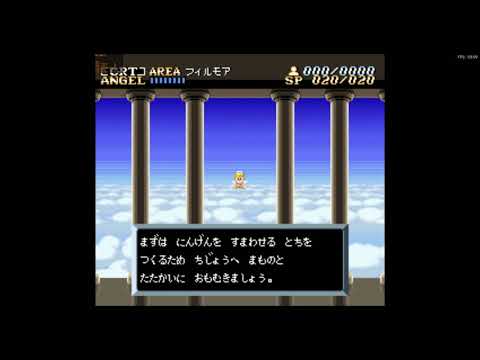
The new release implements a speech synthesis mode that allows for identification of on-screen text, translating it into the specified language, and reading it aloud without stopping the game. A mode for image substitution has also been added, which identifies and translates text, attempting to replace the original text on the screen with the translation. These modes can be particularly useful for completing Japanese games that do not have English versions. Translation is done via the Google Translate API and .
It is also worth noting compatibility module , allowing classic quests to be launched directly in Steam Play ScummVM , uden at starte Windows-versionerne af ScummVM eller DOSBox gennem Proton.
Kilde: opennet.ru
