

Anmerkung des Übersetzers.: Der Autor des Artikels — Erkan Erol, Ingenieur bei SAP — teilt seine Erkenntnisse über die Funktionsweise des Kommandos kubectl exec, das für alle, die mit Kubernetes arbeiten, so vertraut ist. Er begleitet den gesamten Algorithmus mit Listings des Quellcodes von Kubernetes (und verwandten Projekten), die es ermöglichen, das Thema so tief zu durchdringen, wie es erforderlich ist.
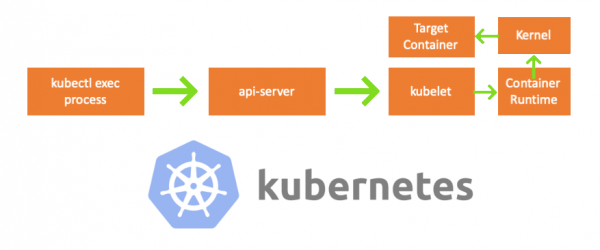
An einem Freitag kam ein Kollege auf mich zu und fragte, wie man einen Befehl im Pod mit Hilfe von ausführen kann. Ich konnte ihm nicht antworten und erkannte plötzlich, dass ich nichts über den Mechanismus wusste. kubectl execJa, ich hatte gewisse Vorstellungen über dessen Funktionsweise, aber ich war mir ihrer Richtigkeit nicht 100%ig sicher und beschloss daher, dieser Frage nachzugehen. Nach dem Durchforsten von Blogs, Dokumentationen und Quellcode habe ich viel Neues gelernt und möchte in diesem Artikel meine Entdeckungen und mein Verständnis teilen. Wenn etwas nicht stimmt, kontaktieren Sie mich bitte unter .
Vorbereitung
Um einen Cluster auf einem MacBook zu erstellen, habe ich ausgecheckt. Dann habe ich die IP-Adressen der Knoten in der Konfiguration von kubelet angepasst, da die Standardkonfiguration nicht erlaubte, dass kubectl exec. Mehr über den Hauptgrund dafür kann man lesen .
- Jeder Rechner = mein MacBook
- IP des Master-Knotens = 192.168.205.10
- IP des Worker-Knotens = 192.168.205.11
- API-Server-Port = 6443
Komponenten
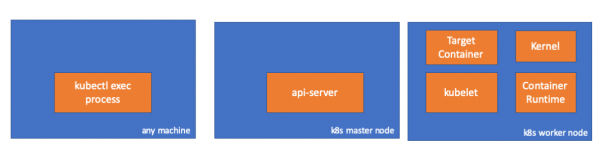
- kubectl exec Prozess: Wenn wir „kubectl exec …“ ausführen, wird ein Prozess gestartet. Dies kann auf jedem Rechner mit Zugang zum API-Server von K8s erfolgen. Anmerkung des Übersetzers: In den Konsolen-Listings verwendet der Autor den Kommentar „any machine“, was bedeutet, dass die folgenden Befehle auf allen solchen Maschinen mit Zugang zu Kubernetes ausgeführt werden können.
- : Eine Komponente auf dem Master-Knoten, die Zugang zur Kubernetes-API bietet. Dies ist das Frontend für den Control Plane in Kubernetes.
- : Ein Agent, der auf jedem Knoten im Cluster läuft. Er sorgt für den Betrieb der Container im Pod.
- (Container-Ausführungsumgebung): Software, die für den Betrieb der Container verantwortlich ist. Beispiele: Docker, CRI-O, containerd…
- kernel: Das Betriebssystem-Kernel auf dem Worker-Knoten; verantwortlich für die Prozessverwaltung.
- target (Destination) Container: Ein Container, der Teil eines Pods ist und auf einem der Worker-Knoten läuft.
Was ich entdeckt habe
1. Aktivität auf der Client-Seite
Wir erstellen einen Pod im Namensraum default:
// any machine
$ kubectl run exec-test-nginx --image=nginx
Dann führen wir den exec-Befehl aus und warten 5000 Sekunden für weitere Beobachtungen:
// any machine
$ kubectl exec -it exec-test-nginx-6558988d5-fgxgg -- sh
# sleep 5000
Es erscheint ein kubectl-Prozess (mit pid=8507 in unserem Fall):
// any machine
$ ps -ef |grep kubectl
501  8507  8409   0  7:19PM ttys000    0:00.13 kubectl exec -it exec-test-nginx-6558988d5-fgxgg -- sh
Wenn wir die Netzwerkaktivität des Prozesses überprüfen, entdecken wir, dass er Verbindungen zum API-Server (192.168.205.10.6443) hat:
// any machine
$ netstat -atnv |grep 8507
tcp4       0      0  192.168.205.1.51673    192.168.205.10.6443    ESTABLISHED 131072 131768   8507      0 0x0102 0x00000020
tcp4       0      0  192.168.205.1.51672    192.168.205.10.6443    ESTABLISHED 131072 131768   8507      0 0x0102 0x00000028
Schauen wir uns den Code an. Kubectl erstellt eine POST-Anfrage mit dem Subressourcentyp exec und sendet die REST-Anfrage:
              req := restClient.Post().
                        Resource("pods").
                        Name(pod.Name).
                        Namespace(pod.Namespace).
                        SubResource("exec")
                req.VersionedParams(&corev1.PodExecOptions{
                        Container: containerName,
                        Command:   p.Command,
                        Stdin:     p.Stdin,
                        Stdout:    p.Out != nil,
                        Stderr:    p.ErrOut != nil,
                        TTY:       t.Raw,
                }, scheme.ParameterCodec)

return p.Executor.Execute("POST", req.URL(), p.Config, p.In, p.Out, p.ErrOut, t.Raw, sizeQueue)()
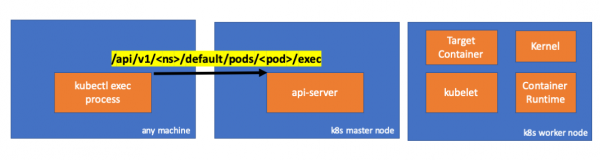
2. Aktivität auf der Master-Node-Seite
Wir können auch die Anfrage auf der API-Server-Seite beobachten:
handler.go:143] kube-apiserver: POST "/api/v1/namespaces/default/pods/exec-test-nginx-6558988d5-fgxgg/exec" erfüllt von gorestful mit webservice /api/v1
upgradeaware.go:261] Verbindung zum Backend-Proxy (Umleitungen abfangen) https://192.168.205.11:10250/exec/default/exec-test-nginx-6558988d5-fgxgg/exec-test-nginx?command=sh&input=1&output=1&tty=1
Headers: map[Connection:[Upgrade] Content-Length:[0] Upgrade:[SPDY/3.1] User-Agent:[kubectl/v1.12.10 (darwin/amd64) kubernetes/e3c1340] X-Forwarded-For:[192.168.205.1] X-Stream-Protocol-Version:[v4.channel.k8s.io v3.channel.k8s.io v2.channel.k8s.io channel.k8s.io]]
Beachten Sie, dass die HTTP-Anfrage einen Protokollwechsel enthält. ermöglicht die Multiplexierung einzelner "Streams" stdin/stdout/stderr/spdy-error über eine einzige TCP-Verbindung.
Der API-Server erhält die Anfrage und wandelt sie um in PodExecOptions:
// PodExecOptions is the query options to a Pod's remote exec call
type PodExecOptions struct {
        metav1.TypeMeta

        // Stdin if true indicates that stdin is to be redirected for the exec call
        Stdin bool

        // Stdout if true indicates that stdout is to be redirected for the exec call
        Stdout bool

        // Stderr if true indicates that stderr is to be redirected for the exec call
        Stderr bool

        // TTY if true indicates that a tty will be allocated for the exec call
        TTY bool

        // Container in which to execute the command.
        Container string

        // Command is the remote command to execute; argv array; not executed within a shell.
        Command []string
}()
Um die erforderlichen Maßnahmen durchzuführen, muss der API-Server wissen, mit welchem Pod er sich verbinden soll:
// ExecLocation returns the exec URL for a pod container. If opts.Container is blank
// and only one container is present in the pod, that container is used.
func ExecLocation(
        getter ResourceGetter,
        connInfo client.ConnectionInfoGetter,
        ctx context.Context,
        name string,
        opts *api.PodExecOptions,
) (*url.URL, http.RoundTripper, error) {
        return streamLocation(getter, connInfo, ctx, name, opts, opts.Container, "exec")
}()
Natürlich stammen die Daten über den Endpunkt aus den Informationen über den Node:
        nodeName := types.NodeName(pod.Spec.NodeName)
        if len(nodeName) == 0 {
                // Wenn dem Pod kein Host zugewiesen wurde, geben Sie einen leeren Standort zurück
                return nil, nil, errors.NewBadRequest(fmt.Sprintf("pod %s hat keinen Host zugewiesen", name))
        }
nodeInfo, err := connInfo.GetConnectionInfo(ctx, nodeName)()
Hurra! Der Kubelet hat jetzt einen Port (node.Status.DaemonEndpoints.KubeletEndpoint.Port), zu dem der API-Server eine Verbindung herstellen kann:
// GetConnectionInfo retrieves connection info from the status of a Node API object.
func (k *NodeConnectionInfoGetter) GetConnectionInfo(ctx context.Context, nodeName types.NodeName) (*ConnectionInfo, error) {
        node, err := k.nodes.Get(ctx, string(nodeName), metav1.GetOptions{})
        if err != nil {
                return nil, err
        }

        // Find a kubelet-reported address, using preferred address type
        host, err := nodeutil.GetPreferredNodeAddress(node, k.preferredAddressTypes)
        if err != nil {
                return nil, err
        }

        // Use the kubelet-reported port, if present
        port := int(node.Status.DaemonEndpoints.KubeletEndpoint.Port)
        if port <= 0 {
                port = k.defaultPort
        }

        return &ConnectionInfo{
                Scheme:    k.scheme,
                Hostname:  host,
                Port:      strconv.Itoa(port),
                Transport: k.transport,
        }, nil
}()
Aus der Dokumentation :
Diese Verbindungen werden an den HTTPS-Endpunkt des Kubelet gebunden. Standardmäßig überprüft der apiserver nicht das Zertifikat des Kubelet, was die Verbindung anfällig für "Man-in-the-Middle"-Angriffe (MITM) und unsicher für den Betrieb in unsicheren und/oder öffentlichen Netzwerken.
Jetzt kennt der API-Server den Endpunkt und stellt eine Verbindung her:
// Connect returns a handler for the pod exec proxy
func (r *ExecREST) Connect(ctx context.Context, name string, opts runtime.Object, responder rest.Responder) (http.Handler, error) {
        execOpts, ok := opts.(*api.PodExecOptions)
        if !ok {
                return nil, fmt.Errorf("invalid options object: %#v", opts)
        }
        location, transport, err := pod.ExecLocation(r.Store, r.KubeletConn, ctx, name, execOpts)
        if err != nil {
                return nil, err
        }
        return newThrottledUpgradeAwareProxyHandler(location, transport, false, true, true, responder), nil
}()
Lassen Sie uns sehen, was auf der Master-Node passiert.
Lass uns zunächst die IP des Arbeitsknotens herausfinden. In unserem Fall ist das 192.168.205.11:
// any machine
$ kubectl get nodes k8s-node-1 -o wide
NAME         STATUS   ROLES    AGE   VERSION   INTERNAL-IP      EXTERNAL-IP   OS-IMAGE             KERNEL-VERSION      CONTAINER-RUNTIME
k8s-node-1   Ready    <none>   9h    v1.15.3   192.168.205.11   <none>        Ubuntu 16.04.6 LTS   4.4.0-159-generic   docker://17.3.3
Dann setzen wir den Port des Kubelets (10250 in unserem Fall):
// any machine
$ kubectl get nodes k8s-node-1 -o jsonpath='{.status.daemonEndpoints.kubeletEndpoint}'
map[Port:10250]
Jetzt ist es an der Zeit, das Netzwerk zu überprüfen. Gibt es eine Verbindung zum Arbeitsknoten (192.168.205.11)? Ja, die gibt es! Wenn man den Prozess "killt", exec, verschwindet er, also weiß ich, dass die Verbindung vom API-Server als Folge des ausgeführten exec-Befehls hergestellt wurde.
// master node
$ netstat -atn |grep 192.168.205.11
tcp        0      0 192.168.205.10:37870    192.168.205.11:10250    ESTABLISHED
… 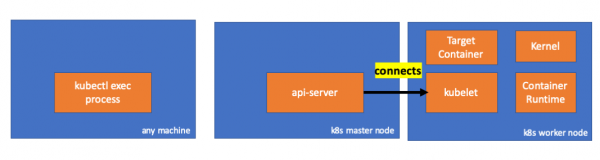
Die Verbindung zwischen kubectl und dem API-Server ist nach wie vor offen. Außerdem gibt es eine weitere Verbindung, die den API-Server mit dem Kubelet verbindet.
3. Aktivität am Arbeitsknoten
Lass uns jetzt mit dem Arbeitsknoten verbinden und sehen, was dort passiert.
Zuerst sehen wir, dass die Verbindung auch hier hergestellt ist (zweite Zeile); 192.168.205.10 ist die IP des Master-Knotens:
 // worker node
  $ netstat -atn |grep 10250
  tcp6       0      0 :::10250                :::*                    LISTEN
  tcp6       0      0 192.168.205.11:10250    192.168.205.10:37870    ESTABLISHED
Wie steht es um unser Kommando sleep? Ура, она тоже присутствует!
 // worker node
  $ ps -afx
  ...
  31463 ?        Sl     0:00      _ docker-containerd-shim 7d974065bbb3107074ce31c51f5ef40aea8dcd535ae11a7b8f2dd180b8ed583a /var/run/docker/libcontainerd/7d974065bbb3107074ce31c51
  31478 pts/0    Ss     0:00          _ sh
  31485 pts/0    S+     0:00              _ sleep 5000
  …
Aber Moment mal: Wie hat das Kubelet das gemacht? Im Kubelet gibt es einen Daemon, der den Zugriff auf die API über den Port für Anforderungen des API-Servers öffnet:
// Server is the library interface to serve the stream requests.
type Server interface {
        http.Handler

        // Get the serving URL for the requests.
        // Requests must not be nil. Responses may be nil iff an error is returned.
        GetExec(*runtimeapi.ExecRequest) (*runtimeapi.ExecResponse, error)
        GetAttach(req *runtimeapi.AttachRequest) (*runtimeapi.AttachResponse, error)
        GetPortForward(*runtimeapi.PortForwardRequest) (*runtimeapi.PortForwardResponse, error)

        // Start the server.
        // addr is the address to serve on (address:port) stayUp indicates whether the server should
        // listen until Stop() is called, or automatically stop after all expected connections are
        // closed. Calling Get{Exec,Attach,PortForward} increments the expected connection count.
        // Function does not return until the server is stopped.
        Start(stayUp bool) error
        // Stop the server, and terminate any open connections.
        Stop() error
}()
Das Kubelet berechnet den Antwortendpunkt für Exec-Anfragen:
func (s *server) GetExec(req *runtimeapi.ExecRequest) (*runtimeapi.ExecResponse, error) {
        if err := validateExecRequest(req); err != nil {
                return nil, err
        }
        token, err := s.cache.Insert(req)
        if err != nil {
                return nil, err
        }
        return &runtimeapi.ExecResponse{
                Url: s.buildURL("exec", token),
        }, nil
}()
Verwechsle das nicht. Es gibt nicht das Ergebnis des Kommandos zurück, sondern den Endpunkt für die Kommunikation:
type ExecResponse struct {
        /// Vollständig qualifizierte URL des Exec-Streaming-Servers.
        Url                  string   `protobuf:"bytes,1,opt,name=url,proto3" json:"url,omitempty"`
        XXX_NoUnkeyedLiteral struct{} `json:"-"`
        XXX_sizecache        int32    `json:"-"`
}()
Das Kubelet implementiert das Interface RuntimeServiceClient, das Teil der Container Runtime Interface ist (mehr dazu haben wir zum Beispiel geschrieben, — Anm. d. Übersetzer):
Langer Listing aus cri-api in kubernetes/kubernetes
// For semantics around ctx use and closing/ending streaming RPCs, please refer to https://godoc.org/google.golang.org/grpc#ClientConn.NewStream.
type RuntimeServiceClient interface {
        // Version returns the runtime name, runtime version, and runtime API version.
        Version(ctx context.Context, in *VersionRequest, opts ...grpc.CallOption) (*VersionResponse, error)
        // RunPodSandbox creates and starts a pod-level sandbox. Runtimes must ensure
        // the sandbox is in the ready state on success.
        RunPodSandbox(ctx context.Context, in *RunPodSandboxRequest, opts ...grpc.CallOption) (*RunPodSandboxResponse, error)
        // StopPodSandbox stops any running process that is part of the sandbox and
        // reclaims network resources (e.g., IP addresses) allocated to the sandbox.
        // If there are any running containers in the sandbox, they must be forcibly
        // terminated.
        // This call is idempotent, and must not return an error if all relevant
        // resources have already been reclaimed. kubelet will call StopPodSandbox
        // at least once before calling RemovePodSandbox. It will also attempt to
        // reclaim resources eagerly, as soon as a sandbox is not needed. Hence,
        // multiple StopPodSandbox calls are expected.
        StopPodSandbox(ctx context.Context, in *StopPodSandboxRequest, opts ...grpc.CallOption) (*StopPodSandboxResponse, error)
        // RemovePodSandbox removes the sandbox. If there are any running containers
        // in the sandbox, they must be forcibly terminated and removed.
        // This call is idempotent, and must not return an error if the sandbox has
        // already been removed.
        RemovePodSandbox(ctx context.Context, in *RemovePodSandboxRequest, opts ...grpc.CallOption) (*RemovePodSandboxResponse, error)
        // PodSandboxStatus returns the status of the PodSandbox. If the PodSandbox is not
        // present, returns an error.
        PodSandboxStatus(ctx context.Context, in *PodSandboxStatusRequest, opts ...grpc.CallOption) (*PodSandboxStatusResponse, error)
        // ListPodSandbox returns a list of PodSandboxes.
        ListPodSandbox(ctx context.Context, in *ListPodSandboxRequest, opts ...grpc.CallOption) (*ListPodSandboxResponse, error)
        // CreateContainer creates a new container in specified PodSandbox
        CreateContainer(ctx context.Context, in *CreateContainerRequest, opts ...grpc.CallOption) (*CreateContainerResponse, error)
        // StartContainer starts the container.
        StartContainer(ctx context.Context, in *StartContainerRequest, opts ...grpc.CallOption) (*StartContainerResponse, error)
        // StopContainer stops a running container with a grace period (i.e., timeout).
        // This call is idempotent, and must not return an error if the container has
        // already been stopped.
        // TODO: what must the runtime do after the grace period is reached?
        StopContainer(ctx context.Context, in *StopContainerRequest, opts ...grpc.CallOption) (*StopContainerResponse, error)
        // RemoveContainer removes the container. If the container is running, the
        // container must be forcibly removed.
        // This call is idempotent, and must not return an error if the container has
        // already been removed.
        RemoveContainer(ctx context.Context, in *RemoveContainerRequest, opts ...grpc.CallOption) (*RemoveContainerResponse, error)
        // ListContainers lists all containers by filters.
        ListContainers(ctx context.Context, in *ListContainersRequest, opts ...grpc.CallOption) (*ListContainersResponse, error)
        // ContainerStatus returns status of the container. If the container is not
        // present, returns an error.
        ContainerStatus(ctx context.Context, in *ContainerStatusRequest, opts ...grpc.CallOption) (*ContainerStatusResponse, error)
        // UpdateContainerResources updates ContainerConfig of the container.
        UpdateContainerResources(ctx context.Context, in *UpdateContainerResourcesRequest, opts ...grpc.CallOption) (*UpdateContainerResourcesResponse, error)
        // ReopenContainerLog asks runtime to reopen the stdout/stderr log file
        // for the container. This is often called after the log file has been
        // rotated. If the container is not running, container runtime can choose
        // to either create a new log file and return nil, or return an error.
        // Once it returns error, new container log file MUST NOT be created.
        ReopenContainerLog(ctx context.Context, in *ReopenContainerLogRequest, opts ...grpc.CallOption) (*ReopenContainerLogResponse, error)
        // ExecSync runs a command in a container synchronously.
        ExecSync(ctx context.Context, in *ExecSyncRequest, opts ...grpc.CallOption) (*ExecSyncResponse, error)
        // Exec prepares a streaming endpoint to execute a command in the container.
        Exec(ctx context.Context, in *ExecRequest, opts ...grpc.CallOption) (*ExecResponse, error)
        // Attach prepares a streaming endpoint to attach to a running container.
        Attach(ctx context.Context, in *AttachRequest, opts ...grpc.CallOption) (*AttachResponse, error)
        // PortForward prepares a streaming endpoint to forward ports from a PodSandbox.
        PortForward(ctx context.Context, in *PortForwardRequest, opts ...grpc.CallOption) (*PortForwardResponse, error)
        // ContainerStats returns stats of the container. If the container does not
        // exist, the call returns an error.
        ContainerStats(ctx context.Context, in *ContainerStatsRequest, opts ...grpc.CallOption) (*ContainerStatsResponse, error)
        // ListContainerStats returns stats of all running containers.
        ListContainerStats(ctx context.Context, in *ListContainerStatsRequest, opts ...grpc.CallOption) (*ListContainerStatsResponse, error)
        // UpdateRuntimeConfig updates the runtime configuration based on the given request.
        UpdateRuntimeConfig(ctx context.Context, in *UpdateRuntimeConfigRequest, opts ...grpc.CallOption) (*UpdateRuntimeConfigResponse, error)
        // Status returns the status of the runtime.
        Status(ctx context.Context, in *StatusRequest, opts ...grpc.CallOption) (*StatusResponse, error)
} ()
Es verwendet einfach gRPC, um eine Methode über das Container Runtime Interface aufzurufen:
type runtimeServiceClient struct {
        cc *grpc.ClientConn
}()
func (c *runtimeServiceClient) Exec(ctx context.Context, in *ExecRequest, opts ...grpc.CallOption) (*ExecResponse, error) {
        out := new(ExecResponse)
        err := c.cc.Invoke(ctx, "runtime.v1alpha2.RuntimeService/Exec", in, out, opts...)
        if err != nil {
                return nil, err
        }
        return out, nil
}()
Die Container Runtime ist verantwortlich für die Implementierung RuntimeServiceServer:
Langer Listing aus cri-api in kubernetes/kubernetes
// RuntimeServiceServer is the server API for RuntimeService service.
type RuntimeServiceServer interface {
        // Version returns the runtime name, runtime version, and runtime API version.
        Version(context.Context, *VersionRequest) (*VersionResponse, error)
        // RunPodSandbox creates and starts a pod-level sandbox. Runtimes must ensure
        // the sandbox is in the ready state on success.
        RunPodSandbox(context.Context, *RunPodSandboxRequest) (*RunPodSandboxResponse, error)
        // StopPodSandbox stops any running process that is part of the sandbox and
        // reclaims network resources (e.g., IP addresses) allocated to the sandbox.
        // If there are any running containers in the sandbox, they must be forcibly
        // terminated.
        // This call is idempotent, and must not return an error if all relevant
        // resources have already been reclaimed. kubelet will call StopPodSandbox
        // at least once before calling RemovePodSandbox. It will also attempt to
        // reclaim resources eagerly, as soon as a sandbox is not needed. Hence,
        // multiple StopPodSandbox calls are expected.
        StopPodSandbox(context.Context, *StopPodSandboxRequest) (*StopPodSandboxResponse, error)
        // RemovePodSandbox removes the sandbox. If there are any running containers
        // in the sandbox, they must be forcibly terminated and removed.
        // This call is idempotent, and must not return an error if the sandbox has
        // already been removed.
        RemovePodSandbox(context.Context, *RemovePodSandboxRequest) (*RemovePodSandboxResponse, error)
        // PodSandboxStatus returns the status of the PodSandbox. If the PodSandbox is not
        // present, returns an error.
        PodSandboxStatus(context.Context, *PodSandboxStatusRequest) (*PodSandboxStatusResponse, error)
        // ListPodSandbox returns a list of PodSandboxes.
        ListPodSandbox(context.Context, *ListPodSandboxRequest) (*ListPodSandboxResponse, error)
        // CreateContainer creates a new container in specified PodSandbox
        CreateContainer(context.Context, *CreateContainerRequest) (*CreateContainerResponse, error)
        // StartContainer starts the container.
        StartContainer(context.Context, *StartContainerRequest) (*StartContainerResponse, error)
        // StopContainer stops a running container with a grace period (i.e., timeout).
        // This call is idempotent, and must not return an error if the container has
        // already been stopped.
        // TODO: what must the runtime do after the grace period is reached?
        StopContainer(context.Context, *StopContainerRequest) (*StopContainerResponse, error)
        // RemoveContainer removes the container. If the container is running, the
        // container must be forcibly removed.
        // This call is idempotent, and must not return an error if the container has
        // already been removed.
        RemoveContainer(context.Context, *RemoveContainerRequest) (*RemoveContainerResponse, error)
        // ListContainers lists all containers by filters.
        ListContainers(context.Context, *ListContainersRequest) (*ListContainersResponse, error)
        // ContainerStatus returns status of the container. If the container is not
        // present, returns an error.
        ContainerStatus(context.Context, *ContainerStatusRequest) (*ContainerStatusResponse, error)
        // UpdateContainerResources updates ContainerConfig of the container.
        UpdateContainerResources(context.Context, *UpdateContainerResourcesRequest) (*UpdateContainerResourcesResponse, error)
        // ReopenContainerLog asks runtime to reopen the stdout/stderr log file
        // for the container. This is often called after the log file has been
        // rotated. If the container is not running, container runtime can choose
        // to either create a new log file and return nil, or return an error.
        // Once it returns error, new container log file MUST NOT be created.
        ReopenContainerLog(context.Context, *ReopenContainerLogRequest) (*ReopenContainerLogResponse, error)
        // ExecSync runs a command in a container synchronously.
        ExecSync(context.Context, *ExecSyncRequest) (*ExecSyncResponse, error)
        // Exec prepares a streaming endpoint to execute a command in the container.
        Exec(context.Context, *ExecRequest) (*ExecResponse, error)
        // Attach prepares a streaming endpoint to attach to a running container.
        Attach(context.Context, *AttachRequest) (*AttachResponse, error)
        // PortForward prepares a streaming endpoint to forward ports from a PodSandbox.
        PortForward(context.Context, *PortForwardRequest) (*PortForwardResponse, error)
        // ContainerStats returns stats of the container. If the container does not
        // exist, the call returns an error.
        ContainerStats(context.Context, *ContainerStatsRequest) (*ContainerStatsResponse, error)
        // ListContainerStats returns stats of all running containers.
        ListContainerStats(context.Context, *ListContainerStatsRequest) (*ListContainerStatsResponse, error)
        // UpdateRuntimeConfig updates the runtime configuration based on the given request.
        UpdateRuntimeConfig(context.Context, *UpdateRuntimeConfigRequest) (*UpdateRuntimeConfigResponse, error)
        // Status returns the status of the runtime.
        Status(context.Context, *StatusRequest) (*StatusResponse, error)
} ()
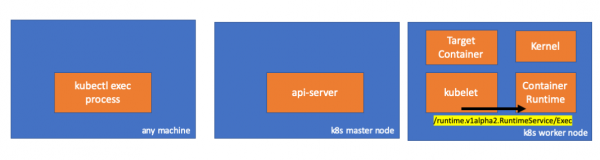
Wenn das so ist, sollten wir eine Verbindung zwischen dem Kubelet und der Container-Ausführungsumgebung sehen, oder? Lasst uns das überprüfen.
Führe diesen Befehl vor und nach dem exec-Befehl aus und schaue dir die Unterschiede an. In meinem Fall ist der Unterschied folgender:
// worker node
$ ss -a -p |grep kubelet
...
u_str  ESTAB      0      0       * 157937                * 157387                users:(("kubelet",pid=5714,fd=33))
...
Hmm... Eine neue Verbindung über Unix-Sockets zwischen dem Kubelet (pid=5714) und etwas Unbekanntem. Was könnte das sein? Richtig, das ist Docker (pid=1186)!
// worker node
$ ss -a -p |grep 157387
...
u_str  ESTAB      0      0       * 157937                * 157387                users:(("kubelet",pid=5714,fd=33))
u_str  ESTAB      0      0      /var/run/docker.sock 157387                * 157937                users:(("dockerd",pid=1186,fd=14))
...
Wie Sie sich erinnern, ist dies der Prozess des Docker-Demons (pid=1186), der unser Kommando ausführt:
// worker node
$ ps -afx
...
 1186 ?        Ssl    0:55 /usr/bin/dockerd -H fd://
17784 ?        Sl     0:00      _ docker-containerd-shim 53a0a08547b2f95986402d7f3b3e78702516244df049ba6c5aa012e81264aa3c /var/run/docker/libcontainerd/53a0a08547b2f95986402d7f3
17801 pts/2    Ss     0:00          _ sh
17827 pts/2    S+     0:00              _ sleep 5000
...
4. Aktivität in der Ausführungsumgebung des Containers
Lassen Sie uns den Quellcode von CRI-O untersuchen, um zu verstehen, was passiert. Die Logik ist in Docker ähnlich.
Es gibt einen Server, der für die Implementierung verantwortlich ist RuntimeServiceServer:
// Server implements the RuntimeService and ImageService
type Server struct {
        config          libconfig.Config
        seccompProfile  *seccomp.Seccomp
        stream          StreamService
        netPlugin       ocicni.CNIPlugin
        hostportManager hostport.HostPortManager

        appArmorProfile string
        hostIP          string
        bindAddress     string

        *lib.ContainerServer
        monitorsChan      chan struct{}
        defaultIDMappings *idtools.IDMappings
        systemContext     *types.SystemContext // Never nil

        updateLock sync.RWMutex

        seccompEnabled  bool
        appArmorEnabled bool
}()
// Exec prepares a streaming endpoint to execute a command in the container.
func (s *Server) Exec(ctx context.Context, req *pb.ExecRequest) (resp *pb.ExecResponse, err error) {
        const operation = "exec"
        defer func() {
                recordOperation(operation, time.Now())
                recordError(operation, err)
        }()

        resp, err = s.getExec(req)
        if err != nil {
                return nil, fmt.Errorf("unable to prepare exec endpoint: %v", err)
        }

        return resp, nil
}()
Am Ende der Kette führt die Ausführungsumgebung des Containers den Befehl auf dem Arbeitsknoten aus:
// ExecContainer prepares a streaming endpoint to execute a command in the container.
func (r *runtimeOCI) ExecContainer(c *Container, cmd []string, stdin io.Reader, stdout, stderr io.WriteCloser, tty bool, resize <-chan remotecommand.TerminalSize) error {
        processFile, err := prepareProcessExec(c, cmd, tty)
        if err != nil {
                return err
        }
        defer os.RemoveAll(processFile.Name())

        args := []string{rootFlag, r.root, "exec"}
        args = append(args, "--process", processFile.Name(), c.ID())
        execCmd := exec.Command(r.path, args...)
        if v, found := os.LookupEnv("XDG_RUNTIME_DIR"); found {
                execCmd.Env = append(execCmd.Env, fmt.Sprintf("XDG_RUNTIME_DIR=%s", v))
        }
        var cmdErr, copyError error
        if tty {
                cmdErr = ttyCmd(execCmd, stdin, stdout, resize)
        } else {
                if stdin != nil {
                        // Use an os.Pipe here as it returns true *os.File objects.
                        // This way, if you run 'kubectl exec <pod> -i bash' (no tty) and type 'exit',
                        // the call below to execCmd.Run() can unblock because its Stdin is the read half
                        // of the pipe.
                        r, w, err := os.Pipe()
                        if err != nil {
                                return err
                        }
                        go func() { _, copyError = pools.Copy(w, stdin) }()

                        execCmd.Stdin = r
                }
                if stdout != nil {
                        execCmd.Stdout = stdout
                }
                if stderr != nil {
                        execCmd.Stderr = stderr
                }

                cmdErr = execCmd.Run()
        }

        if copyError != nil {
                return copyError
        }
        if exitErr, ok := cmdErr.(*exec.ExitError); ok {
                return &utilexec.ExitErrorWrapper{ExitError: exitErr}
        }
        return cmdErr
}()
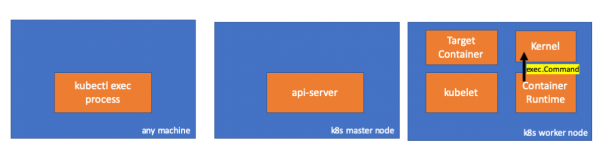
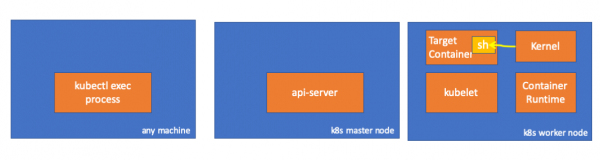
Schließlich führt der Kernel die Befehle aus:
Erinnerungen
- Der API-Server kann ebenfalls eine Verbindung zu kubelet herstellen.
- Die folgenden Verbindungen bleiben bis zum Ende der interaktiven Exec-Sitzung bestehen:
- zwischen kubectl und dem api-server;
- zwischen dem api-server und kubectl;
- zwischen kubelet und der Ausführungsumgebung des Containers.
- Kubectl oder der API-Server können nichts auf den Arbeitsknoten ausführen. Kubelet kann etwas ausführen, aber für diese Aktionen interagiert es auch mit der Ausführungsumgebung des Containers.
Ressourcen
- Diskussion "" in kubernetes-dev;
- Artikel "»;
- Diskussion "" auf Server Fault.
P.S. vom Übersetzer
Lesen Sie auch in unserem Blog:
- "Was passiert in Kubernetes, wenn man kubectl run startet?" und ;
- «»;
- «»;
- «».
Quelle: habr.com
