

Hallo, Habr. Das ist der 2. Artikel aus der Reihe ssh-chat.
Was wir tun werden:
- Wir fügen die Möglichkeit hinzu, eigene Formatierungsfunktionen zu erstellen
- Wir fügen Unterstützung für Markdown hinzu
- Wir fügen Unterstützung für Bots hinzu
- Wir erhöhen die Sicherheit der Passwörter (Hash und Salt)
Leider wird es keine Dateiuploads geben
Benutzerdefinierte Formatierungsfunktionen
Momentan unterstützen wir die folgenden Formatierungsfunktionen:
@color@bold@underline@hex@box
Aber es ist sinnvoll, die Möglichkeit hinzuzufügen, eigene Funktionen zu erstellen:
Alle Funktionen werden im
Es reicht also, eine Funktion zu erstellenregisterMethod:
// parserExec.js at end
module.exports.registerMethod  =  function(name, func) {
  methods[name] =  func
}
Außerdem muss diese Methode nach der Erstellung des Servers zurückgegeben werden
// index.js at require part
const { registerMethod } = require('./parserExec')

// index.js at end
module.exports.registerMethod  =  registerMethod
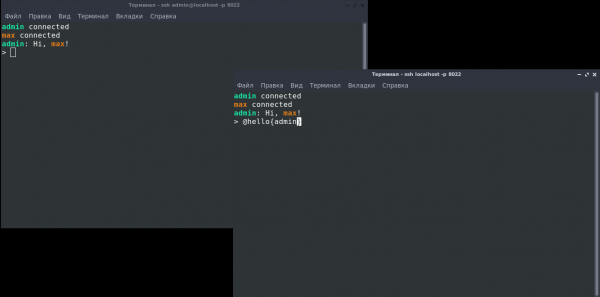
Jetzt können wir beim Erstellen eines Servers Formatierungsmethoden registrieren. Beispiel:
const chat = require('.')
const { formatNick } = require('./format')

chat({})

chat.registerMethod('hello', function(p, name){
  return 'Hallo, ' + formatNick(name) + '!'
})
Unterstützung für Markdown
Markdown ist sehr praktisch, also fügen wir es mit Hilfe von
// format.js near require
const marked = require('marked');
const TerminalRenderer = require('marked-terminal');

marked.setOptions({
  renderer: new TerminalRenderer()
});

// format.js line 23
message = marked(message)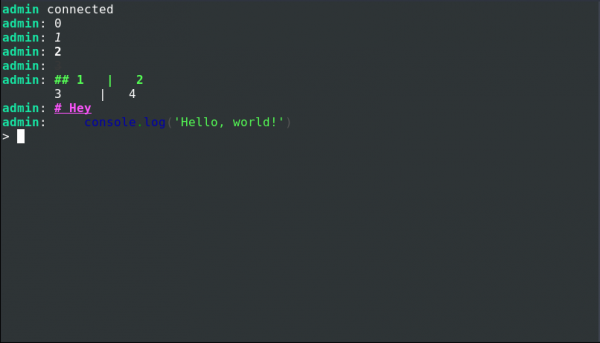
Bots
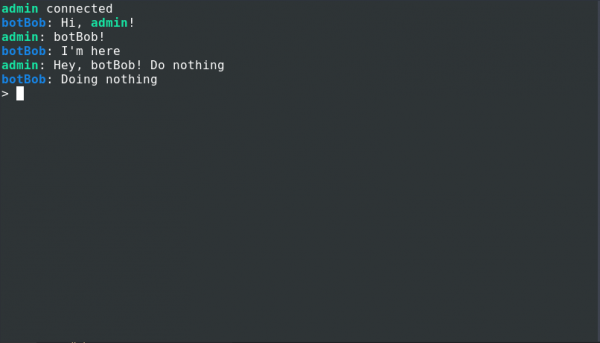
Wie wird das funktionieren
let writeBotBob = chat.registerBot({
  name: 'botBob',

  onConnect(nick, write){
    write('@hello{' + nick + '}')
  },

  onDisconnect(nick, write){},

  onMessage(nick, message, write) {
    if(message == 'botBob!') write('Ich bin hier')
  },

  onCommand(command, write) {
    write('Mach ' + command)
  }
})
onCommand kann mit Hilfe von @bot(botBob){Command} aufgerufen werden
Alles, was mit Bots zu tun hat, ist in der Datei beschrieben:
let bots = []; // Все боты

let onWrite = () => {};

function getWrite(bot) { // Генерирует метод отправки сообщения для бота
  return msg => {
    onWrite(bot.name, msg);
  };
}

module.exports.message = function message(nick, message) { // index.js выполнит эту функцию после отправки сообщения
  bots.forEach(bot => {
    try {
      bot.onMessage(nick, message, getWrite(bot));
    } catch (e) {
      console.error(e);
    }
  });
};

module.exports.connect = function message(nick) { // При соединении
  bots.forEach(bot => {
    try {
      bot.onConnect(nick, getWrite(bot));
    } catch (e) {
      console.error(e);
    }
  });
};

module.exports.disConnect = function message(nick) { // При отсоединении
  bots.forEach(bot => {
    try {
      bot.onDisconnect(nick, message, getWrite(bot));
    } catch (e) {
      console.error(e);
    }
  });
};

module.exports.command = function message(name, message) { // При выполнении команды
  bots.forEach(bot => {
    if (bot.name == name) {
      try {
        bot.onCommand(message, getWrite(bot));
      } catch (e) {
        console.error(e);
      }
    }
  });
};

module.exports.registerBot = function(bot) {
  bots.push(bot);
  return  getWrite(bot)
};

module.exports.onMessage = func => {
  onWrite = func;
};
Was mit Bots gemacht werden kann:
- Lastüberwachung
- Bereitstellung
- Taskboard
Hash und Salt
Warum keine SSH-Schlüssel? Weil SSH-Schlüssel auf verschiedenen Geräten unterschiedlich sind.
Wir erstellen eine Datei, die für die Überprüfung und Erstellung von Passwörtern verantwortlich ist.
// crypto.js
const crypto = require('crypto');

function genRandomString(length) {
  return crypto
    .randomBytes(Math.ceil(length / 2))
    .toString('hex')
    .slice(0, length);
}

function sha512(password, salt){
  const hash = crypto.createHmac('sha512', salt); /** Hashing algorithm sha512 */
  hash.update(password);
  const value = hash.digest('hex');
  return value
};

function checkPass(pass, obj){
  return obj.password == sha512(pass, obj.salt)
}

function encodePass(pass){
  const salt = genRandomString(16)
  return JSON.stringify({
    salt,
    password: sha512(pass, salt)
  })
}

module.exports.encodePass = encodePass
module.exports.checkPass = checkPass
Außerdem ein Skript für das Salzen und Hashen des Passworts.
// To generate password run node ./encryptPassword password
const { encodePass } =require('./crypto')
console.log(encodePass(process.argv[2]))
Wir aktualisieren in users.json und verwenden anstelle des Vergleichs in lobby.js checkPassword.
Fazit
Das Resultat ist ein SSH-Chat mit Formatierungsfunktionen und Bots.
Quelle: habr.com
