

Google has released version 91 of the Chrome web browser. At the same time, the stable release of the open-source project Chromium, which serves as the foundation for Chrome, is available. The Chrome browser features the use of Google logos, a system for sending notifications in case of crashes, modules for playing protected video content (DRM), an automatic update installation system, and the transfer of RLZ parameters during searches. The next release, Chrome 92, is scheduled for July 20.
Key changes in Chrome 91:
- The ability to stop JavaScript execution in a minimized tab group has been implemented. Chrome 85 introduced support for grouping tabs, which can be associated with a specific color and label. Clicking on the group label minimizes the related tabs and leaves just one label (a repeat click on the label expands the group). In this new release, aimed at reducing CPU load and saving energy, inactivity in minimized tabs is paused. The only exceptions are tabs playing sound, using the Web Locks API or IndexedDB, connected to USB devices, or capturing video, audio, or window contents. This change will be rolled out gradually, starting with a small percentage of users.
- Support for a key agreement method resistant to attacks from quantum computers has been added. Quantum computers can dramatically solve the problem of factorization of natural numbers into prime factors, which underpins modern asymmetric encryption algorithms and is effectively unsolvable on classical processors. A plugin called CECPQ2 (Combined Elliptic-Curve and Post-Quantum 2) is provided for use in TLSv1.3, combining the classic key exchange mechanism X25519 with the HRSS scheme based on the NTRU Prime algorithm, designed for post-quantum cryptosystems.
- Support for TLS 1.0 and TLS 1.1 protocols has been completely discontinued, as they have been designated obsolete by the IETF (Internet Engineering Task Force). This includes the removal of the ability to revert to TLS 1.0/1.1 through changing the SSLVersionMin policy.
- The Linux platform builds now include support for "DNS over HTTPS" (DoH), which was previously made available to users of Windows, macOS, ChromeOS, and Android. DNS-over-HTTPS will be automatically activated for users whose settings specify DNS providers that support this technology (the same provider used for DNS will apply to DNS-over-HTTPS). For example, if a user's system settings specify DNS 8.8.8.8, then Google’s DNS-over-HTTPS service ("https://dns.google.com/dns-query") will be activated in Chrome; if the DNS is 1.1.1.1, then Cloudflare’s DNS-over-HTTPS service ("https://cloudflare-dns.com/dns-query") will be used, and so on.
- Port 10080, used by Amanda backup and VMware vCenter, has been added to the list of blocked network ports. Ports 69, 137, 161, 554, 1719, 1720, 1723, 5060, 5061, and 6566 have already been blocked. For ports on the blacklist, the sending of HTTP, HTTPS, and FTP requests is blocked to protect against the NAT slipstreaming attack, which allows an attacker to establish a network connection from their server to any UDP or TCP port on the user's system when a specially crafted webpage is opened in the browser, despite the use of private address ranges (192.168.x.x, 10.x.x.x).
- The option to automatically launch standalone web applications (PWA - Progressive Web Apps) upon user login (Windows and macOS) has been implemented. Auto-launch can be configured on the page chrome://apps. This functionality is currently being tested on a small percentage of users, while for others it requires activating the setting "chrome://flags/#enable-desktop-pwas-run-on-os-login."
- As part of the initiative to adopt inclusive terminology in the browser, the file "master_preferences" has been renamed to "initial_preferences." To ensure compatibility, support for "master_preferences" will continue in the browser for some time. The browser had previously eliminated the use of the terms "whitelist," "blacklist," and "native."
- In Enhanced Safe Browsing mode, which activates additional checks to protect against phishing, malicious activity, and other web threats, the ability to upload files for scanning on Google's side has been implemented. Furthermore, Enhanced Safe Browsing includes the consideration of tokens linked to a Google account when detecting phishing attempts, as well as sending the Referrer header values to Google's servers to check for leakage from malicious sites.
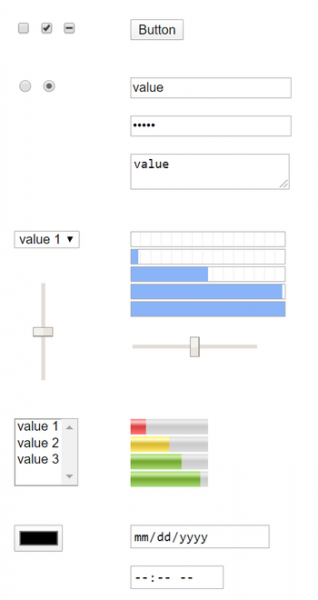
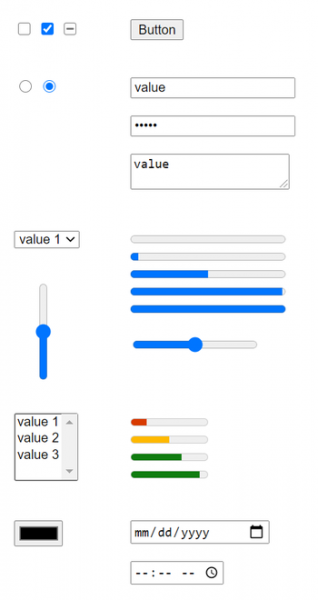
- The version for the Android platform has improved the design of web form elements, which have been optimized for use on touch screens and systems for people with disabilities (the design for desktop systems was revamped in Chrome 83). The redesign aimed to unify the styling of form elements and eliminate style inconsistencies — previously, some form elements were designed according to the interface elements of operating systems, while others followed the most popular styles. As a result, different elements suited touch screens and systems for people with disabilities unevenly.

- A user feedback survey has been added, displayed when opening the Privacy Sandbox settings (chrome://settings/privacySandbox).
- When launching the Android version of Chrome on large-screen tablets, a request for the desktop version of the site is ensured instead of the mobile version. This behavior can be changed using the setting 'chrome://flags/#request-desktop-site-for-tablets'.
- The code for rendering tables has been reworked, which resolved issues with inconsistent behavior when displaying tables in Chrome versus Firefox/Safari.
- The processing of server certificates from the Spanish certification authority Camerfirma has been discontinued due to recurring incidents since 2017 related to violations in certificate issuance. Support for client certificates has been maintained; the block applies only to certificates used on HTTPS sites.
- The implementation of network partitioning support continues to protect against user movement tracking methods that rely on storing identifiers in areas not intended for permanent information storage ("Supercookies"). Since cached resources are stored in a shared namespace, regardless of the originating domain, one site can determine the loading of resources from another site by checking for the presence of that resource in the cache. The protection is based on the application of network partitioning, which involves adding additional bindings of records to the cache. domain, from which the main page is opened, limiting the cache coverage for tracking scripts to the current site only (the script from the iframe will not be able to check whether the resource was loaded from another site).
The cost of segmentation is a decrease in cache efficiency, leading to a slight increase in page load time (up to 1.32%, but for 80% of sites, it’s about 0.09-0.75%). To test the segmentation mode, you can start the browser with the option "--enable-features=PartitionConnectionsByNetworkIsolationKey, PartitionExpectCTStateByNetworkIsolationKey, PartitionHttpServerPropertiesByNetworkIsolationKey, PartitionNelAndReportingByNetworkIsolationKey, PartitionSSLSessionsByNetworkIsolationKey, SplitHostCacheByNetworkIsolationKey."
- A new external REST API, VersionHistory (https://versionhistory.googleapis.com/v1/chrome), has been added, through which information about Chrome versions can be obtained in relation to platforms and branches, as well as the browser's update history.
- In iframes loaded from domains different from the base page's domain, the output of JavaScript dialogs alert(), confirm(), and prompt() is prohibited, which will protect users from attempts to display messages by third-party scripts as if they were notifications from the main site.
- The API for WebAssembly SIMD has been stabilized and proposed as the default for utilizing vector SIMD instructions in WebAssembly applications. To ensure platform independence, a new 128-bit type has been introduced, which can represent various types of packed data, along with several basic vector operations for processing packed data. SIMD allows for increased performance through data processing parallelization and will be beneficial when compiling native code into WebAssembly.
- Several new APIs have been added in Origin Trials (experimental features that require separate activation). Origin Trials allow the specified API to be used from applications loaded from localhost or 127.0.0.1, or after registration and obtaining a special token, which is valid for a limited time for a specific site.
- WebTransport — a protocol and accompanying JavaScript API for sending and receiving data between the browser and proxy server. The communication channel is established over HTTP/3 using the QUIC protocol as transport, which is itself a layer over the UDP protocol, supporting multiplexing of multiple connections and providing encryption methods equivalent to TLS/SSL.
WebTransport can be used instead of WebSockets and RTCDataChannel mechanisms, offering additional features such as multi-stream transmission, unidirectional streams, out-of-order delivery, and reliable and unreliable delivery modes. Furthermore, WebTransport can be utilized as an alternative to the Server Push mechanism, which Google has discontinued in Chrome.
- A declarative interface for defining links to standalone web applications (PWA), enabled via the capture_links parameter in the web app manifest, allowing sites to automatically open a new PWA window when clicking on an application link or to switch to a single-window mode similar to mobile applications.
- The WebXR Plane Detection API has been implemented, providing information about flat surfaces in a virtual 3D environment. This API allows for resource-efficient data processing without the need for the resource-intensive MediaDevices.getUserMedia() call, leveraging custom implementations of computer vision algorithms. It’s worth noting that the WebXR API standardizes interaction with various classes of virtual reality devices, from stationary 3D headsets to mobile-based solutions.
- WebTransport — a protocol and accompanying JavaScript API for sending and receiving data between the browser and proxy server. The communication channel is established over HTTP/3 using the QUIC protocol as transport, which is itself a layer over the UDP protocol, supporting multiplexing of multiple connections and providing encryption methods equivalent to TLS/SSL.
- Support for WebSockets over HTTP/2 (RFC 8441) has been implemented, which only applies to secure WebSocket requests and requires an already established HTTP/2 connection with the server that has announced support for the 'WebSockets over HTTP/2' extension.
- Timer accuracy limits for values produced by the performance.now() call have been standardized across all supported platforms and adjusted considering the potential isolation of handlers in separate processes. For example, on desktop systems, the accuracy in non-isolated contexts has been reduced from 5 to 100 microseconds.
- Desktop system builds have implemented the ability to read files from the clipboard (writing files to the clipboard is still not allowed). async function onPaste(e) { let file = e.clipboardData.files[0]; let contents = await file.text(); }
- CSS has introduced the @counter-style rule, allowing for the definition of custom styles for counters and labels in numbered lists.
- In CSS, the pseudo-classes ':host()' and ':host-context()' have been enhanced to allow the passing of single values from compound selectors (<compound-selector>) alongside lists of selectors (<compound-selector-list>).
- The GravitySensor interface has been added to determine volumetric data (across three coordinate axes) from the gravity sensor.
- The File System Access API now allows for the definition of recommendations for file and directory names presented in the file creation or opening dialog.
- In iframes loaded from other domains, access to the WebOTP API is permitted when the user grants the necessary permissions. WebOTP allows reading one-time confirmation codes sent via SMS.
- Sharing credentials for sites linked through the DAL (Digital Asset Links) mechanism, which associates Android applications with websites to simplify login, is now allowed.
- Service workers now support the use of JavaScript modules. When specifying the 'module' type during the constructor call, the indicated scripts will be loaded as modules and available for importing in the context of the worker. Module support simplifies code sharing on web pages and in service workers.
- In JavaScript, it is now possible to check for the existence of private fields in an object using the syntax '#foo in obj'. class A { static test(obj) { console.log(#foo in obj); } #foo = 0; } A.test(new A()); // true A.test({}); // false
- In JavaScript, the use of the await keyword is allowed at the top level in modules by default, facilitating a smoother integration of asynchronous calls into the module loading process without needing to wrap it in an 'async function'. For example, instead of (async function() { await Promise.resolve(console.log('test')); }()); you can now directly write await Promise.resolve(console.log('test'));
- The V8 JavaScript engine has improved template caching efficiency, resulting in a 4.5% increase in Speedometer2-FlightJS test speed.
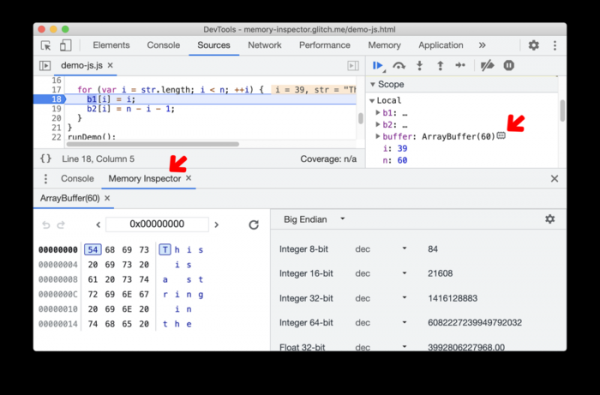
- A significant batch of improvements has been made to web development tools. A new Memory inspector mode has been added, providing tools for examining ArrayBuffer data and Wasm memory.

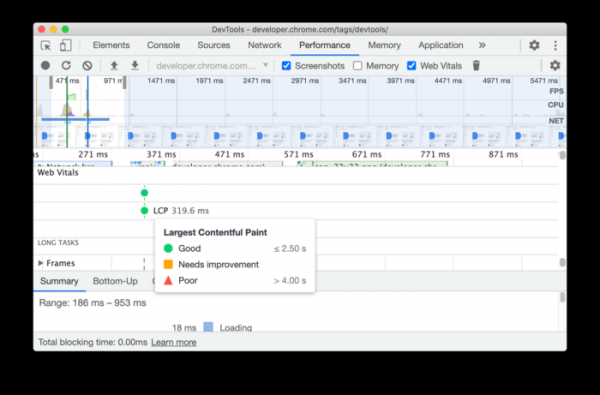
The Performance panel now includes a summary performance indicator, allowing for assessment of whether a site requires optimization.
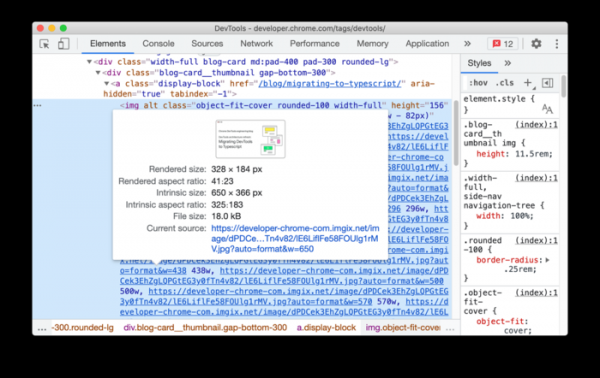
When previewing images in the Elements panel and in the network request analysis panel, information about the image's aspect ratio, rendering parameters, and file size is provided.

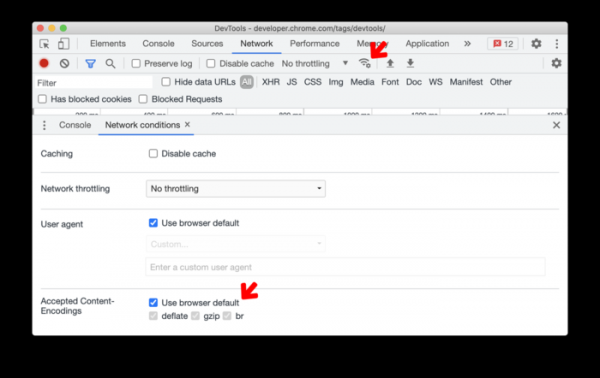
The network inspection panel now includes the ability to modify accepted values for the Content-Encoding header.
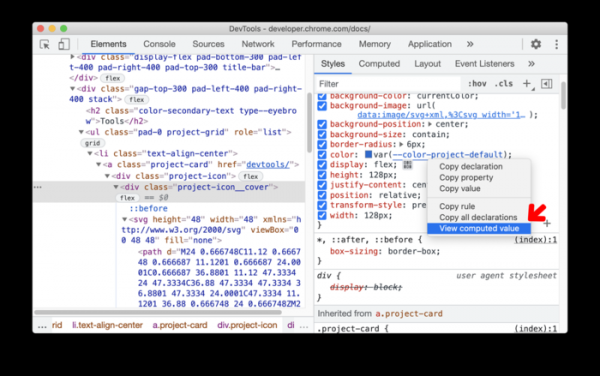
In the styles panel, there is now a quick preview feature for the computed value when navigating through CSS properties, accessible by selecting 'View computed value' from the context menu.

In addition to new features and bug fixes, the new version addresses 32 vulnerabilities. Many of the vulnerabilities were identified through automated testing using tools like AddressSanitizer, MemorySanitizer, Control Flow Integrity, LibFuzzer, and AFL. No critical issues allowing bypassing all browser security levels or executing code in the system outside of the sandbox environment have been found. As part of the bug bounty program for this release, Google has paid out 21 rewards totaling $92,000 (one reward of $20,000, one reward of $15,000, four rewards of $7,500, three rewards of $5,000, three rewards of $3,000, two rewards of $1,000, and two rewards of $500). The amount for five rewards has not yet been determined.
Source: opennet.ru
