

Google has announced the release of the web browser Chrome 94. At the same time, a stable version of the free project Chromium, which serves as the foundation for Chrome, is available. The Chrome browser is distinguished by the use of Google logos, a crash notification system, modules for playing protected video content (DRM), an automatic update installation system, and the transmission of RLZ parameters during searches. The next release, Chrome 95, is scheduled for October 19.
Starting with the Chrome 94 release, development has transitioned to a new release cycle. Significant new releases will now be published every 4 weeks instead of every 6 weeks, allowing for quicker delivery of new features to users. It has been noted that optimizing the release preparation process and improving the testing system enables more frequent releases without compromising quality. For enterprises and those who need more time to update, an Extended Stable edition will be released separately every 8 weeks, allowing transitions to new feature releases every 8 weeks instead of every 4 weeks.
Key changes in Chrome 94:
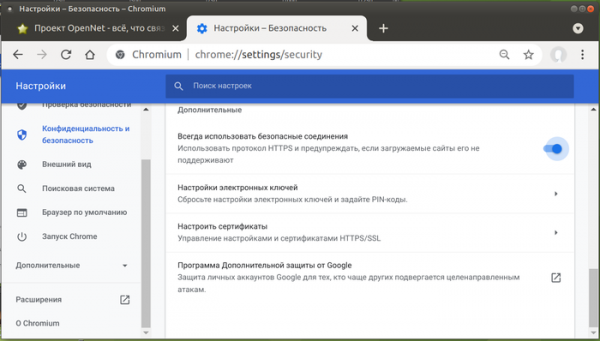
- A new HTTPS-First mode has been added, reminiscent of the previously introduced HTTPS Only mode in Firefox. If this mode is enabled in settings, when attempting to access a resource without encryption over HTTP, the browser will first attempt to reach the site via HTTPS, and if this attempt fails, a warning will be shown to the user about the lack of HTTPS support, offering to open the site without encryption. In the future, Google is considering enabling HTTPS-First by default for all users, restricting access to some web platform features for pages opened over HTTP, and adding additional warnings to inform users of the risks associated with accessing unencrypted sites. This mode can be turned on in the settings section 'Privacy and Security' > 'Security' > 'Advanced'.

- For pages accessed without HTTPS, requests (resource loading) to local URLs (e.g., 'http://router.local' and localhost) and private address ranges (127.0.0.0/8, 192.168.0.0/16, 10.0.0.0/8, etc.) are prohibited. An exception is made only for pages loaded from servers, with internal IPs. For example, a page loaded from server 1.2.3.4 will be able to access a resource hosted at IP 192.168.0.1 or IP 127.0.0.1, while one loaded from server 192.168.1.1 will not. This change introduces an additional layer of protection against exploitation of vulnerabilities in handlers that accept requests on local IPs and will also help defend against DNS rebinding attacks.
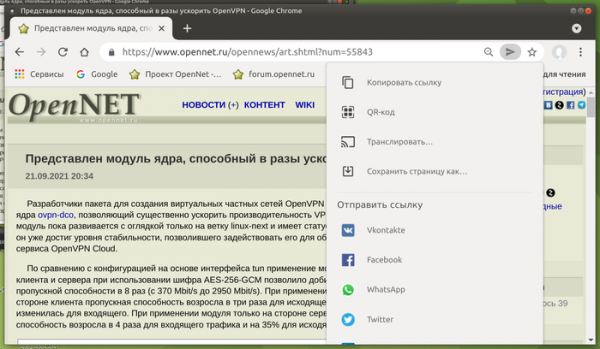
- The ‘Sharing Hub’ feature has been added, allowing users to quickly share a link to the current page with others. It provides the ability to generate a QR code with the URL, save the page, send the link to another device linked to the user's account, and share the link on third-party sites like Facebook, WhatsApp, Twitter, and VK. This feature is not yet available to all users. To enable the ‘Share’ button in the menu and address bar, you can use the settings ‘chrome://flags/#sharing-hub-desktop-app-menu’ and ‘chrome://flags/#sharing-hub-desktop-omnibox’.

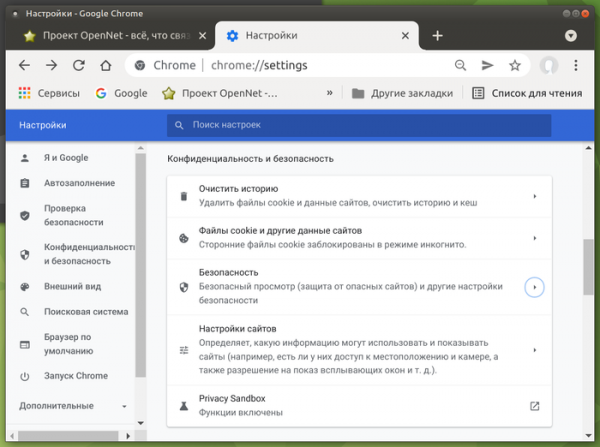
- The browser settings interface has been restructured. Each settings section is now displayed on a separate page, rather than on a single combined page.

- Support has been implemented for dynamically updating the log of issued and revoked certificates (Certificate Transparency), which will now be updated independently of browser updates.
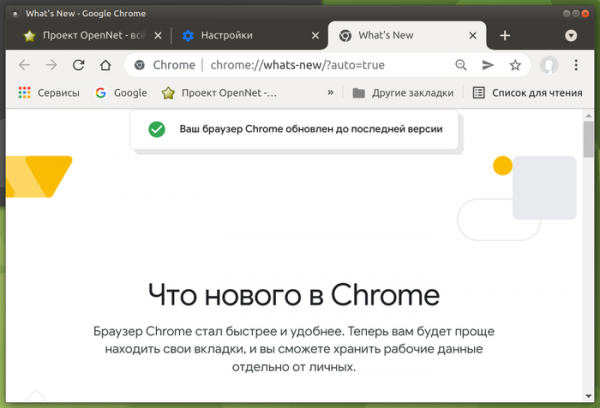
- A new page ‘chrome://whats-new’ has been added, showcasing visible changes to users in the latest release. This page is automatically displayed right after the update or can be accessed through the ‘What’s New’ button in the Help menu. Currently, the page mentions tab search, the ability to split profiles, and a background color change feature, which are not specific to Chrome 94 and appeared in earlier releases. The display of this page is not yet enabled for all users; to manage activation, you can use the settings ‘chrome://flags#chrome-whats-new-ui’ and ‘chrome://flags#chrome-whats-new-in-main-menu-new-badge’.

- The use of the WebSQL API from content loaded from third-party sites (e.g., via iframe) has been declared deprecated. In Chrome 94, a warning will display when attempting to access WebSQL from external scripts, but starting from Chrome 97, such calls will be blocked. Support for WebSQL will gradually be completely discontinued in the future, regardless of the usage context. The WebSQL handler is based on SQLite code and could be exploited by attackers to leverage vulnerabilities in SQLite.
- For security and to prevent malicious activity, the use of the deprecated MK protocol (URL:MK), once used in Internet Explorer and allowing web applications to extract information from compressed files, has started to be blocked.
- Support for synchronization with older versions of Chrome (Chrome 48 and earlier) has been discontinued.
- Support for the 'display-capture' flag has been added to the Permissions-Policy HTTP header, which is intended to enable specific capabilities and manage access to APIs, allowing control over the use of the Screen Capture API on the page (by default, screen content capture from external iframes is blocked).
- Several new APIs have been added in Origin Trials (experimental features that require separate activation). Origin Trials allow the specified API to be used from applications loaded from localhost or 127.0.0.1, or after registration and obtaining a special token, which is valid for a limited time for a specific site.
- The WebGPU API has been introduced to replace the WebGL API, providing tools for performing operations on the GPU, such as rendering and computations. Conceptually, WebGPU is similar to the Vulkan, Metal, and Direct3D 12 APIs. WebGPU differs from WebGL in much the same way as the Vulkan graphics API differs from OpenGL; however, it does not rely on any specific graphics API, serving instead as a universal layer that utilizes the same low-level primitives found in Vulkan, Metal, and Direct3D 12.
WebGPU provides JavaScript applications with low-level control over the organization, processing, and dispatching of commands to the GPU, as well as managing associated resources, memory, buffers, texture objects, and compiled graphics shaders. This approach enables higher performance for graphics applications by reducing overhead and increasing efficiency in GPU operations. The API also allows for the creation of complex 3D projects for the web that perform comparably to standalone applications while remaining platform-agnostic.
- Standalone PWA applications now have the capability to register as URL handlers. For example, the application music.example.com can register itself as the handler for the URL https://*.music.example.com, and all transitions from external applications using these links, such as from messengers and email clients, will lead to opening this PWA application instead of a new tab in the browser.
- Support for the new HTTP status code 103 has been implemented, which can be used for proactive header output. Code 103 allows informing the client about the contents of certain HTTP headers immediately after the request, without waiting for the server to complete all operations related to the request and begin delivering content. In this way, hints about elements related to the served page, which can be preloaded (for example, links to the CSS and JavaScript used on the page), can be communicated. Upon receiving information about such resources, the browser will begin loading them without waiting for the main page delivery to finish, which helps reduce the overall processing time of the request.
- The WebGPU API has been introduced to replace the WebGL API, providing tools for performing operations on the GPU, such as rendering and computations. Conceptually, WebGPU is similar to the Vulkan, Metal, and Direct3D 12 APIs. WebGPU differs from WebGL in much the same way as the Vulkan graphics API differs from OpenGL; however, it does not rely on any specific graphics API, serving instead as a universal layer that utilizes the same low-level primitives found in Vulkan, Metal, and Direct3D 12.
- The WebCodecs API has been added to manipulate multimedia streams at a low level, complementing high-level APIs like HTMLMediaElement, Media Source Extensions, WebAudio, MediaRecorder, and WebRTC. The new API may be in demand in areas such as game streaming, client-side effects application, stream transcoding, and support for non-standard multimedia containers. Instead of implementing individual codecs in JavaScript or WebAssembly, the WebCodecs API provides access to high-performance components built into the browser. Specifically, the WebCodecs API includes decoders and encoders for audio and video, image decoders, and functions for working with individual video frames at a low level.
- The Insertable Streams API has been stabilized, allowing manipulation of raw multimedia streams transmitted through the MediaStreamTrack API, such as data from cameras and microphones, screen capture results, or intermediate decoding data from codecs. Interfaces from WebCodec are used to represent raw frames, after which a stream is formed, similar to what the WebRTC Insertable Streams API generates based on RTCPeerConnections. Practically, the new API enables functionalities such as applying machine learning methods for object identification or annotation in real-time, or adding effects like background removal before encoding or after decoding by a codec.
- The stabilized method scheduler.postTask() allows for managing the scheduling of task executions (JavaScript callback invocations) with various levels of priority. Three priority levels are provided: 1 - execute first, even if it may block user operations; 2 - visible changes to the user are permitted; 3 - background execution. The TaskController object can be used to change priorities and cancel tasks.
- The API Idle Detection is now stabilized and expands beyond Origin Trials to determine user inactivity. The API can detect when the user is not interacting with the keyboard/mouse, the screensaver is active, the screen is locked, or work is being done on another monitor. The application is notified of inactivity through a notification sent after the specified inactivity threshold is reached.
- The process of color management in CanvasRenderingContext2D and ImageData objects has been formalized, incorporating the sRGB color space. It is now possible to create CanvasRenderingContext2D and ImageData objects in color spaces other than sRGB, such as Display P3, to utilize the enhanced capabilities of modern monitors.
- The VirtualKeyboard API has been enhanced with methods and properties to control the display and hiding of the virtual keyboard, as well as to retrieve information about the size of the displayed virtual keyboard.
- JavaScript classes now support the use of static initialization blocks to group code that runs once during class processing: class C { // This block will execute when the class itself is processed static { console.log('C’s static block'); } }
- In CSS properties, flex-basis and flex now implement the keywords content, min-content, max-content, and fit-content for more flexible management of the main area size in Flexbox.
- The CSS property scrollbar-gutter has been added to manage the screen space reserved for the scrollbar. For instance, when scrolling content is not needed, it can expand the output and occupy the area of the scrollbar.
- An API Self Profiling has been added, implementing a profiling system that allows for measuring JavaScript execution time on the client side to debug performance issues in JavaScript code without manual interventions in the web developer interface.
- After the removal of the Flash plugin, it was decided to return empty values in the properties navigator.plugins and navigator.mimeTypes. However, it turned out that some applications used these properties to check for the presence of plugins for displaying PDF files. Since Chrome has a built-in PDF viewer, the properties navigator.plugins and navigator.mimeTypes will now return a fixed list of standard plugins and MIME types for viewing PDF files: ‘PDF Viewer, Chrome PDF Viewer, Chromium PDF Viewer, Microsoft Edge PDF Viewer, and WebKit built-in PDF.’
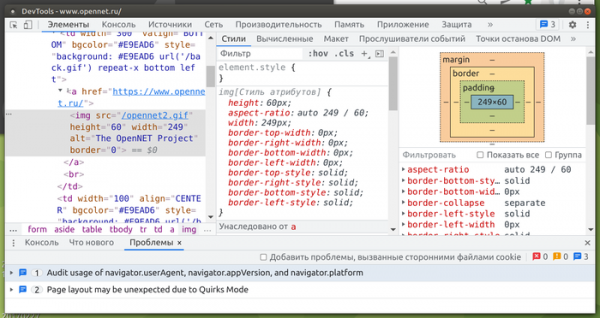
- Improvements have been made to the web developer tools. The device simulation list now includes Nest Hub and Nest Hub Max. The network activity inspection interface has added a button to invert filters (for example, when a filter ‘status-code: 404’ is set, you can quickly view all other requests), as well as the ability to view the original values of Set-Cookie headers (allowing you to assess the presence of incorrect values removed during normalization). The sidebar in the web console has been deprecated and will be removed in a future release. An experimental feature to hide issues in the Issues tab has been added. Language selection has been added to the settings.

In addition to the new features and bug fixes, this release addresses 19 vulnerabilities. Many of the vulnerabilities were identified through automated testing using the tools AddressSanitizer, MemorySanitizer, Control Flow Integrity, LibFuzzer, and AFL. No critical issues that would allow bypassing all browser security levels to execute code outside the sandbox environment were found. Under the bug bounty program for this release, Google has awarded 17 prizes totaling $56,500 (one prize of $15,000, two prizes of $10,000, one prize of $7,500, four prizes of $3,000, and two prizes of $1,000). The amount for 7 awards has not yet been determined.
Source: opennet.ru
