

Google has released the open mobile platform Android 12. The source code related to the new release is available in the project's Git repository (branch android-12.0.0_r1). Firmware updates have been prepared for Pixel series devices as well as for smartphones from Samsung Galaxy, OnePlus, Oppo, Realme, Tecno, Vivo, and Xiaomi. Additionally, universal GSI (Generic System Images) builds have been created, suitable for various devices based on ARM64 and x86_64 architectures.
Key innovations:
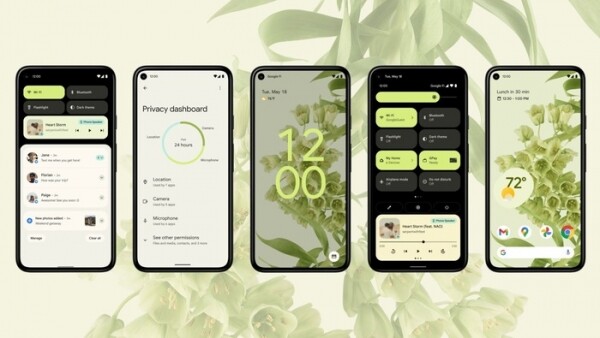
- One of the most significant interface design updates in the project’s history has been proposed. The new design implements the concept of 'Material You,' presented as a variant of the next-generation Material Design. The new concept will be applied automatically to all platforms and interface elements and will not require application developers to make any changes. In July, application developers are expected to receive the first stable release of the new graphics interface development toolkit — Jetpack Compose.

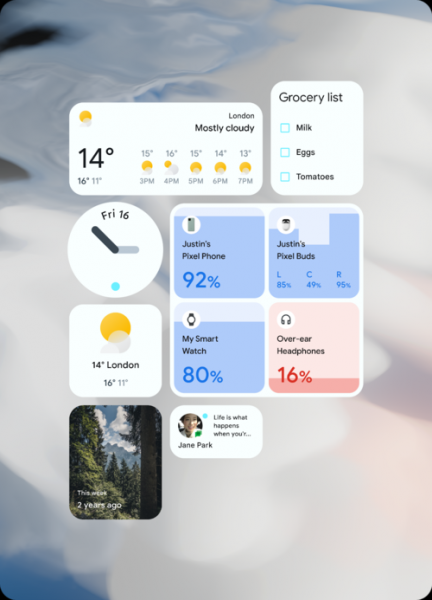
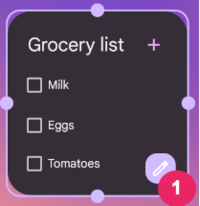
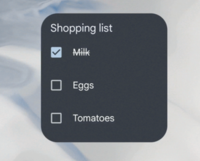
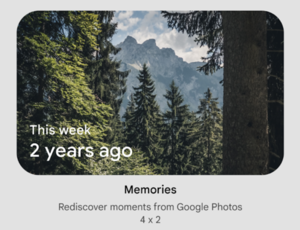
The platform features a new design for widgets. Widgets are made more prominent, with enhanced corner rounding and the ability to use dynamic colors that match the system theme. Interactive controls have been added, such as checkboxes and switches (CheckBox, Switch, and RadioButton), allowing for task list editing in the TODO widget without opening the application.

A smoother visual transition to applications launched from widgets has been implemented. Widget personalization has been simplified — a button (a circle with a pencil) for quickly repositioning the widget on the screen appears after a long press on the widget.


Additional modes for limiting the size of widgets and the ability to use an adaptive layout for widget elements (responsive layout) have been provided to create standard layouts that change based on the visible area size (for example, separate layouts can be formed for tablets and smartphones). The widget picker interface has been enhanced with dynamic previews and the ability to display widget descriptions.

- A feature has been added for automatic adaptation of the system color palette to the color of the selected wallpaper — the system automatically identifies the predominant colors, adjusts the current palette, and applies changes to all interface elements, including the notification area, lock screen, widgets, and volume slider.
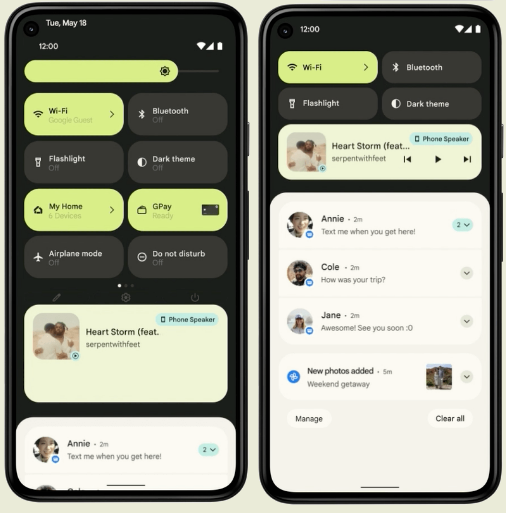
- New animated effects have been implemented, such as gradual zooming and smooth shifting of areas during scrolling, appearing, and moving elements on the screen. For example, when dismissing a notification on the lock screen, the time indicator automatically enlarges and takes up space previously occupied by the notification.
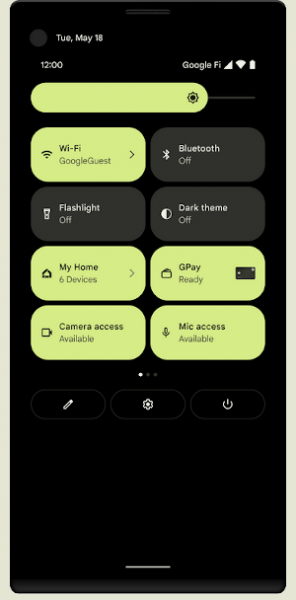
- The design of the notification and quick settings dropdown area has been revamped. Quick settings now include options for Google Pay and smart home management. Long-pressing the power button invokes Google Assistant, which can be instructed to make a call, launch an app, or read an article aloud. Notifications have been standardized to display content as set by the application.

- The stretch overscroll effect has been added, indicating that the user has scrolled beyond the scrollable area and reached the end of the content. The content image stretches and then bounces back with this new effect. The new scroll end indication mode is activated by default, but there is an option in settings to revert to the old behavior.
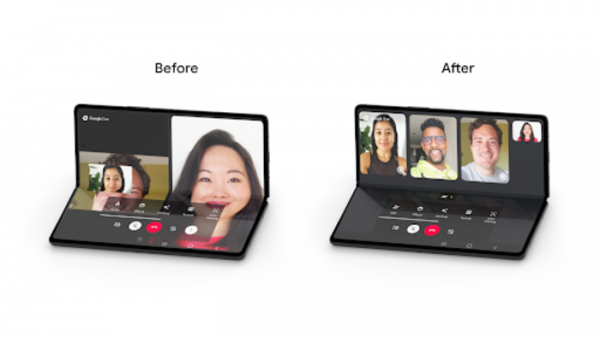
- The interface has been optimized for devices with foldable screens.

- Smoother sound transitions have been implemented — when switching from one app that outputs sound to another, the first app's sound now fades out smoothly while the second app's sound fades in, without overlapping.
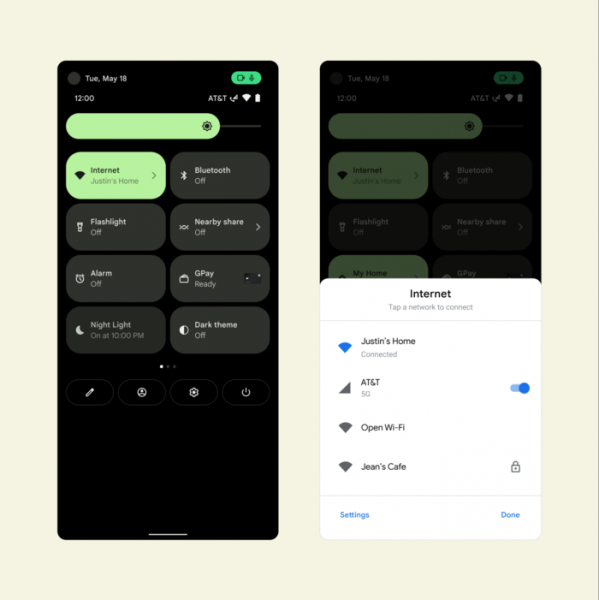
- The management interface for network connections in the quick settings panel and system configurator has been upgraded. A new Internet panel has been added, allowing quick switching between different providers and troubleshooting issues.

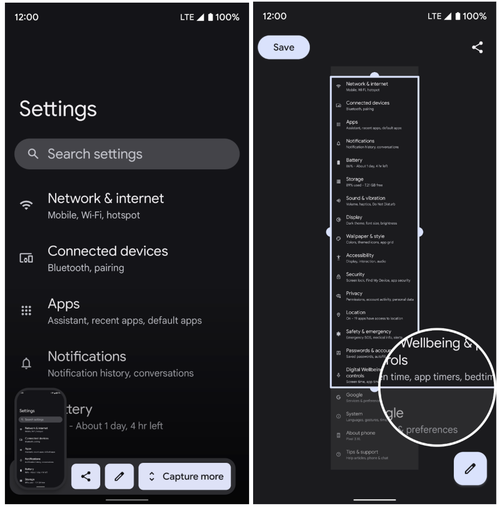
- The ability to take screenshots that capture not just the visible area but also the content in the scrolling area has been added. The capability to save content outside the visible area works for all applications using the View class for output. To implement support for scrolling screenshots in programs that use specific interfaces, an API called ScrollCapture has been proposed.

- The automatic screen rotation feature has been improved, which can now use facial recognition from the front camera to determine the need to rotate the screen, for example, when a person is using the phone lying down. To ensure privacy, information is processed on-the-fly without intermediate image storage. This capability is currently only available on Pixel 4 smartphones and newer models.
- The picture-in-picture (PIP) mode has been enhanced with smoother transition effects. If automatic switching to PIP is enabled with the up-to-home gesture (swiping the bottom of the screen up), the app now transitions to PIP mode immediately without waiting for the animation to finish. Resizing PIP windows with content different from video has improved. There's now the option to hide the PIP window by dragging it to the left or right edge of the screen. The behavior of touching the PIP window has changed — a single touch now shows control buttons, while a double touch resizes the window.
- Significant system performance optimization has been carried out — the CPU load of core system services has decreased by 22%, which in turn has increased battery life by 15%. Due to reduced contention for locks, decreased latencies, and optimized input/output, the performance of switching between applications has improved, and application launch times have been reduced.
In PackageManager, lock competition when working with snapshots in read-only mode has been reduced by 92%. The Binder interprocess communication mechanism has implemented lightweight caching, allowing delays for certain types of calls to be reduced by 47 times. Performance in processing dex, odex, and vdex files has improved, leading to reduced application load times, especially on devices with limited memory. The launch of applications from notifications has been accelerated; for instance, launching Google Photos from a notification is now 34% faster.
Database query performance has been improved by applying inline optimizations in the CursorWindow operation. For small data volumes, CursorWindow has become 36% faster, and for datasets containing more than 1000 rows, the speedup can reach up to 49 times.
Criteria for classifying devices by performance have been proposed. Depending on the device's capabilities, it is assigned a performance class, which can then be used in applications to limit codec functionality on low-powered devices or to handle higher-quality multimedia content on powerful hardware.
- A hibernation mode for applications has been implemented, allowing the app to automatically revoke previously granted permissions, stop execution, reclaim resources used by the app, such as memory, and block background work and push notification delivery if the user has not interacted with the program for a long time. This mode can be applied to most applications and helps protect user data that forgotten programs may still access. The hibernation mode can be selectively disabled in the settings if desired.
- Optimized animation during screen rotation, reducing the lag before rotation by about 25%.
- The new high-performance search engine AppSearch has been included, allowing for indexing information on the device and performing full-text search with ranked results. AppSearch provides two types of indexes — for organizing search within individual applications and for searching across the entire system.
- Added Game Mode API and corresponding settings to manage game performance profiles — for instance, sacrificing performance to extend battery life or utilizing all available resources for maximum FPS.
- The play-as-you-download feature has been added for downloading game resources in the background during installation, allowing you to start playing before the download is complete.
- Responsiveness and reaction speed when handling notifications have been improved. For example, touching a notification now results in an instant transition to the associated application. The use of intermediate notification handlers (notification trampoline) is limited within applications.
- IPC calls in Binder have been optimized. Thanks to a new caching strategy and elimination of conflicts during locks, delays have been significantly reduced. In general, the performance of Binder calls has increased by approximately two times, but in some areas, even greater improvements have been made. For example, the refContentProvider() call is now 47 times faster, releaseWakeLock() is 15 times faster, and JobScheduler.schedule() is 7.9 times faster.
- To prevent potential performance issues, applications are prohibited from starting foreground services while running in the background, except for a few special cases. It is recommended to use WorkManager for running tasks in the background. A new type of task has been proposed in JobScheduler, which runs immediately, has a higher priority, and has network access.
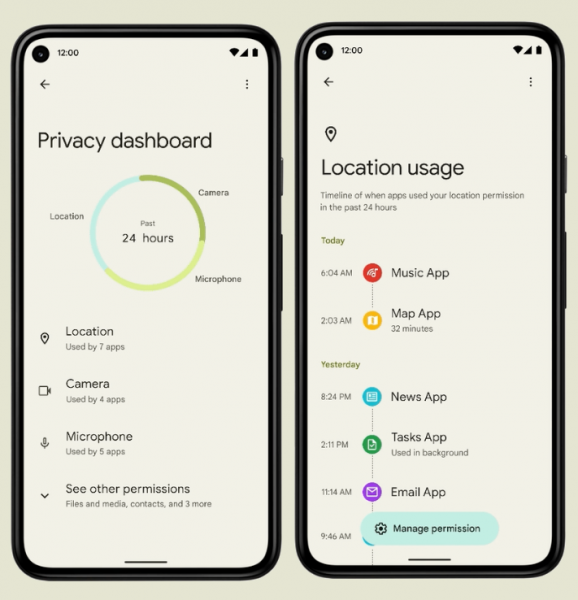
- A Privacy Dashboard interface has been implemented, providing an overview of all permission settings, allowing you to understand what data the applications have access to. The interface also features a timeline visualizing the access history of applications to the microphone, camera, and location data. For each application, details and reasons for accessing sensitive data can be reviewed.

- The panel has added indicators for microphone and camera activity that appear when an application accesses the camera or microphone. Clicking on the indicators opens a settings dialog, allowing users to determine which application is using the camera or microphone, and revoke permissions if necessary.
- The quick settings pop-up block has been enhanced with switches that can forcibly turn off the microphone and camera. Once turned off, attempts to access the camera and microphone will trigger notifications and send empty data to the application.

- A new notification has been added, displayed at the bottom of the screen every time an application attempts to read the clipboard content through the getPrimaryClip() function. If the content is copied from the same application in which it was added, the notification will not appear.
- A separate BLUETOOTH_SCAN permission has been added for scanning nearby devices via Bluetooth. Previously, this capability was provided only when access to the device's location information was granted, which necessitated additional permissions for applications requiring pairing with another device via Bluetooth.
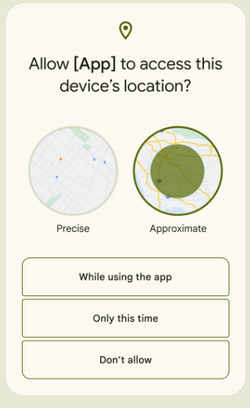
- The dialog for granting access to device location information has been improved. Users now have the option to share precise location data with the application or provide only approximate information, as well as restrict permissions to only the active session (disallow access while in the background). The level of precision of the data provided when selecting an approximate location can be modified in the settings, including binding to specific applications.

- Application developers are now able to disable warning pop-ups that obscure content. Previously, the ability to show overlay windows was controlled via permissions granted during the installation of applications that displayed such windows. There were no tools to influence content overlap from applications whose windows were being obstructed. With the call to Window#setHideOverlayWindows(), all windows obstructing content will now be automatically hidden. For example, hiding may be triggered when displaying critically important information, such as transaction confirmations.
- Applications have been provided with additional settings for restricting notification operations during screen lock. Previously, only visibility control for notifications during screen lock was available, but now mandatory authentication can be required for any actions involving notifications while the screen is locked. For instance, a messaging application may require authentication before deleting a message or marking it as read.
- An API PackageManager.requestChecksums() has been added for requesting and verifying the checksum of an installed application. Supported algorithms include SHA256, SHA512, and Merkle Root.
- The WebView web engine has implemented the option to use the SameSite attribute to manage cookie handling. The value 'SameSite=Lax' limits the sending of cookies for cross-site subrequests, such as image requests or content loading via iframe from another site. In 'SameSite=Strict' mode, cookies are not sent for any type of cross-site requests, including all incoming links from external sites.
- Work continues on randomizing MAC addresses to prevent the tracking of devices when connecting to wireless networks. For non-privileged applications, access to the device's MAC address has been restricted, and when calling the getHardwareAddress() function, an empty value is now returned.
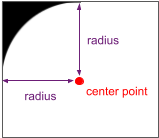
- The ability to adapt interface elements to devices with rounded screens has been added. Developers can now obtain information about screen curvature and adjust interface elements that fall into invisible corner areas. Through the new RoundedCorner API, parameters such as radius and center of rounding can be identified, and with Display.getRoundedCorner() and WindowInsets.getRoundedCorner(), the coordinates of each rounded corner of the screen can be determined.

- A new API, CompanionDeviceService, has been added, which allows applications managing companion devices, such as smartwatches and fitness trackers, to be activated. The API addresses the issue of launching and connecting necessary applications when a companion device appears nearby. The system activates the service when the device is nearby and sends a notification when the device disconnects or enters or leaves the visibility area. Applications can also use the new companion device profile to simplify the configuration of permissions for connecting to the device.
- The bandwidth forecasting system has been improved. Applications can now request information about the expected overall bandwidth related to the operator, specific wireless networks (Wi-Fi SSID), network type, and signal level.
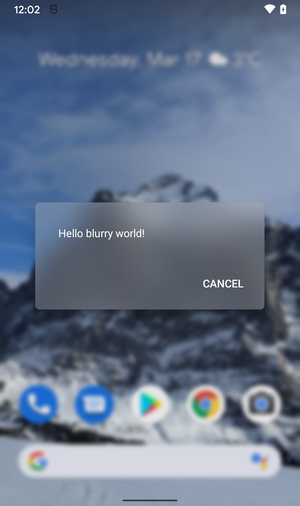
- The application of standard visual effects, such as blurring and color distortion, has been simplified, allowing them to be applied using the RenderEffect API to any RenderNode object or the entire visible area, even in conjunction with other effects. For example, this capability allows for blurring an image displayed through ImageView without explicitly copying, processing, and replacing the bitmap, offloading these actions to the platform. Additionally, the API Window.setBackgroundBlurRadius() has been introduced, which can blur the window's background with a frosted glass effect and highlight depth by blurring the space surrounding the window.

- Integrated tools for transcoding multimedia streams are provided, which can be used in environments with camera applications that save video in HEVC format, ensuring compatibility with applications that do not support this format. For such applications, an automatic transcoding function to the more common AVC format has been added.
- Support for the AVIF image format (AV1 Image Format) has been added, which utilizes intra-frame compression technologies from the AV1 video encoding format. The container for distributing compressed data in AVIF is fully analogous to HEIF. AVIF supports images in HDR (High Dynamic Range) and wide-gamut color space, as well as in standard dynamic range (SDR).
- A unified API OnReceiveContentListener has been proposed for inserting and transferring between applications extended types of content (formatted text, images, videos, sound files, etc.) using various data input sources, including the clipboard, keyboard, and drag-and-drop interface.
- A haptic feedback effect implementable through the built-in vibration motor of phones has been added, with the frequency and intensity of the vibration depending on the parameters of the sound currently being played. This new effect allows for a physical sensation of sound and can be used to add extra realism to games and audio applications.
- In immersive mode, where the program displays full screen while hiding the menus, navigation is simplified using gesture controls. For instance, in applications for reading books, watching videos, and managing photos, you can now navigate with a single swipe gesture.
- As part of the Mainline project, which allows for updating individual system components without requiring a full platform update, new updatable system modules have been prepared in addition to the 22 modules available in Android 11. The updates affect hardware-independent components that are delivered through Google Play separately from OTA firmware updates from manufacturers. Among the new modules that can be updated through Google Play without updating the firmware are ART (Android Runtime) and the video re-encoding module.
- The WindowInsets class has been augmented with an API to determine the display position of camera and microphone usage indicators (these indicators can overlap controls in full-screen apps, and through the specified API, the application can adjust its interface).
- For centrally managed devices, an option has been added to prohibit the use of switches to turn off the microphone and camera.
- For background CDM applications (Companion Device Manager), which manage companion devices like smartwatches and fitness trackers, the ability to run active (foreground) services has been provided.
- Instead of an edition for wearable devices, a new unified platform is being developed in collaboration with Samsung that combines the capabilities of Android and Tizen.
- The capabilities of Android editions have been expanded for automotive infotainment systems and smart televisions.
Source: opennet.ru
