

The release of web browser Firefox 94 has taken place. Additionally, an update for the long-term support branch 91.3.0 has been formed. The Firefox 95 branch has entered beta testing, with its release scheduled for December 7.
Key innovations:
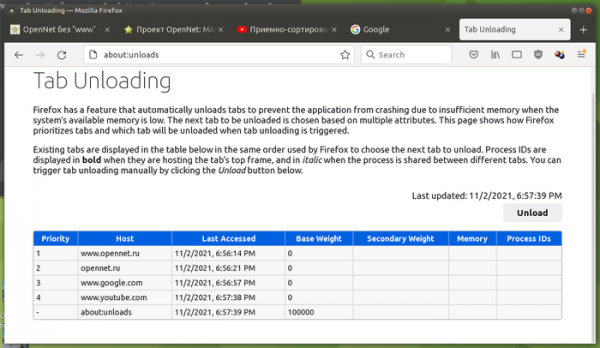
- A new service page "about:unloads" has been implemented, allowing users to forcibly unload the most resource-intensive tabs from memory without closing them, thereby reducing memory consumption (the content will be reloaded when switching back to the tab). The existing tabs on the "about:unloads" page are listed in order of priority for unloading when memory is low. The priority in the list is determined by the access time to the tab, not based on resource consumption. Pressing the Unload button will unload the first tab from the list, the next press will unload the second, and so on. Currently, it is not possible to choose which tab to unload.

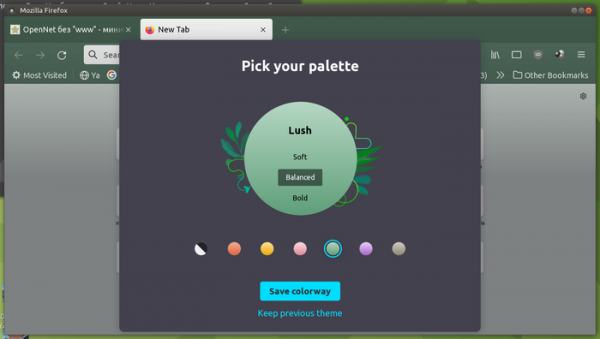
- Upon the first launch after installing the update, a new interface is presented for selecting from six seasonal color themes, each offering three levels of dark shade application that affect the display of the content area, panels, and tab switching bar in darker tones.

- A strict site isolation mode has been proposed, developed within the Fission project. Unlike the arbitrary distribution of tab processing across an available pool of processes (default is 8) used until now, the strict isolation mode assigns each site to its own separate process, dividing not by tabs but by domains (Public Suffix). This mode is not activated for all users; it can be turned off or on using the "about:preferences#experimental" page or the "fission.autostart" setting in about:config.
The new mode provides more reliable protection against Spectre class attacks, reduces memory fragmentation, allows for additional isolation of external script contents and iframe blocks. It more efficiently returns memory to the operating system, minimizes the impact of garbage collection and intensive calculations on pages in other processes, increases efficiency in distributing load across different CPU cores, and enhances stability (a crash of the process handling an iframe will not affect the main site and other tabs). The cost is an overall increase in memory consumption with a large number of open sites.
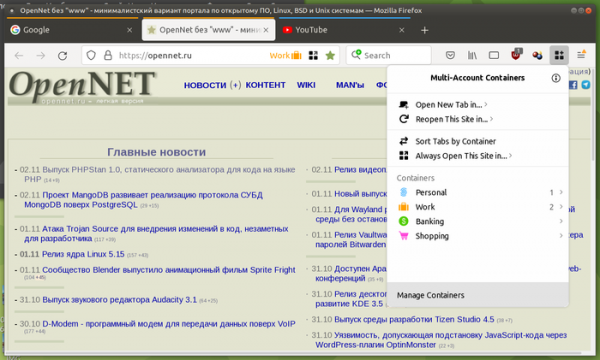
- Users are offered the Multi-Account Containers add-on, which implements the concept of contextual containers that can be used for flexible isolation of arbitrary websites. The containers provide the ability to isolate different types of content without creating separate profiles, allowing separation of information from different groups of pages. For example, isolated areas can be created for personal communication, work, shopping, and banking transactions, or simultaneous use of different user accounts on the same website can be organized. Each container uses separate storage for Cookies, Local Storage API, indexedDB, cache, and content OriginAttributes. Additionally, when using Mozilla VPN different VPN servers can be used for each container.

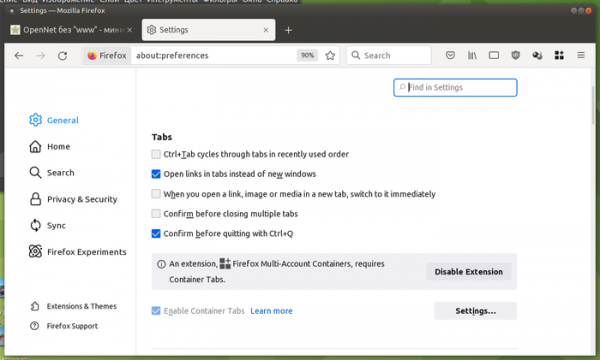
- The confirmation request for operations when exiting the browser or closing the window through the menu and window close buttons has been removed. That is, mistakenly clicking the "[x]" button in the window header now leads to the closing of all tabs, including those with open editing forms, without a prior warning message. After session restoration, data in web forms is not lost. Pressing Ctrl+Q still displays a warning. This behavior can be changed in the settings (General panel / Tabs section / "Confirm before closing multiple tabs" option).
- In Linux builds for graphical environments using the X11 protocol, a new rendering backend is enabled by default, notable for using EGL for interface graphics output instead of GLX. This backend supports working with open-source OpenGL drivers Mesa 21.x and proprietary NVIDIA drivers 470.x. Proprietary OpenGL drivers from AMD are not yet supported. The use of EGL resolves issues with gfx drivers and allows a broader range of devices to access video acceleration and WebGL. The new backend was prepared by separating the DMABUF backend, originally created for Wayland, allowing direct output of frames to GPU memory, which can be reflected in EGL framebuffer and rendered as a texture when composing web page elements.
- Linux builds now include a layer by default that addresses clipboard issues in environments based on the Wayland protocol. The update also includes changes related to handling popup windows in Wayland-based environments. Wayland requires strict hierarchy for popup windows, meaning a parent window can create a child window with a popup, but any subsequent popup initiated from this window must be attached to the original child window, forming a chain. In contrast, Firefox allows each window to spawn multiple popups that do not form a hierarchy. The issue arose because closing one of the popups when using Wayland requires rebuilding the entire window chain with other popups, whereas having multiple open popups is common, as popups can represent menus, tooltips, extension dialogs, permissions requests, etc.
- Overhead has been reduced when using the API performance.mark() and performance.measure() with a large number of metrics being analyzed.
- The rendering behavior during page loading has been altered to enhance the performance of "warm" loading of previously opened pages in strict isolation mode.
- To speed up page loading, the priority for loading and displaying images has been increased.
- In the JavaScript engine, memory consumption has been slightly reduced and property enumeration performance improved.
- Garbage collector invocation scheduling operations have been improved, which has helped to reduce page load times in some tests.
- Reduced CPU load during socket polling when processing HTTPS connections.
- Initialization of the storage has been accelerated, and the startup time has been reduced by minimizing input/output operations in the main thread.
- When closing developer tools, more memory than before is released.
- The CSS @import rule now supports the layer() function, which outputs the definitions of a cascading layer defined using the @layer rule.
- The structuredClone() function now supports the cloning of complex JavaScript objects.
- A new attribute 'enterkeyhint' has been implemented for forms, allowing the behavior of the Enter key on the virtual keyboard to be defined.
- The HTMLScriptElement.supports() method has been added, enabling the checking of browser support for specific script types, such as JavaScript modules or traditional scripts.
- The ShadowRoot.delegatesFocus property has been added to check for the setting of the delegatesFocus property in a separate Shadow DOM.
- On the Windows platform, instead of distracting user prompts for browser updates, the browser now updates in the background upon closing. Support for the new menu system (Snap Layouts) is included in the Windows 11 environment.
- In macOS builds, low power consumption mode is utilized for full-screen video.
- In the version for the Android platform:
- Returning to previously viewed and closed content has been simplified — the new base homepage offers the ability to view recently closed tabs, added bookmarks, search queries, and Pocket service recommendations.
- Customization of the content displayed on the homepage is now available. For example, users can configure the display of frequently visited site lists, recently opened tabs, recently saved bookmarks, search queries, and Pocket recommendations.
- Support for moving inactive tabs to a separate Inactive Tabs section has been added to avoid cluttering the main tab bar. Inactive Tabs will contain tabs that have not been accessed for over 2 weeks. This behavior can be disabled in the settings under 'Settings->Tabs-> Move old Tabs to inactive.'
- The heuristics for generating recommendations while typing in the address bar have been enhanced.


In addition to new features and bug fixes, Firefox 94 addresses 16 vulnerabilities, of which 10 are classified as critical. Five vulnerabilities are due to memory management issues, such as buffer overflows and access to already freed memory areas. These issues could potentially allow an attacker to execute code by opening specially crafted pages.
Source: opennet.ru
