

Simon Peter, the creator of the self-sufficient AppImage package format, has released version 0.7 of the helloSystem distribution, based on FreeBSD 13 and positioned as a system for everyday users, targeting macOS enthusiasts dissatisfied with Apple’s policies. The system is free from the complexities characteristic of modern Linux distributions, remains under complete user control, and allows former macOS users to feel comfortable. A bootable image of the distribution has been created for familiarization, sized at 791 MB (torrent).
The interface resembles macOS and includes two panels—a top one with a global menu and a bottom one with an application panel. The global menu and status bar are powered by the panda-statusbar package, developed by the CyberOS distribution (formerly PandaOS). The Dock application panel is based on the cyber-dock project, also from the CyberOS developers. For file management and desktop shortcut placement, the Filer file manager is being developed, which is based on pcmanfm-qt from the LXQt project. The Falkon browser is offered by default, but Firefox and Chromium are also available optionally. Applications are provided in self-contained packages. The launch utility is used to run applications, which finds the program and analyzes execution errors.
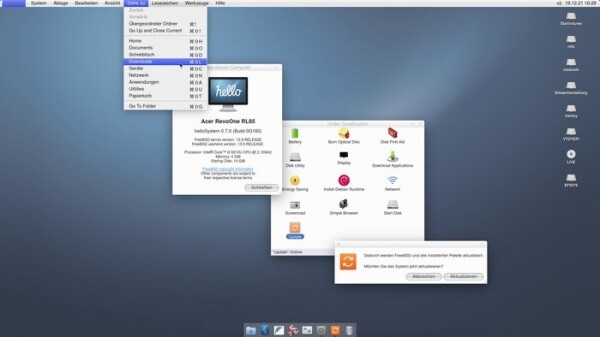
The project is developing a series of its own applications, such as a configurator, installer, mountarchive utility for mounting archives in the file system tree, a data recovery tool for ZFS, a disk splitting interface, a network setup indicator, a screenshot creation utility, a Zeroconf server browser, a volume control indicator, and a boot environment configuration utility. Python and the Qt library are used for development. Among the supported components for application development, listed in order of preference, are PyQt, QML, Qt, KDE Frameworks, and GTK. ZFS is used as the main file system, and UFS, exFAT, NTFS, EXT4, HFS+, XFS, and MTP are supported for mounting.
Key features of helloSystem 0.7:
- The transition to the FreeBSD 13.0 codebase has been completed (the previous release was based on FreeBSD 12.2).
- A new architecture for live mode operation has been implemented, working without a RAM disk, without changing the root partition, and without copying the system image into RAM. In the live image, instead of the ZFS file system, the UFS file system is used, compressed with uzip. The start of the graphical environment has been moved to an earlier stage of the boot process. As a result, the size of the live image has decreased from 1.4 GB to 791 MB, and the boot time has been reduced threefold.
- Compatibility with the Ventoy tool has been ensured, allowing multiple different ISO images to be booted from a single medium.
- Support for the exFAT file system has been added.
- Files for application developers have been specifically included in a separately bootable package, including compilers, header files, and documentation.
- Compatibility with older NVIDIA graphics cards has been improved (several different versions of NVIDIA drivers have been added).
- The boot process design has been changed. By default, the text console is no longer provided.
- Translations for many applications, configuration dialog boxes, and utilities have been added.
- In addition to the default Falkon browser, quick installation of Chromium, Firefox, and Thunderbird packages is available with global menu support and native window decoration.
- Hotkeys that trigger the corresponding menu items are displayed in the menu. Visual highlighting of selected menu items has been ensured. By default, the display of icons in context menus has been discontinued.
- The ability to adjust volume and screen brightness through the corresponding multimedia keys on laptop keyboards has been implemented.
- In the terminal emulator, the operations for Command-C and Command-V have been aligned with the handling of those commands in other applications (to perform Ctrl-C, you need to press Command-Shift-C or Ctrl-Command-C).
- Support for system sounds in the file manager and sound notifications in the message output dialog has been added.
- If it is not possible to start the graphical session within a specified time, an error message with useful information about the hardware is displayed.
- The file manager now supports renaming disk partitions (via the command diskutil rename), displaying their text labels, and binding icons to the partition. Added the ability to open disk images with a double click.
- The makeimg utility has been added for creating disk images.
- A menu item has been added to invoke the disk formatting interface.
- The sticky notes application has been removed from the autostart.
- Sound devices now have the option to invoke the equalizer.
- Completely unready experimental features are gathered in the 'Under Construction' section. Utilities for installing package updates and applying patches from FreeBSD, burning to optical disks, downloading bundles with additional applications, and installing Debian Runtime with an environment for running Linux applications are available for testing.
Source: opennet.ru
