The Document Foundation has released the LibreOffice 7.3 office suite. Installation packages have been prepared for various Linux, Windows, and macOS distributions. 147 developers contributed to this release, of which 98 are volunteers. 69% of the changes were made by staff from the companies managing the project, such as Collabora, Red Hat, and Allotropia, while 31% were added by independent enthusiasts.
The LibreOffice 7.3 release is labeled 'Community' and will be supported by enthusiasts; it is not aimed at enterprise use. LibreOffice Community is freely available to everyone, including corporate users. For enterprises requiring additional support, products from the LibreOffice Enterprise family are developed separately, providing full support from partner companies, long-term support (LTS) updates, and additional features such as SLAs (Service Level Agreements).
The most notable changes:
- The highlighting of grammatical and spelling errors in the text has been revamped — wavy lines that underline errors are now more noticeable on high pixel density screens and adapt to zoom changes.
- The Colibre icon theme, which is set as default on the Windows platform, has been updated; icons related to graphics, saving, formatting, and undoing changes have been redesigned.
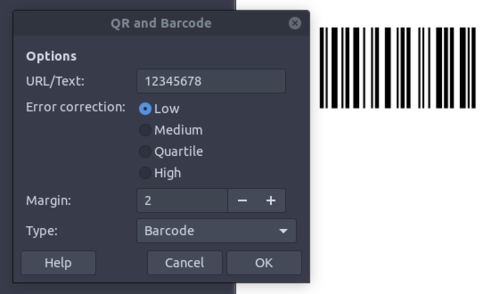
- The ability to generate one-dimensional barcodes has been implemented in addition to QR codes.

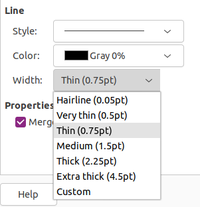
- Line width values have been unified across all LibreOffice components.

- Changes in Writer:
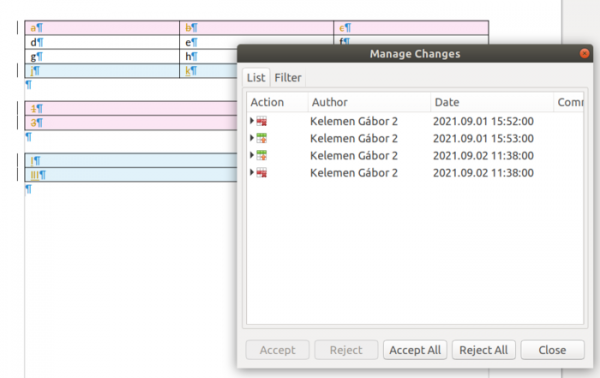
- Support for change tracking in tables has been added. Tracking of row deletions and additions, including empty rows, has been implemented. An interface for visually analyzing the history of deletions/additions of tables and individual rows has also been added, as well as for managing changes in tables (accepting or rejecting deletions and additions of rows and entire tables can now be done with one click). Deleted and added changes are displayed in different colors, and deleted rows and tables are correctly hidden when change hiding mode is activated. Tooltips with a history of changes have been added for table columns.

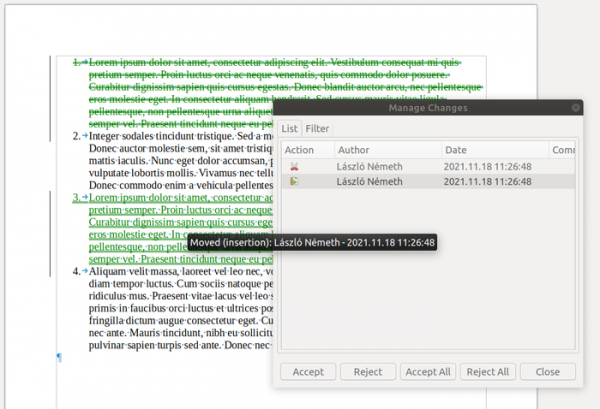
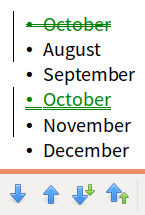
- The change tracking system now supports tracking text movements. When analyzing changes, moved text is highlighted in green, while the original location is shown as struck through, and the new location is underlined. A tooltip and a special icon for tracking text movements have been added in the change management mode. Operations such as changing the order of paragraphs or elements in lists are also visually marked.

- Improved tracking of formatting and paragraph style changes. When moving list items, only the moved items are displayed, without affecting other intermediate list parts.

- The ability to attach hyperlinks to shapes has been implemented.
- Footnotes and endnotes specified at the end of paragraphs are now processed similarly to footnotes in the text, i.e., they comply with the regular expressions ‘[\p{Control}]’ and ‘[:control:]’.
- To enhance compatibility with DOCX formatted documents, information about list levels and character styles associated with paragraphs is now also transferred during paragraph style import.
- The rendering of complex documents has been accelerated. The performance of exporting complex documents to PDF format has been improved. Loading large RTL documents has been sped up.
- Changes in Calc:
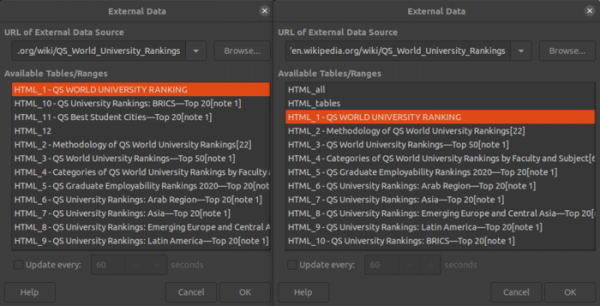
- In the ‘Link to External Data’ dialog (‘Sheet ▸ Link to External Data’), HTML tables are now displayed in the order they appear in the source file.

- Implemented the Kahan compensation summation algorithm, which utilizes CPU vector instructions such as AVX2 for faster computation.
- In cells with formulas, indentation created using spaces or tab characters is preserved. Indentations are now also saved and reproduced when writing and reading in OOXML and ODF formats.
- When importing and exporting data in CSV format, the ability to set the field separator by specifying the parameter ‘sep=;’ or ‘»sep=;»’ in the line instead of the data has been added.
- In the CSV data import and pasting dialog, an option for ‘Evaluate formulas’ has been implemented, which, when enabled, treats data starting with the ‘=’ symbol as formulas and evaluates them.
- Support for Bash-style input auto-completion has been added. For example, if a cell in the column contains 'ABCD123xyz', typing 'A' will suggest adding 'BCD'. The user can confirm by pressing the right arrow, then enter '1' to receive the suggestion '23'.
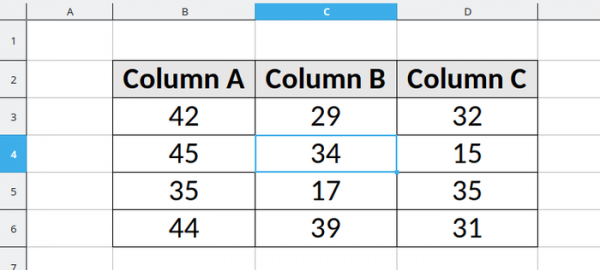
- The cursor in a cell is now displayed using the system highlight color instead of the default font color.

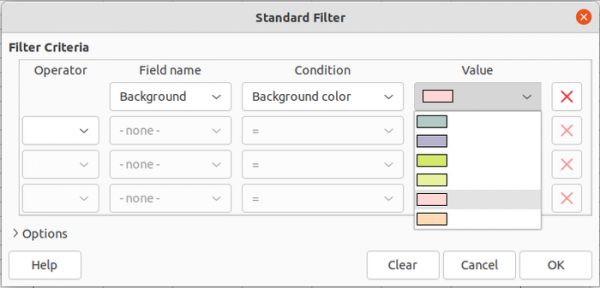
- The 'Standard Filter' dialog now includes the ability to filter items by the background or text color of the cell.

- In queries and filters using text operations such as 'contains', support for numeric data has been enabled.
- The quick search mode now searches among values instead of formulas (an option to select the mode is available in a separate search dialog).
- The speed of opening XLSM files has been increased. The insertion of large charts has been sped up. The performance of search and filter functions has improved. Multithreading has been more widely applied in calculations in Calc.
- The Impress presentation preparation program has added screen sizes compatible with PowerPoint and Google Slides (Slide ▸ Slide Properties… ▸ Slide ▸ Paper Format), such as 'Widescreen' and 'On-screen show'. Issues with sharing shape properties between groups of shapes have been resolved. In the '3D-Settings' dialog, correct rendering of surfaces has been ensured when selecting the properties 'Matte', 'Plastic', and 'Metal', which were previously rendered uniformly.

- Support for change tracking in tables has been added. Tracking of row deletions and additions, including empty rows, has been implemented. An interface for visually analyzing the history of deletions/additions of tables and individual rows has also been added, as well as for managing changes in tables (accepting or rejecting deletions and additions of rows and entire tables can now be done with one click). Deleted and added changes are displayed in different colors, and deleted rows and tables are correctly hidden when change hiding mode is activated. Tooltips with a history of changes have been added for table columns.
- A new content provider (UCP, Universal Content Provider) has been added for WebDAV and HTTP, based on the libcurl library.
- The TLS stack provided by the platform has been used in Windows and macOS.
- Significant performance optimizations have been made when working with multiple instances of a single document (e.g., when different parts of a single document are open in different windows or multiple users are collaboratively editing a single document in LibreOffice Online).
- Rendering has been improved when using a backend based on the Skia library.
- Link-Time Optimization has been included in the build of official executable files, resulting in an overall performance boost.
- Numerous improvements have been made related to the import of documents in DOC, DOCX, PPTX, XLSX, and OOXML formats, as well as exporting to OOXML, DOCX, PPTX, and XLSX. Overall, a significant improvement in compatibility with MS Office documents has been noted.
- Support for the Slavic interlanguage (a language understandable to speakers of various languages with Slavic roots) and the Klingon language (a race from the Star Trek series) has been added.

Source: opennet.ru