

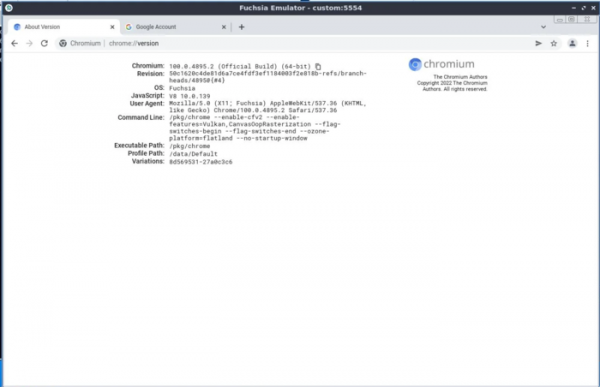
Google has released a full version of the Chromium web browser for the Fuchsia operating system, replacing the previously offered stripped-down Simple Browser, which was designed for isolated web applications rather than general website usage. Indirectly, the provision of support for a standard web browser confirms Google's intention to develop Fuchsia not only for IoT and consumer devices like the Nest Hub, but also for desktop platforms. You can familiarize yourself with the current state of Fuchsia development using the emulator, as well as testing builds from the dahliaOS project.
The Chromium build interface for Fuchsia is generally similar to builds for other desktop systems, with some minor issues and bugs such as problems with context menu display and opening multiple windows. However, recent efforts have been made to address these issues, for instance, support for an integrated PDF viewer and printing capabilities has been added recently.
It is worth noting that the Fuchsia OS has been developed by Google since 2016, taking into account the scaling and security shortcomings of the Android platform. The system is based on the Zircon microkernel, derived from the LK project, expanded for use across various classes of devices, including smartphones and personal computers. Zircon extends LK with support for processes and shared libraries, user-level support, an object handling system, and a security model based on capabilities. Drivers are implemented as dynamic libraries running in user space, loaded by the devhost process and managed by the device manager (devmg, Device Manager).
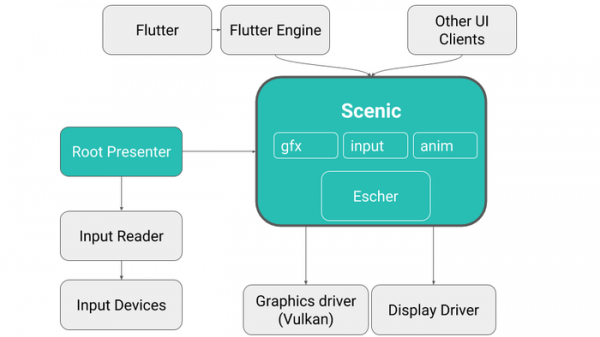
Fuchsia has its own graphical interface developed in Dart using the Flutter framework. The project also includes the development of the user interface framework Peridot, the package manager Fargo, the standard library libc, the rendering system Escher, the Vulkan driver Magma, the compositor Scenic, the file systems MinFS, MemFS, ThinFS (FAT in Go), and Blobfs, as well as the partition manager FVM. For application development, support is provided for C/C++ and Dart, with Rust permitted in system components, Go in the network stack, and Python in the build system.
During boot, a system manager is used, which includes appmgr for creating the initial program environment, sysmgr for forming the boot environment, and basemgr for configuring the user environment and organizing system login. An advanced sandbox isolation system ensures security, where new processes have no access to kernel objects, cannot allocate memory, and cannot execute code. Resource access is managed through a namespace system that defines available permissions. The platform provides a framework for creating components that are programs running in their own sandbox, able to interact with other components via IPC.
Source: opennet.ru
