

The company System76, specializing in the production of laptops, PCs, and servers preinstalled with Linux, has released the distribution of Pop!_OS 22.04. Pop!_OS is based on the Ubuntu 22.04 package base and comes with its own COSMIC desktop environment. The project’s developments are distributed under the GPLv3 license. ISO images are available for x86_64 and ARM64 architectures in versions for NVIDIA (3.2 GB) and Intel/AMD (2.6 GB) graphics chips. Builds for Raspberry Pi 4 are delayed.
The distribution is primarily aimed at people using computers to create something new, such as content development, software products, 3D models, graphics, music, or scientific work. The idea of developing a custom edition of Ubuntu arose after Canonical's decision to transition Ubuntu from Unity to GNOME Shell — the developers at System76 began creating a new theme based on GNOME, but then realized they were ready to offer users a different desktop environment that provides flexible tools for customization according to the current workflow.
The distribution comes with the COSMIC desktop, built on a modified GNOME Shell environment and a set of original GNOME Shell extensions, its own custom theme, a collection of icons, other fonts (Fira and Roboto Slab), and modified settings. Unlike GNOME, COSMIC continues to utilize a separate view for navigating open windows and installed applications. For window manipulation, it offers both a traditional mouse control mode, familiar to beginners, and a tiled window layout mode, allowing management solely through the keyboard. In the future, the developers plan to transform COSMIC into a standalone project, independent of GNOME Shell and developed in Rust. The first alpha release of the new COSMIC is scheduled for early summer.
Among the changes in Pop!_OS 22.04:
- The migration to the Ubuntu 22.04 LTS package base has been completed. The Linux kernel has been updated to version 5.16.19, and Mesa to branch 22.0. The COSMIC desktop has been synchronized with GNOME 42.
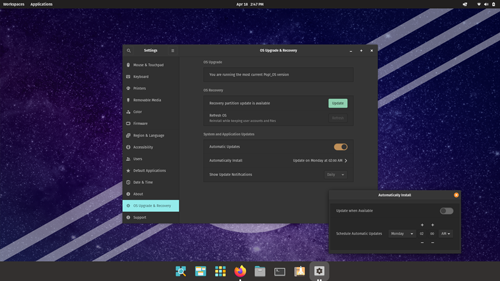
- The 'OS Upgrade & Recovery' panel now includes the option to enable automatic update installation mode. Users can specify which days and at what times to install updates automatically. This mode applies to packages in deb, Flatpak, and Nix formats. By default, automatic updates are disabled, and users receive a notification about available updates once a week (in the settings, users can configure it to display daily or monthly).
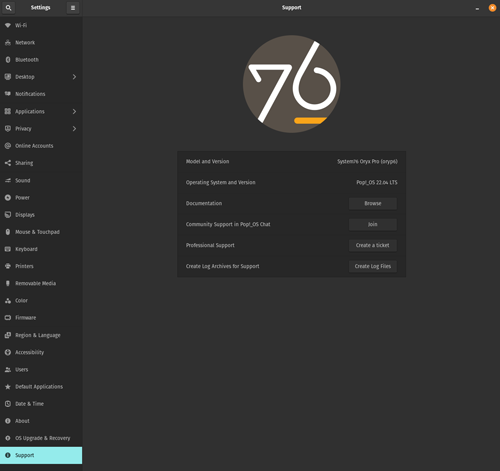
- A new support panel has been introduced, accessible from the bottom of the configuration menu. The panel provides resources for resolving common issues, such as links to hardware setup articles, support chat, and the ability to generate logs to facilitate problem analysis.

- The settings now allow for separate wallpaper assignments for dark and light themes.
- System76 Scheduler now supports performance enhancement by prioritizing the application in the active window. The CPU frequency regulation mechanism (cpufreq governor) has been improved to adjust CPU settings to current load.
- The interface and backend of the Pop!_Shop application catalog have been enhanced. A section for recently added and updated programs has been added. The interface layout has been optimized for small windows. The reliability of package operations has been improved. Support for installed proprietary NVIDIA drivers has been ensured.
- Transition to multimedia usage has been implemented server PipeWire for audio processing.
- Enhanced support for multi-monitor configurations and high pixel density screens.
- Support has been provided for screens that display confidential information; for instance, some laptops come equipped with screens that feature a built-in privacy mode, making it difficult for others to view the display.
- The RDP protocol is enabled by default for remote work.
Source: opennet.ru
