

The PyScript project has been introduced, enabling the integration of handlers written in Python into web pages and the creation of interactive web applications using Python. Applications are granted access to the DOM and an interface for bidirectional interaction with JavaScript objects. The logic of web application development remains, with the distinction being the ability to use Python instead of JavaScript. The source code of PyScript is distributed under the Apache 2.0 license.
Unlike the Brython project, which compiles Python code to JavaScript, PyScript uses Pyodide to execute Python code— a browser-side port of CPython compiled to WebAssembly. Utilizing Pyodide allows for full compatibility with Python 3 and the use of all language features and libraries, including those for scientific computing, such as numpy, pandas, and scikit-learn. PyScript provides a layer for integrating Python code with JavaScript, embedding code into web pages, importing modules, managing input/output, and addressing other related tasks. The project offers a set of widgets (buttons, text blocks, etc.) for creating a web interface in Python.
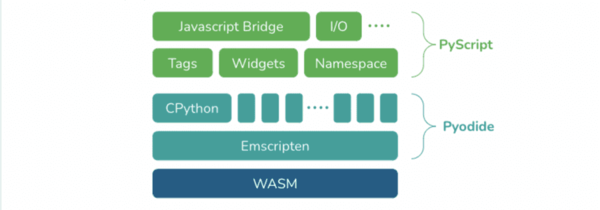
Using PyScript involves linking the pyscript.js script and the pyscript.css stylesheet, after which you can integrate Python code into pages, placed within the tag <py-script>, or linking files through the tag <py-script src="…">. The project also provides the tag <py-repl> which implements an environment for interactive code execution (REPL). To specify paths to local modules, the tag "<py-env>». <html> … <py-script> print('Hello World!') </py-script> <py-env> — numpy — matplotlib — paths: — /data.py </py-env> <py-script src="»./test.py»"></py-script> … </html>
Source: opennet.ru
