

The release of the Nextcloud Hub 24 platform has been announced, offering a self-sufficient solution for enhancing collaboration among enterprise employees and teams working on various projects. Concurrently, the underlying Nextcloud 24 cloud platform has been released, allowing users to deploy cloud storage with data synchronization and sharing capabilities, enabling data viewing and editing from any device anywhere on the network (via web interface or WebDAV). The Nextcloud server can be deployed on any hosting that supports PHP script execution and provides access to SQLite, MariaDB/MySQL, or PostgreSQL. The source code of Nextcloud is distributed under the AGPL license.
In terms of problem-solving capabilities, Nextcloud Hub resembles Google Docs and Microsoft 365, but it allows for a fully controlled collaboration infrastructure, operating on your own servers and not tied to external cloud services. Nextcloud Hub brings together several open-source applications and add-ons over the Nextcloud cloud platform, enabling teamwork with office documents, files, and information for task and event planning. The platform also includes add-ons for accessing email, messaging, and organizing video conferences and chats.
User authentication can be carried out both via a local database and through integration with LDAP/Active Directory, Kerberos, IMAP, and Shibboleth/SAML 2.0, including the use of two-factor authentication, SSO (Single Sign-On), and linking new systems to the account via QR code. Version control allows tracking changes in files, comments, sharing rules, and tags.
The main components of the Nextcloud Hub platform:
- Files — a system for storing, syncing, sharing, and exchanging files. Access can be achieved via both the web and client software for desktop and mobile systems. Advanced features include full-text search, file attachment when sending comments, selective access control, creation of password-protected links for downloads, and integration with external storage (FTP, CIFS/SMB, SharePoint, NFS, Amazon S3, Google Drive, Dropbox, etc.).
- Flow — optimizes business processes through the automation of routine tasks like converting documents to PDF, sending messages to chat when new files are uploaded to specific directories, and automatically assigning tags. Custom handlers can be created to perform actions tied to specific events.
- Nextcloud Office — built-in tools for collaborative document editing, spreadsheets, and presentations developed in partnership with Collabora. Integration support is provided for OnlyOffice, Collabora Online, MS Office Online Server, and Hancom Office.
- Photos — an image gallery that simplifies searching, sharing, and navigating through a collaborative collection of photos and images. Supports ranking photos by time, location, tags, and view frequency.
- Calendar — a scheduling calendar that allows coordination of meetings, planning chats, and video conferences. Integration is provided with group work tools based on iOS, Android, macOS, Windows, Linux, Outlook, and Thunderbird. Event downloading from external sources supporting the WebCal protocol is also supported.
- Mail — a shared address book and web interface for handling emails. Multiple accounts can be linked to a single inbox. Supports email encryption and attachment of digital signatures based on OpenPGP. Address book synchronization is possible via CalDAV.
- Talk — a messaging system and web conferencing platform (chat, audio, and video). Supports groups, screen sharing, and integration with traditional telephony through SIP gateways.
- Nextcloud Backup — a solution for decentralized backup storage.
Key innovations in Nextcloud Hub 24:
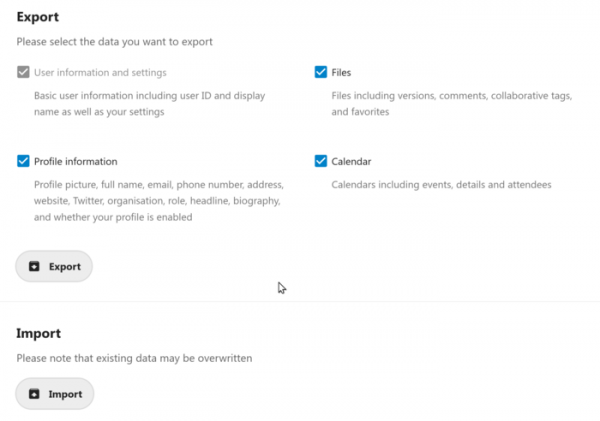
- Migration tools have been provided, allowing users to export all their data as a single archive and import it elsewhere. serverThe export includes user and profile settings, application data (Groupware, Files), calendars, comments, favorites, etc. Migration support has not yet been added to all applications, but a special API has been proposed for extracting application-specific data, which will be gradually implemented. The migration tools enable users to be independent of the platform and simplify the transfer of their information; for example, a user can quickly transfer data to their home server at any time.

- Changes aimed at improving performance and scalability have been added to the file storage and sharing subsystem (Nextcloud Files). An Enterprise Search API has been introduced for indexing content stored in Nextcloud by external search engines. Selective permission management for sharing has been implemented, allowing users to receive individual edit, delete, and upload rights in shared folders. The email sharing feature (Share-by-mail) now generates temporary tokens for verifying the email address owner instead of using a fixed password.
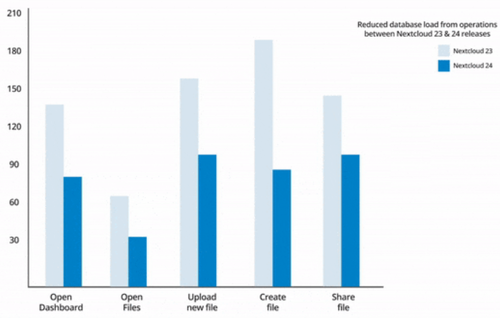
Database load during routine operations has been reduced by up to 4 times. The number of database queries when displaying folder content in the interface has decreased by 75%. Additionally, the number of database calls when working with user profiles has been significantly reduced. The efficiency of avatar caching has been improved, now generating only two size variants. The storage of user activity information has been optimized. A built-in profiling system has been added to identify bottlenecks. proxy server Connections to Redis have been reduced. The processing of quotas, handling of tokens, WebDAV access, and reading user status data have been accelerated. The use of caching has been expanded to speed up resource access. Page load times have been reduced.

Administrators can now set arbitrary times for background tasks to be performed during periods of low activity. Functionality has been introduced for offloading thumbnail generation and resizing operations to a separate microservice that runs in Docker. Data related to user activity processing can now be offloaded to a separate database.
- The collaboration components interface (Nextcloud Groupware) has been improved. The calendar/scheduler now features accept/decline buttons for invitations, allowing users to change their participation status directly from the web interface. The email client has added functionality for scheduling message sending and canceling recently sent emails.
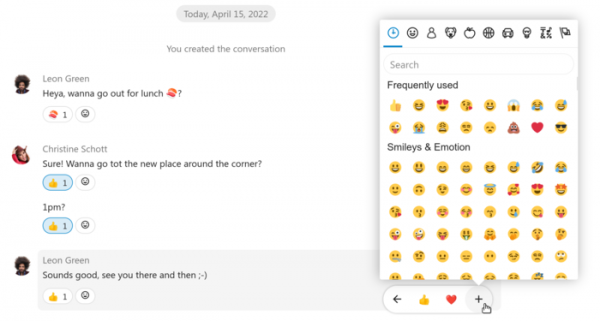
- The Nextcloud Talk messaging system has undergone enhancements for better performance and added support for reactions, allowing users to express their feelings toward a message using Emoji. A Media tab has been introduced, showcasing all multimedia files shared in the chat, now searchable. Desktop integration has improved, enabling users to respond directly from pop-up notifications about new messages, while incoming call reception has been simplified. The mobile version now allows users to select their audio output device. When screen sharing, support for broadcasting system audio alongside the video image has been added.

- The integrated office suite (Collabora Online) now features a new interface with a tabbed menu (the top menu items appear as changing toolbars).
- Collaboration tools now include automatic file locking during editing in the Text and Collabora Online office applications (this locking prevents other clients from making changes to the edited file), with the option to manually lock and unlock files if desired.
- The Nextcloud Text editor has introduced support for tables and information cards. Users can now directly upload images through a drag-and-drop interface. Emoji insertion now includes autocomplete features.
- In the Nextcloud Collectives program, which provides an interface for building knowledge bases and linking documents to groups, flexible access rights configuration has been implemented, allowing access to multiple pages via a single link.
Source: opennet.ru
