

Google has released version 102 of its web browser Chrome. At the same time, a stable release of the open-source Chromium project, which serves as the foundation for Chrome, is also available. The Chrome browser differs from Chromium in its use of Google logos, the presence of a notification system in case of crashes, modules for playing DRM-protected video content, an automatic update installation system, constant inclusion of Sandbox isolation, provisioning of keys for Google APIs, and transmission of RLZ parameters during searches. For those who need more time to update, the Extended Stable branch is supported separately, accompanied by 8 weeks of maintenance. The next release of Chrome 103 is scheduled for June 21.
Key changes in Chrome 102:
- To block exploitation of vulnerabilities caused by accessing freed memory blocks (use-after-free), the MiraclePtr (raw_ptr) type has begun to be used instead of standard pointers. MiraclePtr provides a wrapper around pointers that performs additional checks on accessing freed memory areas and crashes the application if such accesses are detected. The impact of the new protection method on performance and memory consumption is assessed as minimal. The MiraclePtr mechanism is not applicable in all processes, particularly not used in rendering processes, but it can significantly enhance security. For example, in the current release, out of 32 vulnerabilities fixed, 12 were caused by use-after-free issues.
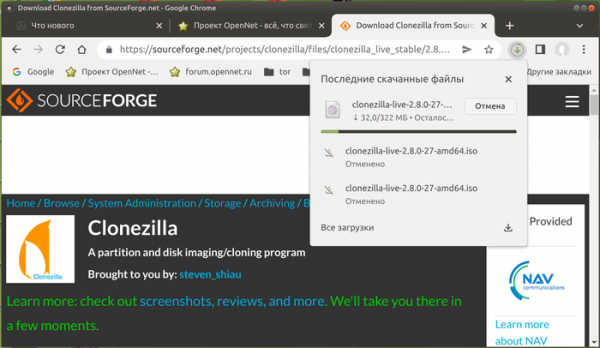
- The design of the interface displaying download information has been modified. Instead of the bottom bar showing download progress, a new indicator has been added to the address bar, which, when clicked, shows the download progress of files and a history with a list of already downloaded files. Unlike the bottom panel, the button is constantly displayed on the panel and allows quick access to the download history. The new interface is currently offered by default only to a portion of users and will be rolled out to everyone if no issues arise. To revert to the old interface or enable the new one, there is a setting available at “chrome://flags#download-bubble.”

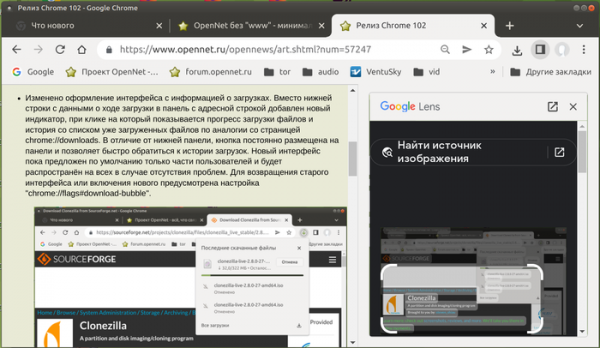
- When searching for images through the context menu (‘Search image with Google Lens’), results are now displayed not on a separate page, but in a sidebar next to the content of the original page, allowing users to see both the page content and the search results simultaneously.
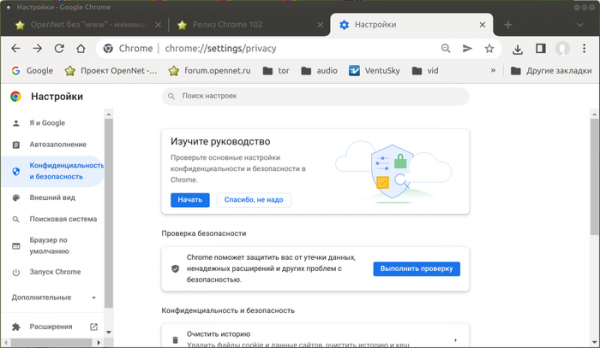
- In the settings under the ‘Privacy and security’ section, a ‘Privacy Guide’ has been added, which offers an overview of key privacy settings with detailed explanations of how each setting impacts privacy. For example, you can determine the data-sharing policy with Google services, manage synchronization, handle cookies, and save history. This feature is available to some users, and can be activated using the setting ‘chrome://flags#privacy-guide’.
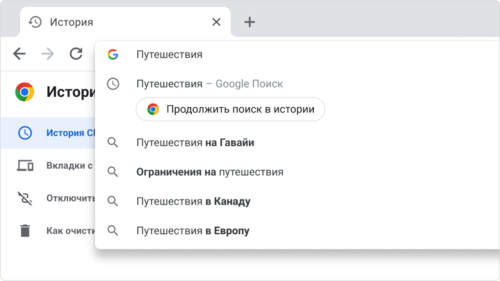
- Search history and viewed pages are now structured. When attempting to search again in the address bar, a prompt appears: ‘Resume your journey,’ allowing you to continue from where you left off.

- The Chrome Web Store catalog now features a page titled ‘Extensions Starter Kit’ with a curated selection of recommended extensions.
- In testing mode, a request for CORS (Cross-Origin Resource Sharing) confirmation has been enabled, with the header ‘Access-Control-Request-Private-Network: true’, for requests from a page to resources on an internal network (192.168.x.x, 10.x.x.x, 172.16.x.x) or to localhost (128.x.x.x). Upon confirmation of the operation, the server should respond with the header ‘Access-Control-Allow-Private-Network: true’. In Chrome version 102, the confirmation result does not yet affect the handling of the request — if confirmation is absent, a warning is displayed in the web console, but the subresource request is not blocked. Blocking in the absence of server confirmation is expected to be implemented no earlier than in Chrome 105. To enable blocking in earlier versions, the setting ‘chrome://flags/#private-network-access-respect-preflight-results’ can be activated.
Authorization confirmation proxy server has been introduced to enhance protection against attacks related to resource access in the local network or on the user's computer (localhost) from scripts loaded when the site is opened. Such requests are leveraged by attackers to carry out CSRF attacks on routers, access points, printers, corporate web interfaces, and other devices and services that accept requests only from the local network. To protect against such attacks, when accessing any subresources in the internal network, the browser will send an explicit request for the authority to load these subresources.
- When opening links in incognito mode through the context menu, certain parameters that affect privacy are automatically removed from the URL.
- The update delivery strategy for Windows and Android has been modified. To provide a more comprehensive comparison of the behavior between the new and old releases, several builds of the new version are now generated for download.
- The network segmentation technology has been stabilized to protect against methods that track user movement across websites, based on storing identifiers in areas not intended for permanent data storage (‘Supercookies’). Since cached resources are stored in a common namespace, regardless of the originating domain, one site can determine the loading of resources from another site by checking for the presence of that resource in the cache. Protection is based on applying network segmentation, which adds additional binding of entries to domain, from which the main page is opened, limiting the cache coverage area for tracking scripts only to the current site (a script from an iframe cannot check if a resource was loaded from another site). State separation covers network connections (HTTP/1, HTTP/2, HTTP/3, websocket), DNS cache, ALPN/HTTP2 data, TLS/HTTP3, configuration, downloads, and information in the Expect-CT header.
- For installed standalone web applications (PWA, Progressive Web App), the ability to change the appearance of the window title area using Window Controls Overlay components has been provided, extending the screen area of the web application to the entire window. The web application can control rendering and input handling throughout the entire window, except for the overlay block with the standard window control buttons (close, minimize, maximize), allowing the web application to take the form of a regular desktop application.

- The autofill system has been updated to support the generation of virtual credit card numbers in fields with payment details for online purchases. The use of a virtual card, whose number is generated for each payment, allows not to transmit data about the actual credit card, but requires the necessary service to be provided by the bank. Currently, this feature can only be used by clients of certain banks in the USA. A setting "chrome://flags/#autofill-enable-virtual-card" has been proposed to manage the activation of this feature.
- The 'Capture Handle' mechanism is activated by default, allowing the transfer of information to applications that perform video capture. The API enables interaction between applications whose content is recorded and the applications that are doing the recording. For example, a video conferencing app that captures video for streaming a presentation can receive information about the presentation controls and display them in the video window.
- Speculative rules support is enabled by default, providing a flexible syntax for defining the potential preloading of linked data occurring before the user navigates to the link.
- The mechanism for packaging resources into Web Bundle format has been stabilized, allowing for increased efficiency in loading a large number of associated files (CSS styles, JavaScript, images, iframe). Unlike Webpack packages, the Web Bundle format has the following advantages: only the constituent parts of the bundle, rather than the bundle itself, are stored in the HTTP cache; compilation and execution of JavaScript start without waiting for the entire package to load; additional resources like CSS and images can be included, which in Webpack had to be encoded as JavaScript strings.
- The ability to define a PWA application as a handler for certain MIME types and file extensions has been provided. After establishing the binding through the file_handlers field in the manifest, the application will receive a special event when the user attempts to open a file associated with the application.
- A new inert attribute has been added, allowing part of the DOM tree to be marked as 'inactive'. For DOM nodes in this state, text selection handlers and pointer hover events are disabled, meaning the CSS properties pointer-events and user-select are always set to 'none'. If a node was editable, it becomes non-editable in inert mode.
- The Navigation API has been added, allowing web applications to intercept navigation operations in the window, initiate transitions, and analyze the history of interactions with the application. The API provides an alternative to the window.history and window.location properties, optimized for single-page web applications.
- A new flag 'until-found' has been proposed for the 'hidden' attribute, which makes an element searchable on the page and scrollable via a text mask. For example, hidden text can be added to the page, which will be found during local search.
- In the WebHID API, designed for low-level access to HID devices (Human Interface Devices, such as keyboards, mice, gamepads, and touch panels) and enabling operation without specific drivers within the system, a property called exclusionFilters has been added to the requestDevice() object. This allows certain devices to be excluded when the browser displays the list of available devices. For example, you can exclude device IDs that have known issues.
- Displaying the payment request form through a call to PaymentRequest.show() is prohibited without an explicit user action, such as clicking on an element linked to the handler.
- Support for alternative implementations of the SDP (Session Description Protocol) protocol, used for session establishment in WebRTC, has been discontinued. Chrome previously offered two versions of SDP — one unified with other browsers and one specific to Chrome. From now on, only the portable version remains.
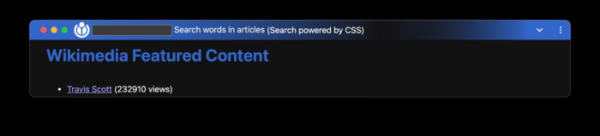
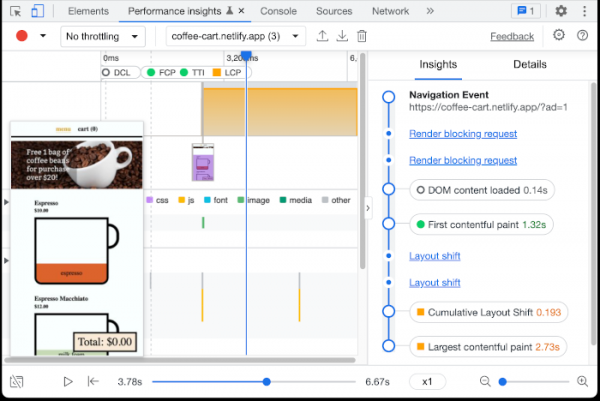
- Improvements have been made to the developer tools. The Styles panel has been enhanced with buttons to simulate applying dark and light themes. The protection for the Preview tab in network inspection mode has been strengthened (Content Security Policy application is now enforced). The debugger now features the ability to terminate script execution to reload breakpoints. A preliminary implementation of a new 'Performance insights' panel has been introduced, allowing the analysis of performance for specific operations on the page.

In addition to new features and bug fixes, the new version addresses 32 vulnerabilities. Many of these vulnerabilities were identified through automated testing using tools such as AddressSanitizer, MemorySanitizer, Control Flow Integrity, LibFuzzer, and AFL. One issue (CVE-2022-1853) has been assigned a critical severity level, indicating the potential to bypass all browser security layers and execute code on the system outside the sandbox environment. Details on this vulnerability have not been disclosed; it is only known that it is triggered by accessing a freed memory block (use-after-free) in the Indexed DB API implementation.
As part of the monetary reward program for identifying vulnerabilities in the current release, Google has paid out 24 bounties totaling $65,600 (one bounty of $10,000, one bounty of $7,500, two bounties of $7,000, three bounties of $5,000, four bounties of $3,000, two bounties of $2,000, two bounties of $1,000, and two bounties of $500). The amount for 7 rewards has yet to be determined.
Source: opennet.ru
