

The release of Chrome OS 103, based on the Linux kernel, the upstart system manager, the ebuild/portage build toolchain, open components, and the Chrome 103 web browser, is now available. The user environment of Chrome OS is limited to the web browser, with web applications replacing standard programs. However, Chrome OS includes a fully functional multi-window interface, desktop, and taskbar. The Chrome OS 103 build is available for most current Chromebook models. The source code is distributed under the Apache 2.0 license. Furthermore, testing continues for Chrome OS Flex, an edition of Chrome OS designed for use on regular computers. Enthusiasts are also creating unofficial builds for standard computers with x86, x86_64, and ARM processors.
Key changes in Chrome OS 103:
- A new Screencast app has been included, allowing users to record and view videos reflecting their screen content. The created videos can be used to demonstrate work done, illustrate ideas that arise, or prepare training materials. Recorded actions can be accompanied by voice explanations, which are automatically converted to text for easier searching and navigation. The program also provides tools for cropping recorded material, uploading to Google Drive, and sharing with other users.

- A fast Bluetooth pairing mode has been implemented, available for devices that support the Fast Pair mechanism, such as Pixel Buds headphones. Devices with Fast Pair support are automatically recognized and can be connected with the push of a button in a pop-up notification, without needing to go into settings. Devices can also be linked to a Google account to simplify use across different Chrome OS and Android devices.
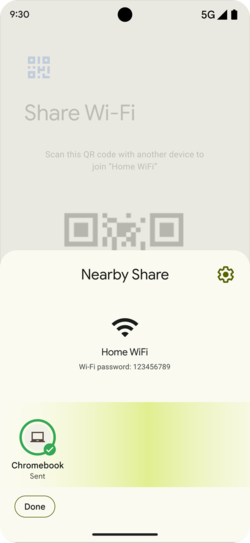
- The Nearby Share feature, which allows for quick and secure file sharing between nearby devices, now includes the ability to send Wi-Fi credentials from Android devices to Chrome OS devices. Once the user accepts the sent data, the device automatically uses the received credentials to connect to Wi-Fi.

- The capabilities of Phone Hub, the smartphone management center, have been expanded, allowing Chromebook users to perform typical actions with an Android-based smartphone, such as viewing incoming messages and notifications, monitoring battery level, accessing hotspot settings, and locating the smartphone. The new version provides access to a list of recently taken photos on the smartphone, which can be used in various Chrome OS applications without prior manual uploading.
- The application launcher now supports searching for device shortcuts and open tabs in the browser.
- Settings related to browser and system data synchronization have been separated. Thus, in the system settings, options such as bookmark and tab synchronization are no longer displayed, while browser settings do not mention app and desktop wallpaper synchronization.
Source: opennet.ru
