

After 8 months of development, a significant release of the specialized browser Tor Browser 11.5 has been introduced, continuing the functionality development based on the Firefox 91 ESR branch. The browser focuses on ensuring anonymity, security, and privacy, as all traffic is redirected solely through the Tor network. Direct access through the current system's standard network connection is impossible, which prevents tracking the user's real IP (in case the browser is compromised, attackers may access system network parameters, so to completely block potential leaks, products like Whonix should be used). Tor Browser builds are prepared for Linux, Windows, and macOS.
To provide additional protection, Tor Browser includes the HTTPS Everywhere extension, allowing encryption of traffic on all sites where possible. To mitigate threats from JavaScript-based attacks and to block plugins by default, the NoScript extension is included. To combat traffic blocking and inspection, fteproxy and obfs4proxy are utilized.
For establishing an encrypted communication channel in environments that block any traffic except HTTP, alternative transports are offered, which, for example, allow circumventing attempts to block Tor in China. To protect against tracking user movement and isolating specific characteristics of individual visitors, APIs such as WebGL, WebGL2, WebAudio, Social, SpeechSynthesis, Touch, AudioContext, HTMLMediaElement, Mediastream, Canvas, SharedWorker, WebAudio, Permissions, MediaDevices.enumerateDevices, and screen.orientation are disabled or limited, as well as telemetry submission tools, Pocket, Reader View, HTTP Alternative-Services, MozTCPSocket, "link rel=preconnect", modified libmdns.
In the new version:
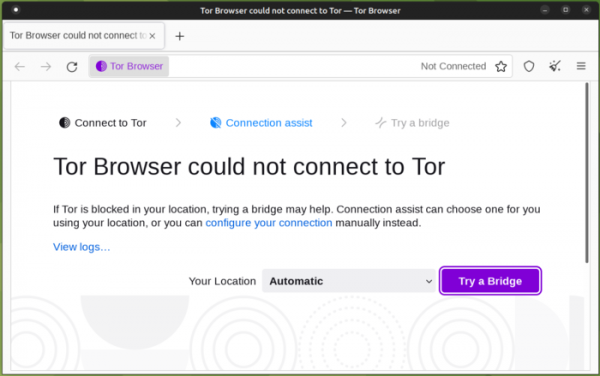
- A Connection Assist interface has been added to automate the configuration for bypassing access blocks to the Tor network. Previously, in the case of traffic censorship, users had to manually obtain and activate bridge nodes in the settings. In the new version, the bypass is set up automatically, without manual changes to the settings — connection issues take into account the specifics of blocking in different countries and select the optimal method to bypass them. Depending on the user's location, a settings package prepared for their country is downloaded, an alternative transport is selected, and a connection through bridge nodes is established.
The moat toolkit is used to download the list of bridge nodes, employing a technique called 'domain fronting', which involves making HTTPS requests with a fictitious host in the SNI and actually transmitting the requested host's name in the HTTP Host header during the TLS session (for example, content delivery networks can be used to bypass blocks).

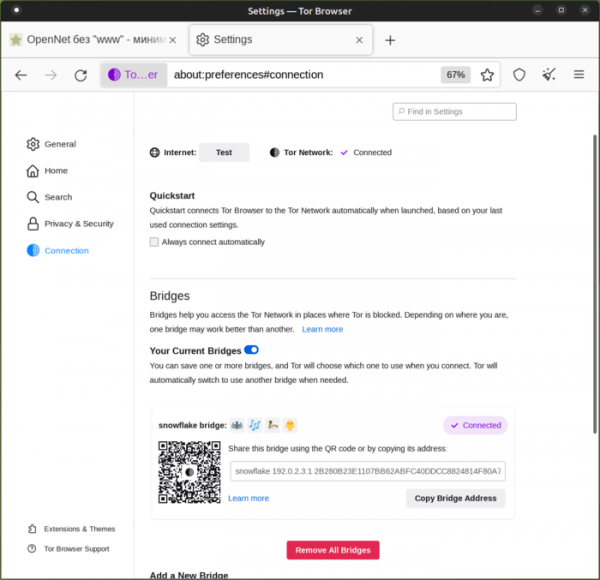
- The design of the Tor network settings configurator section has been changed. The changes aim to simplify the manual configuration of bypassing blocks in the configurator, which may be necessary in case of problems with automatic connection. The Tor settings section has been renamed to 'Connection settings'. At the top of the settings tab, the current connection status is displayed along with a button to check the functionality of the direct connection (not via Tor), allowing users to diagnose the source of connection issues.

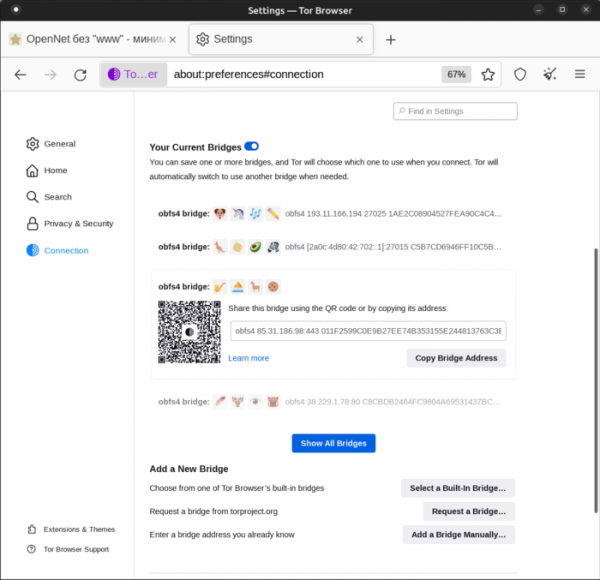
The design of the information cards containing data about bridge nodes has been modified, allowing users to save working bridges and share them with other users. In addition to buttons for copying and sending the bridge node card, a QR code has been added, which can be scanned in the Tor Browser version for Android.

When multiple saved cards exist, they are grouped into a compact list, with items expanding when clicked. The used bridge is marked with a '✔ Connected' icon. To visually differentiate bridge parameters, 'emoji' images are employed. The long list of fields and options for bridge nodes has been removed, and the available methods for adding a new bridge have been moved to a separate block.
- Included in the main set is documentation from the website tb-manual.torproject.org, which has links from the configurator. Thus, in case of connection issues, the documentation is now available offline. The documentation can also be accessed through the menu 'Application Menu > Help > Tor Browser Manual' and the service page 'about:manual'.
- By default, HTTPS-Only mode is enabled, in which all requests made without encryption are automatically redirected to secure versions of pages ('http://' is replaced with 'https://'). The HTTPS-Everywhere add-on, previously used for redirecting to HTTPS, has been removed from the desktop version of Tor Browser but remains in the version for Android.
- Improved font support. To protect against system identification via the enumeration of available fonts, Tor Browser comes with a fixed set of fonts, blocking access to system fonts. This restriction has led to display issues on some websites using system fonts not included in the built-in Tor Browser font set. To resolve this issue, the built-in font set has been expanded in the new release, particularly adding fonts from the Noto family.

Source: opennet.ru
