

A problem has been identified in the Chrome browser regarding the transmission of sensitive data to Google servers when the enhanced spell check mode is activated, which involves using an external service for the check. This issue also occurs in the Edge browser when using the Microsoft Editor extension.
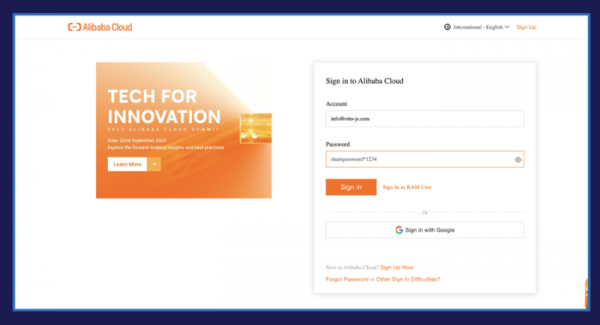
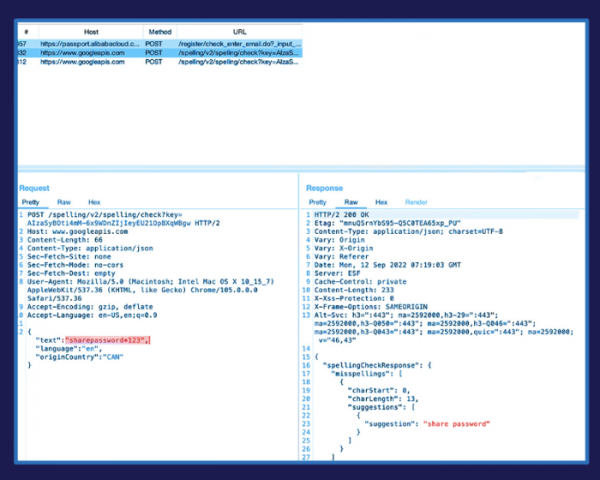
It turns out that the text for checking is transmitted from input forms that contain sensitive information, including fields with usernames, addresses, email, passport details, and even passwords, particularly if the password input fields are not restricted by the standard tag "". For example, this issue leads to the transmission to server www.googleapis.com of passwords when the option to show the entered password is enabled, as implemented in Google Cloud services (Secret Manager), AWS (Secrets Manager), Facebook, Office 365, Alibaba Cloud, and LastPass. Out of 30 tested well-known websites, including social networks, banks, cloud platforms, and online stores, 29 were found to be vulnerable to leaks.
In AWS and LastPass, the issue has already been swiftly resolved by adding the parameter "spellcheck=false" to the "input" tag. To prevent data from being sent from the user's side, it is advisable to disable the enhanced checking in the settings (section "Languages/Spell check/Enhanced spell check" or "Языки/Проверка правописания/Расширенная проверка"; by default, enhanced checking is disabled).
Source: opennet.ru
