

After six months of development, the GNOME 43 desktop environment is now available. For a quick overview of GNOME 43's capabilities, specialized Live builds based on openSUSE and an installation image prepared under the GNOME OS initiative are offered. GNOME 43 is also included in the experimental build of Fedora 37.
In the new release:
- The system status menu has been redesigned to include a block of buttons for quickly adjusting the most frequently used settings and assessing their current state. Among other new features in the status menu is the addition of a user interface style setting (switching between dark and light themes), a new button for taking screenshots, the ability to select an audio device, and a button for connecting via VPN. Otherwise, the new system status menu retains all previously available functions, including the activation of access points via Wi-Fi, Bluetooth, and USB.
- The transition of applications to use GTK 4 and the libadwaita library, which offers ready-made widgets and objects for building applications that comply with the new GNOME HIG (Human Interface Guidelines) and can adaptively adjust to screens of any size, has continued. In GNOME 43, applications such as the file manager, Maps, log viewer, Builder, terminal, initial setup wizard, and parental control interface have been transitioned to libadwaita.
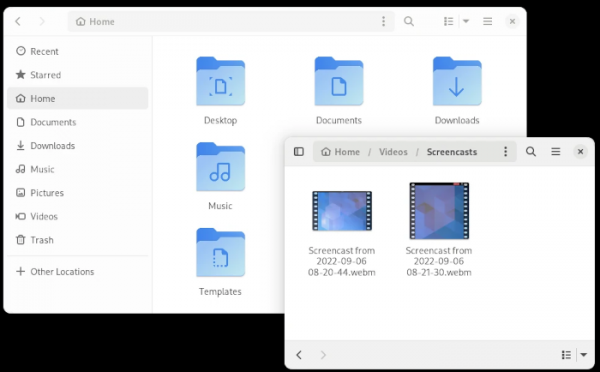
- The Nautilus file manager has been updated and transitioned to the GTK 4 library. An adaptive interface has been implemented that changes the layout of widgets based on the width of the window. The menu has been reorganized. The design of the windows showing file and folder properties has been changed, and a button to open the parent directory has been added. The layout of the list with search results, recently opened files, and bookmarked files has also been modified, and the indication of the location of each file has been improved. A new 'Open With' dialog has been proposed, simplifying the selection of programs for different file types. In list view mode, accessing the context menu for the current directory has been simplified.

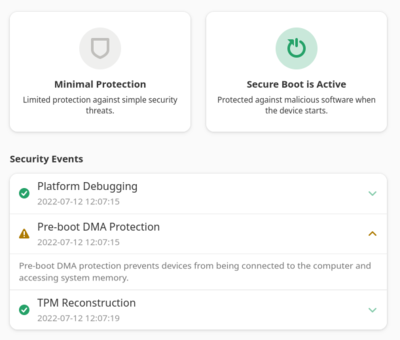
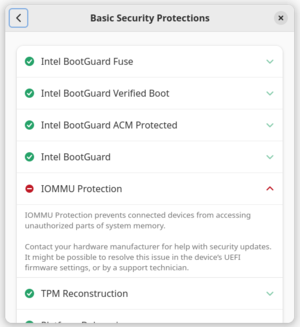
- A new 'Device Security' page has been added to the configurator, featuring hardware and firmware security parameters. This page can be used to identify various hardware issues, including incorrect hardware configurations. It displays information about UEFI Secure Boot activation, TPM status, Intel BootGuard, and IOMMU protection mechanisms, as well as details about security issues and activities indicating potential malware presence.


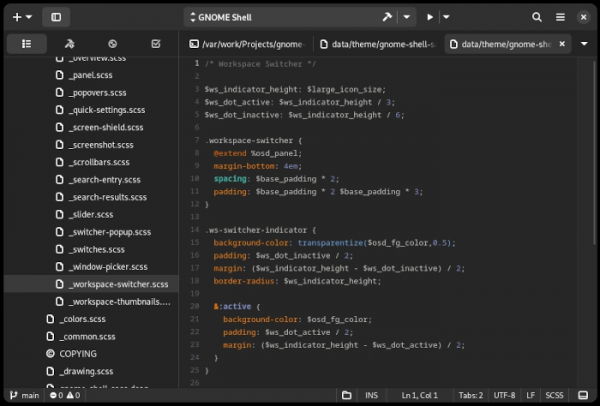
- The integrated development environment Builder has been revamped and migrated to GTK 4. The interface now includes support for tabs and a status bar, as well as the ability to rearrange panels. A new command editor has been added, and support for the Language Server Protocol (LSP) has been rewritten. The number of modes for running applications has been increased (for example, internationalization settings have been added). New options for detecting memory leaks have been introduced, and profiling tools for applications in Flatpak format have been expanded.

- The calendar-scheduler interface has been updated with a new sidebar for navigating the calendar and showcasing upcoming events. A new color palette has been applied to highlight elements in the event grid.
- The address book now supports importing and exporting contacts in vCard format.
- The GNOME Calls interface has been enhanced with support for encrypted VoIP calls and the ability to send SMS from the call history page. Startup time has been reduced.
- The GNOME Web (Epiphany) browser has added support for extensions in the WebExtension format. Refactoring has been conducted for further migration to GTK 4. Support for the ‘view-source:’ URI scheme has been introduced. The reader mode has been improved, and a context menu option for creating screenshots has been added. Settings now include an option to disable search suggestions in web application mode. The style of interface elements on web pages has been aligned with modern GNOME application elements.
- Support for standalone web applications in PWA (Progressive Web Apps) format has been restored, and a D-Bus provider for such programs has been implemented. A button has been added to the Epiphany browser menu to install a site as a web application. In overview mode, support for launching web applications in a separate window has been added, similar to regular programs.
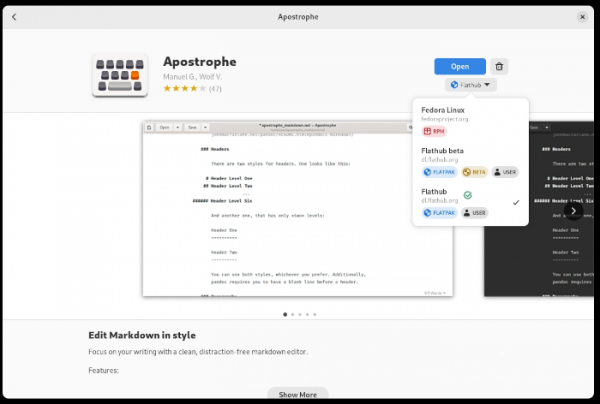
- The GNOME Software application manager now includes a collection of web applications that can be installed and uninstalled like regular programs. The interface for selecting installation sources and formats has been improved in the applications list.

- The on-screen keyboard now shows suggestions for input completion as you type. When typing in the terminal, the Ctrl, Alt, and Tab keys are displayed.
- The character map (GNOME Characters) has expanded its emoji selection, including images of people with different skin tones, hairstyles, and genders.
- Animated effects have been optimized in overview mode.
- The 'about' windows in GNOME applications have been redesigned.
- The dark style of GTK 4-based applications has been refined for a more harmonious appearance of panels and lists.
- When connecting to a remote desktop via the RDP protocol, support for receiving audio from an external host has been added.
- Warning sounds have been updated.
Source: opennet.ru
