

The release of the Firefox 106 web browser has taken place. Additionally, an update to the long-term support branch—102.4.0—has been formed. The Firefox 107 branch has reached beta testing, with a release scheduled for November 15.
Key innovations in Firefox 106:
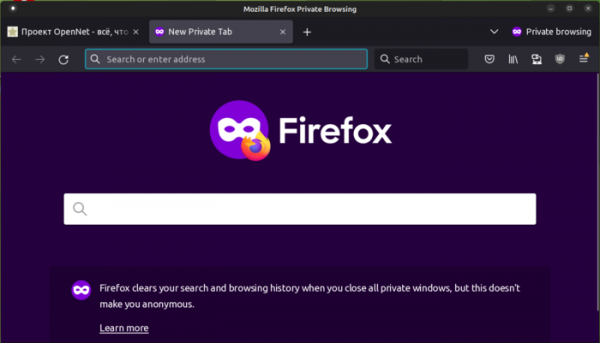
- The design of the private browsing window has been reworked to make it harder to confuse with the regular mode. The private mode window now displays a dark panel background, and in addition to a special icon, there is a clear textual explanation.

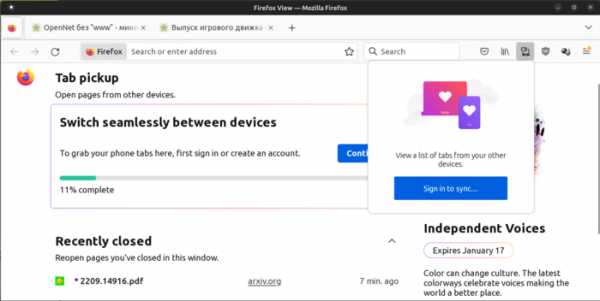
- A 'Firefox View' button has been added to the tab panel, simplifying access to previously viewed content. When clicked, the button opens a service page with a list of recently closed tabs and an interface for viewing tabs on other devices. To facilitate access to tabs on other devices, a separate button has been placed next to the address bar.

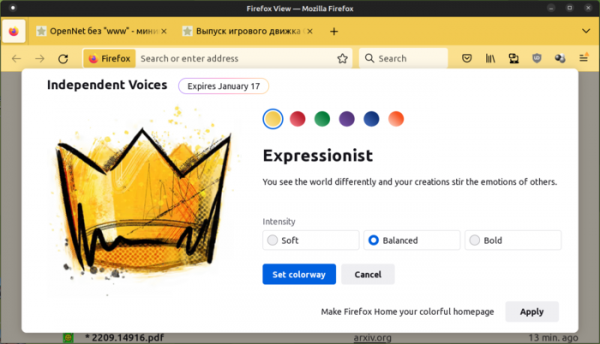
- The Firefox View page also provides the ability to change the browser's appearance using the built-in Colorways extension, which offers an interface for selecting six color themes, each with three shade options that influence the tone selection for the content area, panels, and tab switcher. The color themes will be available until January 17.

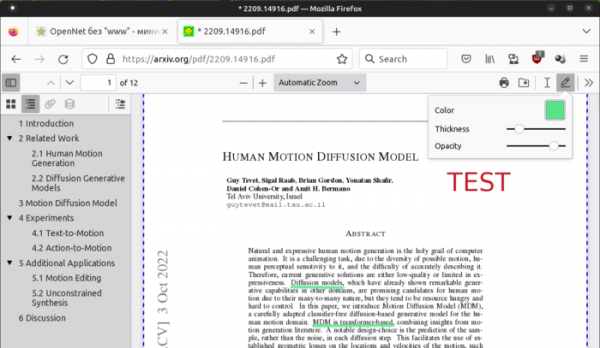
- In the built-in PDF document viewer, the editing mode is enabled by default, providing tools for drawing graphic markings (hand-drawn line sketches) and attaching text comments. It is possible to customize the color, line thickness, and font size.

- For Linux systems with user environments based on the Wayland protocol, support for a control gesture has been implemented, allowing users to navigate back and forth through browsing history by sliding two fingers left or right on the touchpad.
- Support for text recognition in images has been added, allowing users to extract text from images on web pages and place the recognized text in the clipboard or have it read aloud for visually impaired individuals using speech synthesizers. Recognition is initiated by selecting 'Copy Text from Image' from the context menu displayed when right-clicking on an image. This feature is currently available only on systems with macOS 10.15+ (using the system API VNRecognizeTextRequestRevision2).
- Windows 10 and Windows 11 users now have the option to pin private browsing windows to the taskbar.
- On the Windows platform, users can now set Firefox as the default program for viewing PDF documents.
- Significantly improved support for WebRTC (libwebrtc library upgraded from version 86 to 103), including enhanced RTP performance, expanded available statistics, reduced CPU load, improved compatibility with various services, and better screen sharing capabilities in Wayland-based environments.
- In the Android version, synchronized tabs are now shown on the homepage, new background images have been added to the Independent Voices collection, and several crashes have been fixed, such as those occurring when selecting time in web forms or when opening around 30 tabs.
In Firefox 106, in addition to new features and bug fixes, eight vulnerabilities have been addressed, including two categorized as critical: CVE-2022-42927 (bypassing same-origin restrictions that allow access to redirect results) and CVE-2022-42928 (memory corruption in the JavaScript engine). Three vulnerabilities, CVE-2022-42932, which are considered moderately dangerous, stem from memory handling issues like buffer overflows and accessing already freed memory areas. These issues could potentially lead to the execution of malicious code when visiting specially crafted pages.
Source: opennet.ru
