

Google has released version 107 of the Chrome web browser. At the same time, a stable release of the open-source project Chromium, which serves as the basis for Chrome, is available. Chrome differs from Chromium by using Google logos, having a crash reporting system, modules for playing DRM-protected video content, an automatic update installation system, and always-on Sandbox isolation, provision of keys to the Google API, and transmission of RLZ parameters during searches. For those who need more time for updates, a separate Extended Stable branch is supported, accompanied by 8 weeks. The next release of Chrome 108 is scheduled for November 29.
Key changes in Chrome 107:
- Support for the ECH (Encrypted Client Hello) mechanism has been added, which continues the development of ESNI (Encrypted Server Name Indication) and is used for encrypting information about TLS session parameters, such as the requested domain name. The key difference between ECH and ESNI is that ECH encrypts the entire TLS ClientHello message instead of merely encrypting individual fields, effectively preventing leaks through fields not covered by ESNI, like the PSK (Pre-Shared Key) field. ECH also employs the HTTPSSVC DNS record instead of a TXT record to convey public key information and utilizes authenticated end-to-end encryption based on the HPKE (Hybrid Public Key Encryption) mechanism for key acquisition and encryption. A setting 'chrome://flags#encrypted-client-hello' has been proposed for controlling ECH's activation.
- Hardware acceleration for H.265 (HEVC) video decoding has been enabled.
- The fifth stage of user information trimming in the HTTP User-Agent header and JavaScript parameters navigator.userAgent, navigator.appVersion, and navigator.platform has been activated, aimed at reducing the information that can be used for passive user identification. In Chrome 107, the User-Agent string has reduced platform and processor information for desktop users, and the content of the navigator.platform JavaScript parameter has been frozen. This change is noticeable only in Windows platform versions, where the specific platform version is replaced with 'Windows NT 10.0'. In Linux, the platform content in User-Agent remains unchanged.
Previously, the version components of the browser numbers MINOR.BUILD.PATCH have been replaced with 0.0.0. In the future, the header will only include information about the browser name, significant browser version, platform, and device type (mobile phone, PC, tablet). To obtain additional data such as the exact version and advanced platform data, you need to use the User Agent Client Hints API. For websites that find the new information insufficient and are not yet ready to transition to User Agent Client Hints, the option to return the full User-Agent will be available until May 2023.
- Support for the Android 6.0 platform has been discontinued in the Android version; the browser now requires at least Android 7.0 to operate.
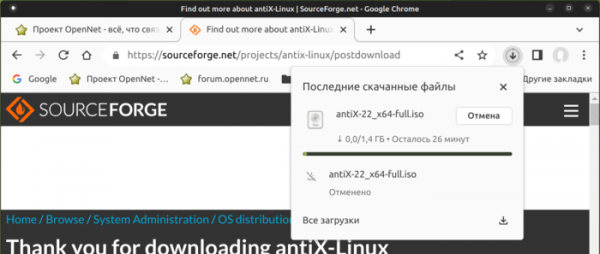
- The interface for tracking download status has been revamped. Instead of the bottom bar with download progress data, a new indicator has been added to the address bar, which, when clicked, shows the download progress of files and a history list of already downloaded files. Unlike the bottom panel, the button is constantly displayed on the toolbar and allows quick access to the download history. This new interface is currently offered by default only to a portion of users and will be rolled out to everyone if there are no issues.

- Desktop users are now able to import passwords saved in a CSV file. Previously, passwords could only be transferred from a file to the browser via the service passwords.google.com, but now this can also be done through the built-in password manager (Google Password Manager).
- After a user creates a new profile, a prompt will appear offering to enable synchronization and access settings to change the profile name and select a color theme.
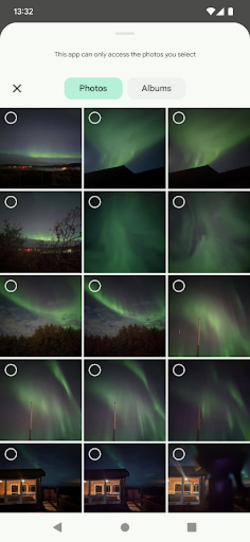
- In the Android platform version, a new interface for selecting multimedia files for uploading photos and videos has been proposed (replacing its own implementation with the standard Android Media Picker interface).

- Automatic revocation of notification permissions for sites identified as sending disruptive notifications and messages has been implemented. Furthermore, for such sites, the request for notification sending permissions has been suspended.
- The Screen Capture API has added new properties related to screen sharing — selfBrowserSurface (which allows excluding the current tab when calling getDisplayMedia()), surfaceSwitching (which allows hiding the tab switching button), and displaySurface (which enables limiting the shared access to a tab, window, or screen).
- The Performance API has added the renderBlockingStatus property to identify resources that are causing the page rendering to be paused until they are fully loaded.
- Several new APIs have been added in Origin Trials (experimental features that require separate activation). Origin Trials allow the specified API to be used from applications loaded from localhost or 127.0.0.1, or after registration and obtaining a special token, which is valid for a limited time for a specific site.
- The declarative PendingBeacon API, which manages the sending of server data that do not require a response (beacon). The new API allows delegating such data sending to the browser, eliminating the need to call sending operations at specific times, for example, to organize telemetry transmission after the user has closed the page.
- The Permissions-Policy (Feature Policy) HTTP header, used for delegating permissions and enabling extended capabilities, has added support for the 'unload' value, which can disable 'unload' event handlers on the page.
- The <form> tag has added support for the 'rel' attribute, which allows applying 'rel=noreferrer' to navigation through web forms to disable the transmission of the Referer header, or 'rel=noopener' to prevent setting the Window.opener property and restrict access to the context from which the navigation was performed.
- CSS Grid has added support for interpolating grid-template-columns and grid-template-rows properties to facilitate smooth transitions between different grid states.
- Improvements have been made to the web developer tools. Hotkey customization has been introduced. Memory inspection of C/C++ application objects transformed into WebAssembly format has been enhanced.
In addition to new features and bug fixes, the latest version addresses 14 vulnerabilities. Many of these vulnerabilities were discovered through automated testing tools such as AddressSanitizer, MemorySanitizer, Control Flow Integrity, LibFuzzer, and AFL. No critical issues that would allow bypassing all levels of browser protection and executing code on the system outside of the sandbox environment were found. As part of the bug bounty program for this release, Google has awarded 10 prizes totaling $57,000 (including one prize of $20,000, one of $17,000, one of $7,000, two prizes of $3,000, three prizes of $2,000, and one prize of $1,000). The size of one reward has not yet been determined.
Source: opennet.ru
