

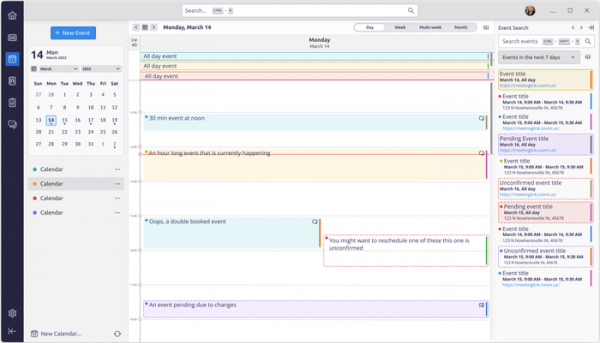
The developers of the Thunderbird email client have introduced a new design for the calendar-scheduler, which will be offered in the next major release of the project. Almost all elements of the calendar have been revamped, including dialogs, pop-up windows, and tips. The design is optimized to improve the visibility of loaded schedules that contain a large number of events. The options for adapting the interface to personal preferences have been expanded.
In the summary view of events for the month, the columns for events on Saturday and Sunday have been narrowed to provide more screen space for events on weekdays. Users can manage this behavior and adjust it to their work schedule by determining which weekdays can be collapsed. Calendar operations that were previously shown in the toolbar are now displayed contextually, and users can customize the panel's composition to their liking.
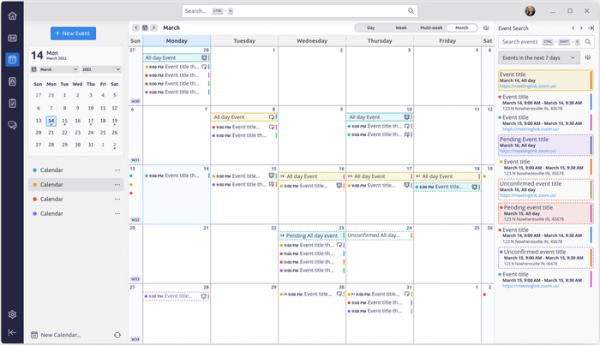
The drop-down menu has added new appearance customization options; for example, in addition to the previously mentioned ability to collapse the columns for weekends, users can completely remove those columns, change colors, and manage event highlighting with colors and icons. The interface for searching events has been moved to the sidebar. A pop-up dialog has been added for selecting the type of information (title, date, location) displayed for each event.
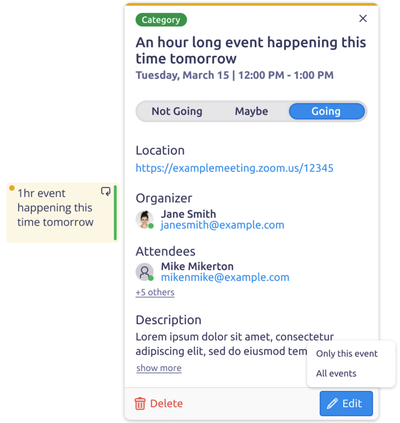
The interface design for viewing detailed event information has been redesigned. Important information such as details about the location, organizer, and participants is now more prominent. It is possible to sort event participants by RSVP status. A single click on an event will take you to the detailed information screen, while a double click will open the editing mode.
Among significant changes unrelated to the calendar in the upcoming release is the addition of support for the Firefox Sync service to synchronize settings and data across multiple instances of Thunderbird installed on different user devices. Users will be able to synchronize IMAP/POP3/SMTP account settings, options. server, filters, calendars, address book, and list of installed add-ons.
Source: opennet.ru
