

The release of Zulip 7 has been announced, a server platform for deploying corporate messengers tailored for facilitating communication among employees and developer teams. The project was originally developed by Zulip and was made open-source after its acquisition by Dropbox under the Apache 2.0 license. The server-side code is written in Python utilizing the Django framework. The client software is available for Linux, Windows, macOS, Android, and iOS, and an integrated web interface is also provided.
The system supports both direct messaging between two individuals and group discussions. Zulip can be compared to the Slack service and can be viewed as an internal corporate equivalent of Twitter, used for communication and discussions on work matters within large employee groups. It provides tools for tracking participation and status across multiple discussions simultaneously, using a threaded message display model, which optimally balances room-specific interactions in Slack with a single public space like Twitter. The simultaneous threaded display of all discussions allows for encompassing all groups in one place while maintaining logical divisions between them.
Among Zulip's features, it also supports sending messages to users in offline mode (messages will be delivered once they come online), preserving the complete history of discussions on server and provides search tools for the archive, the ability to send files via drag-and-drop, automatic syntax highlighting for code blocks sent in messages, a built-in markup language for quick list and text formatting, tools for group notifications, the ability to create private groups, integration with Trac, Nagios, GitHub, Jenkins, Git, Subversion, JIRA, Puppet, RSS, Twitter, and other services, as well as features for attaching visual tags to messages.
Key innovations:
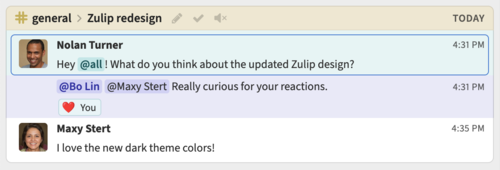
- The visual design has been revamped and modernized. The new design makes more active use of color highlights, utilizes background color for attention-grabbing, clearly highlights personal mentions, group mentions, and current messages, and uses color to differentiate between the headers of various channels (streams).

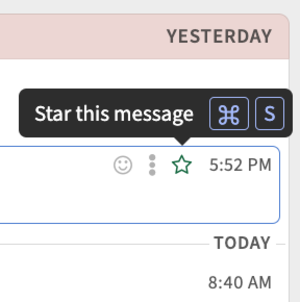
In addition to the time information in the lists, separator lines indicating the days (today, yesterday, etc.) have been added for a clearer understanding of when the message was sent. The pop-up block design in the message composition and editing interface has been improved. The information about keyboard shortcuts is now presented better in the tooltips.

- The ability to schedule messages for a specific time has been added. For example, a message written at night can be delayed until the morning.
- An option to mute channels has been added, disabling notifications for messages. However, for specific topics, notifications can be reinstated, allowing selective tracking of the most interesting topics in the channel.
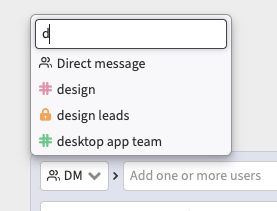
- The process of changing the recipient when editing an unsent message has been simplified. Users can now choose the channel for sending and switch between direct messaging and channel sending without leaving the editing interface.

- Settings have been added for automatically marking messages as read after viewing. For example, automatic marking can be disabled in discussion viewing mode, allowing messages to be marked as read only during separate viewing.
- New keyboard shortcuts have been added: 'z' to increase the detail of the discussion to view individual messages, 's' to go to the discussion where the message was sent, and '=' to react with '👋'.
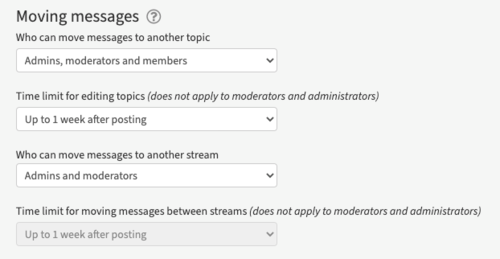
- The interface for setting permissions to move messages has been changed. It is now possible to define who can move messages and for how long, regardless of editing rights.

- In the admin interface, clicking on a username in the settings or subscriber lists opens the user map.
- In the export form, a choice between JSON and CSV formats is provided, as well as filters to exclude specific recipients and messages with attachments during export.
- The term 'Private Messages' is now replaced with 'Messages Sent Directly.'
- A setting has been added that regulates who can see the email provided upon login. For example, supervisors may allow other supervisors to view the email, but it will not be visible to regular participants.
- The number of messages and topics displayed in the sidebar has been expanded.
- Additional confirmation prompts have been added for actions requiring attention, such as marking all messages as read, deleting the last user, and disabling notifications.
- Integration with the Rundeck platform has been ensured. Integration with GitHub has been improved.
- Support for Debian 12 and PostgreSQL 15 has been added.
- Dependencies have been updated, for example, the Django framework has been upgraded to version 4.2.
Source: opennet.ru
