

The release of Qt Creator 12.0, an integrated development environment for creating cross-platform applications using the Qt library, has been announced. It supports both classic C++ program development and the use of QML, where scenarios are defined using JavaScript, and the structure and parameters of interface elements are defined using CSS-like blocks. Ready-made builds are provided for Linux, Windows, and macOS.
In the new version:
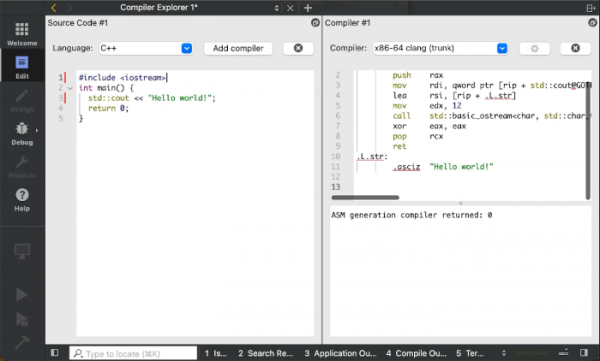
- A Compiler Explorer plugin has been added, allowing real-time tracking of the assembly code generated by the compiler and compiler errors as source texts are entered. The results of the compiled code execution can also be viewed if necessary. Users can select the compiler (GCC, Clang, etc.) and editing environment for different programming languages. The written code can be saved along with the settings in a ‘.qtce’ format file. To activate the plugin, select it in the ‘Help > About Plugins > CompilerExplorer’ window, after which it can be accessed through the ‘Use Tools > Compiler Explorer > Open Compiler Explorer’ menu.

- Support for debugging and profiling CMake build scripts via the DAP (Debug Adapter Protocol), available starting from CMake 3.27, has been added. Operations such as setting breakpoints in CMake files and debugging the configuration process are possible. Debugging can be started via the menu ‘Debug > Start Debugging > Start CMake Debugging’. Additionally, the CMake profiler feature can be accessed through the ‘Analyze > CMake Profiler’ menu.
- A ScreenRecorder plugin (Help > About Plugins > ScreenRecorder) has been added for video recording of the workflow in Qt Creator, which can be useful for creating tutorial articles or attaching visual demonstrations of issues to bug reports.
- Startup time has been significantly reduced on some systems.
- Clangd and Clang analyzer have been updated to LLVM 17.0.1.
- Code refactoring tools for C++ have been improved.
- Buttons for selecting text styles have been added to the Markdown text editor.
- Support has been added for using a proxy to access the GitHub Copilot intelligent assistant, capable of generating standard constructs while coding.
- Project-related settings for file naming with C++ code and documentation through comments have been added.
- The CMake file editor has been improved, significantly enhancing input autocompletion capabilities and adding functions for quick navigation to a specified position, macro, build target, or package definition.
- Automatic detection of PySide settings has been ensured.
Source: opennet.ru
