

Google has released version 124 of the Chrome web browser. Simultaneously, a stable release of the open-source project Chromium, which serves as the basis for Chrome, is available. Chrome differs from Chromium by using Google logos, having a crash-reporting system, modules for playing DRM-protected video content, an automatic update installation system, constant enabling of Sandbox isolation, provision of keys to Google APIs, and transmitting RLZ parameters during searches. For those who need more time to update, an Extended Stable branch is separately maintained, accompanied by 8 weeks of support. The next Chrome release, version 125, is scheduled for May 14.
Key changes in Chrome 124:
- In the Android version, the bookmark manager has added support for saving bookmarks and reading list items linked to the user's Google account. servers In Chrome for Android, a new method of storing local passwords has been implemented, which will not sync with other devices. Previously, local passwords were stored in the Chrome profile, but now they will be housed in the password storage provided by the Google Play services, which is already used for storing the Google account password.
- In builds for Windows, macOS, and Linux, support for the Key Encapsulation Mechanism (KEM) in TLS is enabled by default, utilizing the hybrid algorithm X25519Kyber768, which is resilient to brute-force attacks by quantum computers. X25519Kyber768 is a combination of the X25519 key exchange mechanism, based on elliptic curves and currently used in TLS, with the Kyber-768 algorithm, utilizing cryptographic methods based on solving lattice problems, with solution times that do not differ on classical and quantum computers.
- When rendering text, the Skia library takes into account the contrast and color settings defined in Windows for the ClearType text smoothing technology, which significantly improves font display quality on LCD monitors. The fonts used in the interface for Linux have also changed significantly.
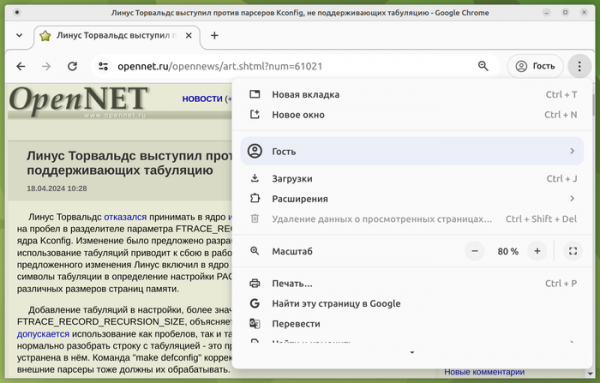
- The ability to install any web page as a standalone PWA app (Progressive Web Apps) has been provided, even if that page does not meet PWA criteria.

- The feature to install any web page as a self-contained PWA application (Progressive Web Apps) is available, even if that page does not meet PWA criteria.
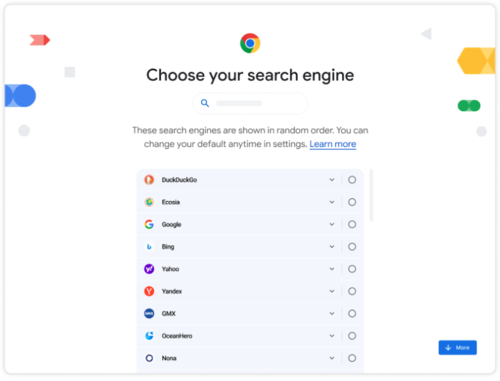
- In accordance with the requirements of the European DMA (Digital Markets Act), a dialog for selecting the default search engine has been implemented. Users can choose from the search engines available in the settings section "chrome://settings/search". The search engines in the list appear in random order. In Chrome 120, this dialog was tested with 1% of users and is now enabled for everyone.

- A permission request has been implemented for users when a web application accesses the Web MIDI API, allowing interaction with connected MIDI musical devices. Previously, permission requests were only displayed during the sending or receiving of SysEx messages; now they will appear for any access to the Web MIDI API. The reason for this change includes situations where random web pages seize exclusive control of a MIDI controller, blocking the ability for other applications to function with it. Security issues are also noted, as the Web MIDI API allows total control over a MIDI device, including uploading custom firmware.
- Full support for the Web SQL API has been discontinued, as it is not standardized, rarely used, and requires revision to meet modern security standards. Web SQL was disabled by default starting from Chrome 119, but there was an option to enable it. This setting has now been removed. Developers who require similar functionality are advised to use a version of the SQLite library compiled to WebAssembly.
- The ability to control the text direction displayed vertically in web form elements (select, meter, progress, button, textarea, and input) has been added when vertical orientation is selected via the CSS property writing-mode. To display text from top to bottom, the form element property "ltr" can be used, while "rtl" can be used for bottom to top.
- In the API User-Agent Client Hints, developed as a replacement for the User-Agent header, support for the Sec-CH-UA-Form-Factors parameter has been added. This allows the client to inform the server about the user's device form factor (Desktop, Automotive, Mobile, XR, EInk, and Watch). User-Agent Client Hints enables selective delivery of data regarding specific browser and system parameters (version, platform, etc.) only upon request. proxy serverThe user, in turn, can determine what information may be shared with website owners. When using User-Agent Client Hints, the browser identifier is not transmitted without explicit request, and by default, only basic parameters are indicated, making passive identification more difficult.
- The ability to manage the cloning of individual roots in the Shadow DOM has been added, accomplished by commands such as cloneNode(). Cloning of root branches in the DOM can be enabled using the clonable parameter (‘attachShadow({clonable:true})’) or the attribute ‘shadowrootclonable’ (<template shadowrootmode=open shadowrootclonable>).

- New methods setHTMLUnsafe() and parseHTMLUnsafe() have been introduced for using the Shadow DOM syntax from JavaScript. The setHTMLUnsafe() and parseHTMLUnsafe() methods, similar to innerHTML and DOMParser.parseFromString(), allow for injecting content into an element or parsing it in HTML format, but differ in their support for handling template elements with the shadowrootmode attribute.
- Support for the WebSocket Stream API has been added, enabling the transfer of data between the browser and server in a streaming mode without polling, which is optimal for the transmission and reception of continuously incoming data, such as in chat implementations. const wss = new WebSocketStream(WSS_URL); const {readable, writable} = await wss.opened; const reader = readable.getReader(); const writer = writable.getWriter(); while (true) { const {value, done} = await reader.read(); if (done) { break; } const result = await process(value); await writer.write(result); }
- The capabilities of the View Transitions API have been expanded, simplifying the creation of transition animation effects between different DOM states (for example, a smooth transition from one image to another). The new version adds support for the ‘pageswap’ event, which is generated for the ‘window’ object when the associated ‘document’ object is replaced with a new one during navigation. It also introduces the ‘render-blocking’ property, allowing the blocking of document rendering until important content parsing is completed.
- A disallowReturnToOpener parameter has been added, passed when calling the requestWindow method, which allows the removal of the ‘back’ button in a window opened in picture-in-picture mode, preventing return to the tab from which the window was opened.
- The ability to assign a NULL value to the CSSImportRule.styleSheet attribute has been added to indicate the absence of a linked stylesheet. A CSSKeyframesRule.length attribute has been added, which indicates the number of indexed properties.
- For editable fields, a 'writingsuggestions' attribute has been implemented to manage the display of suggestions during input.
- Support for ServiceWorker and SharedWorker has been added to the WebGPU API.
- Support for the HTTP header 'Priority' has been added, which allows the transmission of information about the priority of request processing (RFC 9218) during the first access to a resource.
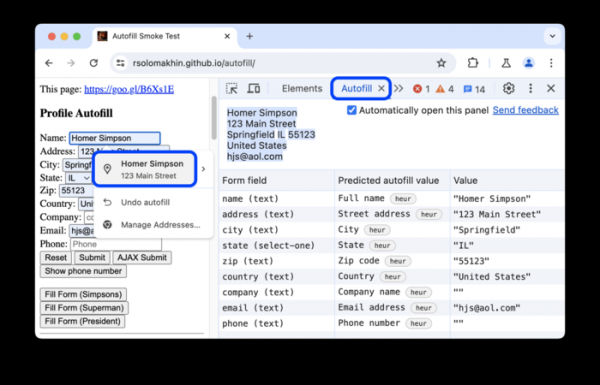
- Improvements have been made to the developer tools. A new Autofill panel has been added to inspect information used in auto-filling forms.

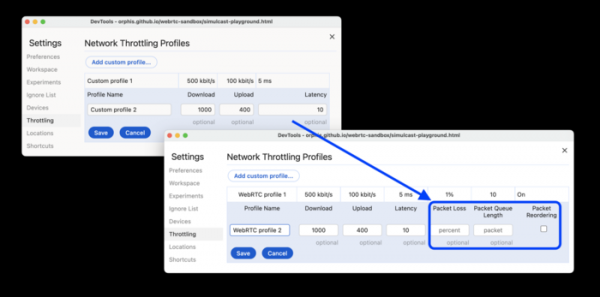
The CSS styles inspection panel has improved support for nested styles. In the performance measurement panel, the ability to hide unnecessary functions and their related child calls has been provided to reduce noise on the graph. Support for scroll-driven animation has been added to the animation debugging panel. In the network inspection panel, the ability to set packet loss parameters and network queue size has been implemented to test the performance of WebRTC applications under network issues.


In addition to new features and bug fixes, the latest version resolves 22 vulnerabilities. Many of the vulnerabilities were identified through automated testing tools such as AddressSanitizer, MemorySanitizer, Control Flow Integrity, LibFuzzer, and AFL. No critical issues have been found that would allow bypassing all browser security levels and executing code in the system outside the sandbox environment. As part of the vulnerability reward program for the current release, Google has paid out 13 rewards totaling $65,000 (one reward of $20,000, one of $10,000, one of $7,000, and one of $2,000; three rewards of $5,000 and $3,000; two rewards of $1,000). The amount of one reward has not yet been determined.
Source: opennet.ru
