

After 8 months of development, a significant release of the specialized Tor Browser 13.5 has been presented, continuing the functionality development based on the ESR branch of Firefox 115. The browser focuses on ensuring anonymity, security, and privacy, with all traffic routed solely through the Tor network. Direct access via the current system's network connection is impossible, preventing tracking of the user's real IP address (in case of a browser hack, attackers may gain access to system network parameters; therefore, to fully block potential leaks, products like Whonix should be used). Tor Browser builds are available for Linux, Android, Windows, and macOS.
To ensure additional protection, Tor Browser features the 'HTTPS Only' setting, which allows traffic encryption on all sites where possible. To reduce the threat from JavaScript-based attacks, the NoScript add-on is included by default, blocking plugins. To combat traffic blocking and inspection, fteproxy and obfs4proxy are employed. Alternative transports are offered for establishing an encrypted communication channel in environments that block any traffic except HTTP.
To prevent tracking of user movement and to limit the identification of visitor-specific characteristics, APIs such as WebGL, WebGL2, WebAudio, Social, SpeechSynthesis, Touch, AudioContext, HTMLMediaElement, Mediastream, Canvas, SharedWorker, WebAudio, Permissions, MediaDevices.enumerateDevices, and screen.orientation have been disabled or restricted, as well as telemetry sending tools, Pocket, Reader View, HTTP Alternative-Services, MozTCPSocket, 'link rel=preconnect', and libmdns has been modified.
In the new version:
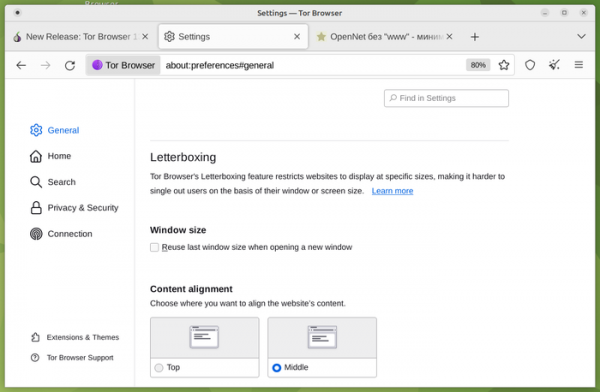
- The 'letterboxing' mechanism has been upgraded, adding padding around web page content to prevent leaking information about screen sizes and open windows. The appearance of a gray border around the content was perceived by some users as a site rendering issue or a browser error. To make the empty space around the page look like an intentional change rather than a content display problem, a thin rounded border has been added in the new version. When double-clicking the border, the size of the Tor Browser window now automatically adapts to the selected 'letterboxing' size, completely hiding the border.

A separate section has been added to the configurator for adjusting 'letterboxing' parameters, such as retaining the previous size when opening a new window and centering the content or aligning it to the top edge.

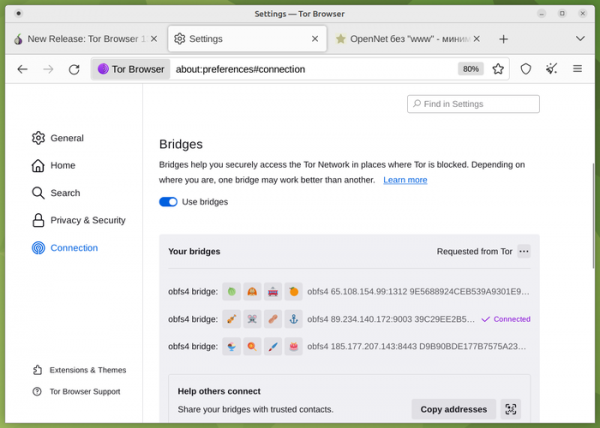
- The bridge node settings interface has improved the search for working bridge nodes and simplified the management of multiple bridge nodes at once. The design of the information cards containing bridge node data has been modified, allowing users to save working bridges and share them with others. Instead of displaying the cards as a stack, the new version features a compact list that organizes the cards by their source of addition (built-in, user-added manually, or requested from Tor).
When using three or fewer bridge nodes, it is now possible to share them all at once with other users via QR code, without needing to provide information about each node separately. A new section "Find more bridges" has been added, listing additional ways to obtain information about bridge nodes, such as a Telegram channel, a separate website, and email requests.

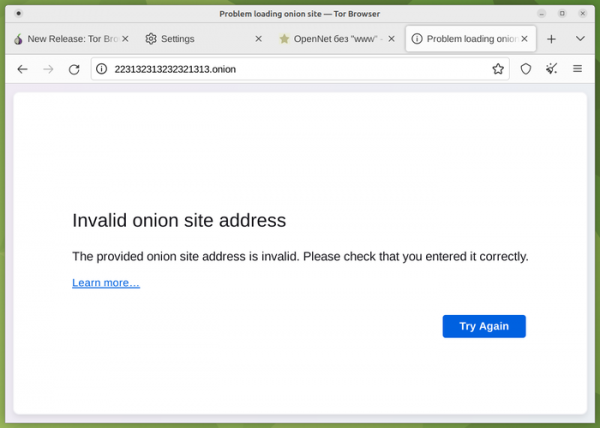
- Error messages encountered while working with onion sites have been simplified, for example, addressing typos in the address or network failures. Pages with such errors for onion sites have been styled similarly to error messages for regular websites.
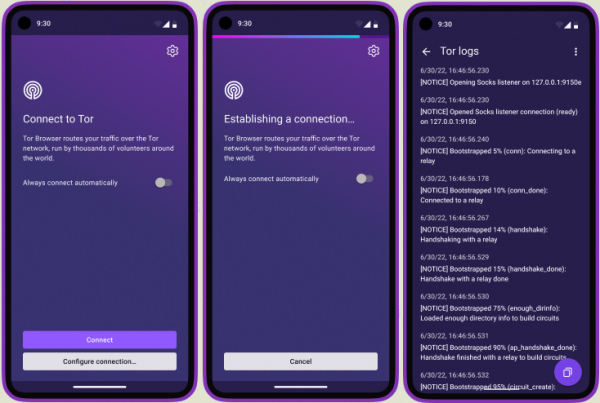
- In the Android version, the interface displayed during the connection to the Tor network has been completely overhauled to resemble the Tor Browser interface for desktops. A button has been added to allow full access to the settings before completing the connection to Tor. It is noted that this interface change marks the first step towards the future implementation of the Connection Assist component in the Android version, which automates the search and selection of bridge nodes and alternative transportation in situations where a direct connection cannot be established.
- In the Android version, the tools for viewing the operation log have been expanded, reflecting the activity when connecting to Tor, as well as errors or warnings that occur during interaction with the network. The information added to the log does not contain confidential data, such as visited websites, but can be useful for diagnosing problems. Previously, the log could only be viewed until the connection was established by performing a rightward swipe gesture on the screen, but now it can also be accessed during operation from the connection settings section. Additionally, a button has been added in the log viewing interface to copy the content to the clipboard.

Source: opennet.ru
