

Google has released version 127 of the Chrome web browser. At the same time, a stable release of the open-source project Chromium, which forms the basis of Chrome, is available. Chrome differs from Chromium in its use of Google logos, the presence of a crash reporting system, modules for playing protected content (DRM), an automatic update installation system, constant activation of sandbox isolation, provision of keys for Google APIs, and the transmission of RLZ parameters during searches. For those who need more time to update, an Extended Stable branch is separately supported for 8 weeks. The next release, Chrome 128, is scheduled for August 20.
Key changes in Chrome 127:
- In incognito mode, the 'HTTPS-First' feature is enabled by default, which automatically redirects HTTP requests to HTTPS. To ensure compatibility with websites that do not support HTTPS, a fallback to HTTP is implemented if a request fails after attempting HTTPS or if there are issues with certificates. A special warning is displayed when trying to open a site via HTTP.
- It has been decided to stop trusting the certification authority Entrust in the built-in root certificate store (Chrome Root Store) due to numerous violations of certification authority requirements, failure to respond within set timeframes to problematic certificates, delays in certificate revocation, improper reporting of incidents, and non-compliance with rules regarding the issuance of for TLS certificates EV (Extended Validation) certificates, which require domain ownership document verification and confirmation of resource ownership. Due to the lack of action to rectify identified deficiencies, TLS certificates issued by Entrust after October 31, 2024, will be perceived as untrustworthy in Chrome. Certificates issued before October 31 will continue to be recognized as normal.
- The process of gradually phasing out support for the second version of the Chrome manifest, which defines the capabilities and resources available for extensions written using the WebExtensions API, has begun. The disabling of extensions using the second version of the manifest currently affects only a portion of users on Chrome test builds (not releases). The complete migration to the third version of the manifest is planned to be finished by June 2025.
- When enhanced browser protection (Safe Browsing > Enhanced protection) is enabled, additional telemetry data regarding visited pages is sent to servers Google, along with information about the pages visited if those pages use APIs to initiate vibration (Vibration) or full control over the mouse (PointerLock) and keyboard (Keyboard). If the opened page is on the blacklist, a corresponding warning will be displayed to the user and the actions associated with the marked APIs will be disabled.
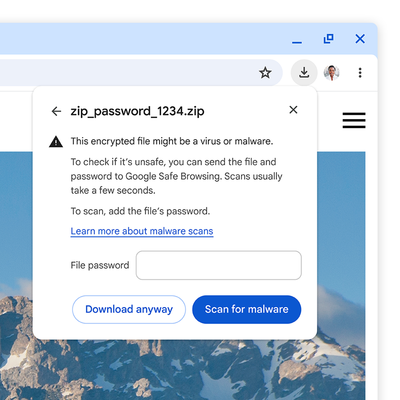
- The results of upgrading the file upload checking process in enhanced browser protection mode (Safe Browsing > Enhanced protection) have been summarized, during which executable files and suspicious archives are sent to Google servers for verification for viruses and malware. For checking the security of uploaded encrypted archives (.zip, .7z, and .rar), the browser will prompt the user for a password to decrypt the archive. The user can choose to skip the check or enter the password, after which the browser will send the file with the password for verification to Google servers. In standard (non-enhanced) Safe Browsing mode, a password prompt will also be presented, but instead of sending the contents of the archive to Google servers for verification, only metadata and hashes of the files contained in the archive will be sent. More prominent warnings for downloading dangerous files have been implemented, which will appear not in the lower panel but under the upper panel.

- An initial implementation of the Private Network Access specification has been proposed, limiting the ability to load resources from publicly accessible sites that reference hosts on the internal network (127.0.0.0/8, 192.168.0.0/16, 10.0.0.0/8, etc.). Loading such resources is now permitted only when the page is opened in a secure context (over HTTPS). In the future, it is planned to completely restrict uncontrolled access to internal intranet subnets from pages opened from public sites, as such requests are used by attackers to conduct CSRF attacks on routers, access points, printers, corporate web interfaces, and other devices and services that accept requests only from the local network. Experiments with blocking were started back in 2022 in Chrome 98, but due to identified vulnerabilities, the blocking implementation was postponed.
- An experimental block on accessing IP 0.0.0.0 has been implemented in 'Origin trials', as this IP can be used to bypass the block on accessing IP 127.0.0.1 (localhost) on Linux and macOS platforms.
- The Android version has simplified the interface for linking to a Google account and synchronizing data such as saved passwords and bookmarks. Synchronization is now integrated with account sign-in and is not presented as a separate option in the settings.
- The password management interface has been updated in the Android version. Users who have signed in to their Google account but have not activated synchronization are now given the option to save and use passwords linked to their Google account.
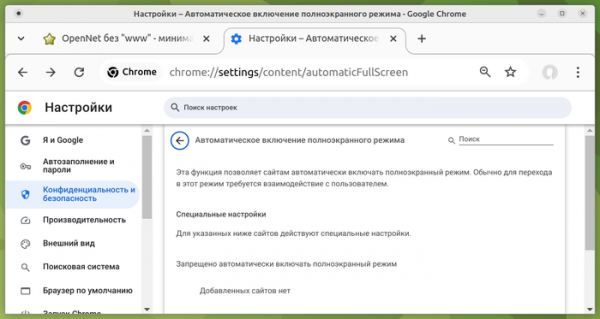
- A setting for "Automatic Fullscreen" (Automatic Fullscreen, chrome://settings/content/automaticFullScreen) has been added, allowing websites to automatically enter fullscreen mode using the Element.requestFullscreen() method without user confirmation. It also enables browser dialogs to be displayed without exiting fullscreen mode. This setting is disabled by default and can be activated for specific websites and web applications. In combination with the Window Management API and popup notification settings (chrome://settings/content/popups), the new feature simplifies the use of functionalities such as opening a popup window in fullscreen on another monitor, displaying fullscreen content on all screens or an additional screen, and switching fullscreen content between displays.

- The CSS property font-size-adjust has been added, allowing the adjustment of the size of lowercase letters relative to the uppercase letters set by the font-size property. This can be useful, for example, to maintain text readability when switching to a fallback font family if the primary one is unavailable. Fonts with different aspect ratios of lowercase letter height to font size can vary significantly, which may result in poor readability when changing from Verdana to Times.

- In the API for static routing of Service Workers (Service Worker Static Routing), which determines how specific resources should be loaded and allows disabling the Service Worker call for resources that can be fetched from the cache or loaded directly, the ability to use the "not" logical operation to invert request matching conditions has been added.
- Events of activation generated by user interaction with content in a window opened in picture-in-picture mode are now transmitted to the parent window of this mode. This change allows the main page, from which the picture-in-picture window was opened, to utilize the User Activation API (navigator.userActivation) to determine user interaction with this window (for example, it can be determined whether the user clicked in the picture-in-picture window or if the page was simply loaded and remains untouched).
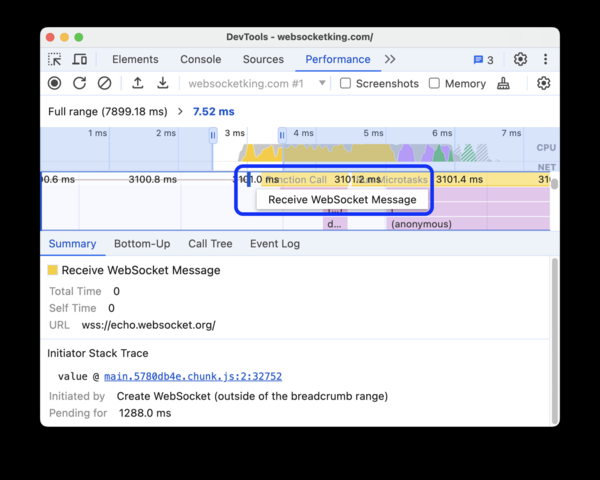
- Improvements have been made to the tools for web developers. When viewing CSS styles, links have been added to corresponding positions in the document that the CSS display property references, tied to the location of other elements (CSS Anchor Positioning). When viewing the HTML code, links have been added where the attribute ‘popovertarget’ points. A new ‘Fast 4G’ access speed simulation preset has been added to the network activity inspection panel (the ‘Fast 3G’ preset has been renamed to ‘Slow 4G’, and ‘Slow 3G’ to ‘3G’). In the performance analysis panel during tracing, information about WebSocket message sending and receiving events is now displayed.


In addition to new features and bug fixes, the new version addresses 24 vulnerabilities. Many of the vulnerabilities were identified through automated testing using AddressSanitizer, MemorySanitizer, Control Flow Integrity, LibFuzzer, and AFL tools. Five issues have been assigned a high severity level. No critical issues that allow bypassing all browser security layers and executing code outside the sandbox environment have been found. Under the vulnerability bounties program, Google has awarded 16 bounties totaling $47.5 thousand (one bounty of $11,000, $5,000, $3,000, and $500, two bounties of $8,000, and three bounties of $2,000). The amount of 6 bounties is yet to be determined.

Source: opennet.ru
