

Function , allowing you to initiate an image search by outlining an area on the screen, appeared in beta versions of Google ChromeOS 127 and Chrome 128 for Windows and macOS.

Initially, the feature debuted on Samsung Galaxy S24 smartphones and Google Pixel 8, but quickly spread to other devices. Circle to Search allows you to search based on visual content, and is now available on PCs running Google ChromeOS 127, as well as in the desktop versions of Chrome 128 — currently only in beta versions.

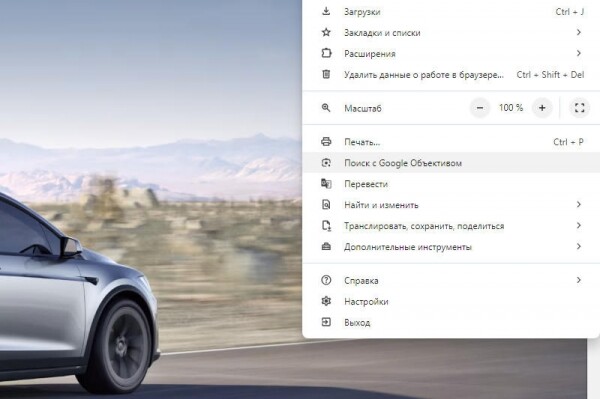
In ChromeOS, to activate it, you need to select the 'Google Lens' icon in the address bar, while in Chrome for Windows and macOS, you need to select 'Search with Google Lens' from the browser menu — for convenience, the corresponding button can be moved to the Chrome toolbar.
The search for content captured in the outlined area of the page begins immediately, and its results are displayed on the sidebar — you can remain on the open page and simultaneously review the search results.
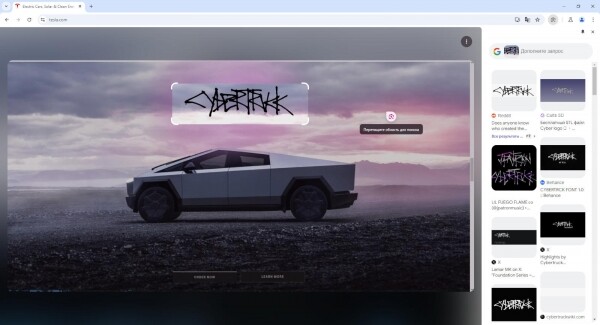
'Google Lens' in Chrome simplifies searching for anything displayed on the screen: a running video, a live stream frame, or an image from the current page — the required answers are shown in the same tab. The presence of this new feature in the official beta versions of the ChromeOS platform and Chrome browser indicates that it will soon be publicly available — as , this will happen on August 14.
Source:
Source: 3dnews.ru
