

The release of the web browser Firefox 133 has taken place, and updates for the previous long-term support branches — 115.18.0 and 128.5.0 — have been formed. The Firefox 134 branch has entered beta testing, with its release scheduled for January 7.
Key innovations in Firefox 133:
- In the enhanced tracking protection (ETP) strict mode, bounce tracking protection has been enabled. The Bounce Tracking Protection mechanism detects activities specific to tracking through redirects and periodically clears cookies and locally stored data used for tracking. Unlike the previously available 'Cookie Purging' mode, clearing is based not on a list of known trackers, but on heuristics that allow the identification of new tracker sites by analyzing behavior after a redirect.
The essence of redirect-based tracking is that the tracker's code first redirects the user to its site and then forwards them to the target page, allowing the tracker to save cookies and data in local storage tied to its site. Retaining data after transitioning to another site allows the previously implemented methods in the browser to block cross-site operations to be bypassed — as the intermediary page opens outside the context of the other site, tracking cookies can be established freely on that page.
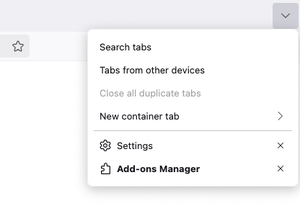
- In the tab list menu, accessible through the button in the upper right corner, an option has been added to show a sidebar list of tabs from browsers opened on other devices linked to the current Mozilla account.

- The number of websites that work with the automatic video playback continuation feature in a floating window (picture-in-picture mode) has been expanded after switching from the tab displaying the video to another tab.
- When information about time is available, server, the adjustment of the 'expire' attribute value is implemented taking into account the difference between local time and server time. If time on the local system is set in the future, cookies continue to be considered valid according to the time. server.
- In the builds for the Windows platform, the use of the GPU for accelerating the Canvas2D API has been included.
- The Fetch API now supports the 'keepalive' parameter, which keeps the connections associated with an HTTP request active after the page is closed or navigated away, allowing the fetch() call to send analytics at the end of a session even if the page is already closed.
- The Permissions API is now allowed to be used in the context of Web Workers. Support for the WorkerNavigator.permissions property has been added.
- In the <audio> and <video> elements, the 'onwaitingforkey' attribute can now be specified to attach an event handler for the 'waitingforkey' event (when playback cannot proceed due to the absence of a key for decoding).
- Similarly to popover windows, the 'beforetoggle' events for <dialog> elements are now sent before the dialog is opened, and 'toggle' events after it is closed.
- Methods Uint8Array.fromBase64(), Uint8Array.prototype.toBase64(), Uint8Array.prototype.setFromBase64(), Uint8Array.fromHex(), Uint8Array.prototype.toHex(), and Uint8Array.prototype.setFromHex() have been added to the Uint8Array subclass for encoding to hexadecimal and Base64, and vice versa.
- The WebCodecs API now includes the ImageDecoder, ImageTrackList, and ImageTrack interfaces for decoding images.
- Experimental support has been added for setting the 'contenteditable' attribute to 'plaintext-only', allowing only plain text to be used in editing forms (when pasting formatted text, it is automatically cleaned). To enable support in about:config, set the 'dom.element.contenteditable.plaintext-only.enabled' preference.
- Experimental support has been added for the CSS pseudo-class ':has-slotted', applied to define the style of elements inside <template>, whose contents are added to the <slot> element when rendering web components. To enable support in about:config, set the 'layout.css.has-slotted-selector.enabled' preference.
- In the Firefox version for Android on larger screens, desktop mode is enabled by default (this behavior can be changed in the 'Site settings' section). When copying text to the clipboard from a page in private browsing mode, the copied content is now treated as containing sensitive data (the user is prompted with a warning).
In addition to new features and bug fixes, Firefox 133 has addressed 18 vulnerabilities. Three vulnerabilities are marked as critical. Four vulnerabilities are caused by memory management issues, such as buffer overflows and access to already freed memory areas. These issues could potentially lead to the execution of malicious code when specially crafted pages are opened.
In the beta testing stage release of Firefox 134, builds for the Linux platform now support additional touchpad gestures (for example, two-finger tap to pause inertial scrolling). On the Windows platform, support has been added for hardware decoding of video in HEVC (H.265) format.
Source: opennet.ru
