

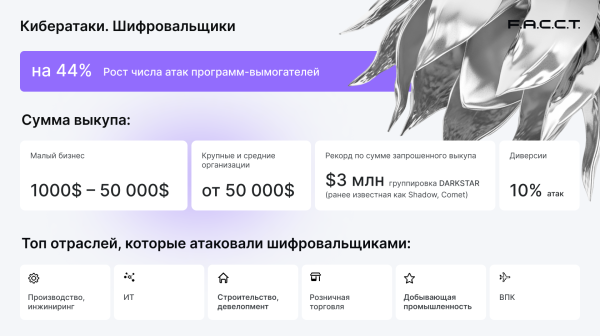
In today's reality, data is an essential component of any size business, including small ones. The loss of important documents, whether operational information, customer data, financial reports, contracts, or business agreements, can lead to significant disruptions in an organization's operations as well as financial and reputational losses. Backup and data recovery solutions can prevent such losses. These products ensure the preservation of an enterprise's digital assets in various situations, ranging from sudden equipment failures or software malfunctions to accidental or intentional data deletions caused, for example, by ransomware—which has become a major headache for Russian organizations increasingly facing this type of malware. By analysts from the F6 Digital Forensics Laboratory (formerly F.A.C.C.T.), the number of ransomware attacks in 2024 increased by 44% compared to the previous year, with cybercriminal demands rising to $50,000 for restoring access to files for small businesses. This amount is quite substantial, and it is no surprise that many companies have begun and to opt for backup tools. Solutions like these are part of the product portfolio of the domestic developer "CyberProtect," which has launched a new product , specifically designed for organizations with a small fleet of computing equipment.
The composition of the solution, supported platforms, file systems, and data carriers
"Cyber Backup Small Business" falls into the category of comprehensive software solutions, offering the user not only a basic set of features but also additional capabilities. In addition to data backup and recovery tools, the product includes utilities for file archiving, disk cloning, migrating the OS from HDD to SSD, creating bootable media, system cleaning, as well as other widely used utilities for data protection and ensuring the safety of workstations and servers running Windows.
The "Cyber Backup Small Business" software suite can be deployed on workstations running Windows 10/11 and server machines based on Windows Home Server 2011, Windows Server 2019/2022/2025 in the Standard and Datacenter editions. It supports working with file systems NTFS, Ext2/Ext3/Ext4, ReiserFS, FAT16/32/exFAT3, Linux SWAP partitions, disk images in TIBX/VHD(X) formats, and dynamic volumes. Data storage can utilize hard drives, solid-state drives, network storage devices, FTP servers, as well as USB storage devices USB 1.1/2.0/3.0, USB-C, eSATA, FireWire (IEEE-1394), SCSI, and PC Card. Notably, it supports the secure cloud storage "Cyber Cloud", which can be used for storing backups and archives with access from anywhere in the world using any internet-enabled device.
User Interface and Functional Capabilities
The working environment of "Cyber Backup Small Business" is implemented according to the classic scheme for multifunctional solutions: there is a main window with current information about existing backups and a navigation menu that allows quick access to necessary tools, their settings, and information about the account in use. Let's briefly go over the main elements of the program's user interface.
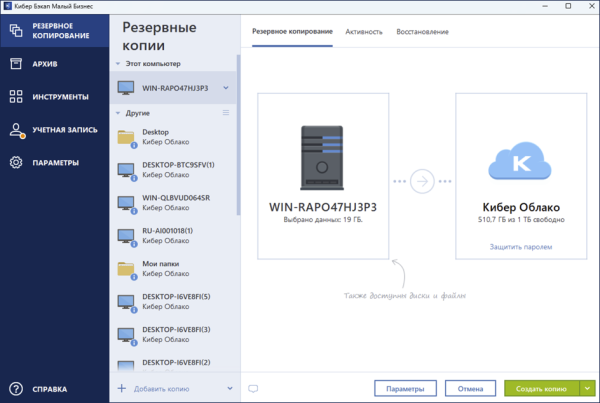
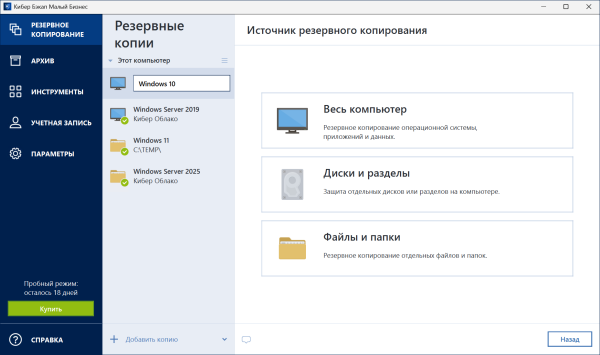
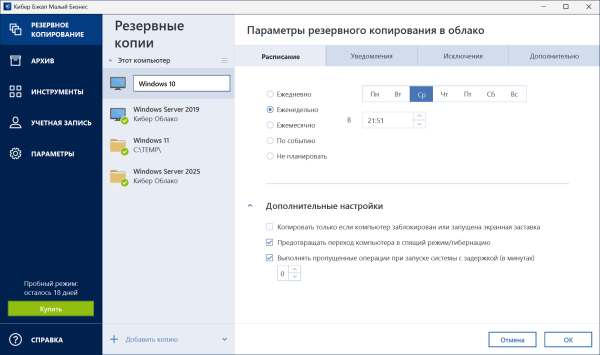
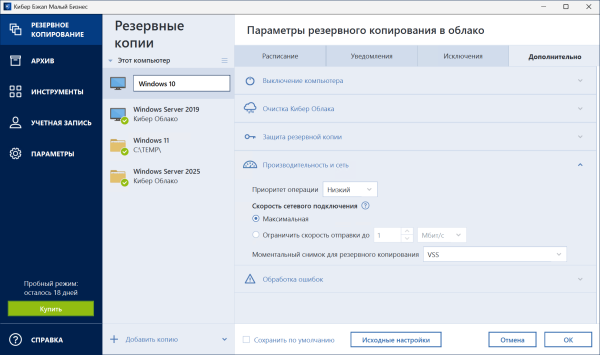
Data Backup. The "Cyber Backup Small Business" allows you to create backups of either the entire computer or server with installed software, operating system settings, and data, as well as of individual disks, partitions, directories, and files. You can specify a local drive, external disk, network storage, or "Cyber Cloud" as the destination. Various backup methods are supported (full, differential, incremental), along with deduplication, compression, and data integrity verification, scheduled tasks set by the user, file exclusion creation, password protection for backups, and many other features. Backup operation priority management and network connection speed control are also available.
 | 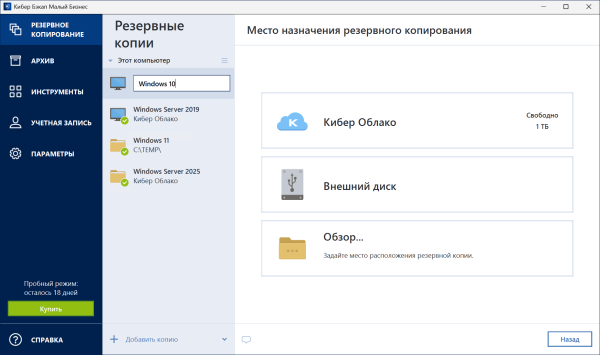 | |
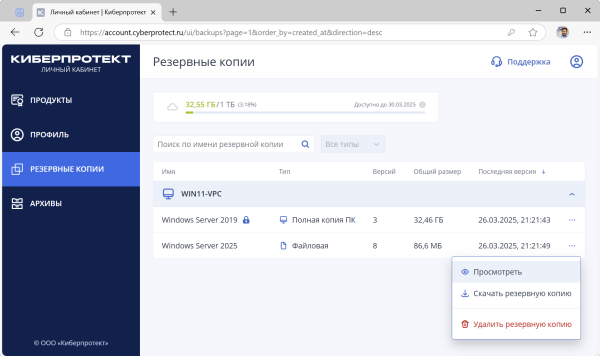
To ensure reliable storage of backups, it is recommended to follow the , which implies creating at least three copies of data, storing them on at least two different physical media, and having one copy in an offsite remote storage, such as in the cloud. The "Cyber Backup Small Business" system enables practical implementation of all elements of this golden rule, significantly aided by the automatic replication feature of backups to the "Cyber Cloud". You don’t have to worry about the safety of these backups: the company "Cyberprotect" guarantees reliable storage of backups in a data center located in Russia, and uses protocols with encryption (SSL, TLS) for file transfers both over the internet and local network, preventing data interception by malicious actors. Convenience when working with the "Cyber Cloud" has also been considered: accessing backups stored there can be done either through the program window or via a web interface from any computer or mobile device connected to the global network.
 |  | |
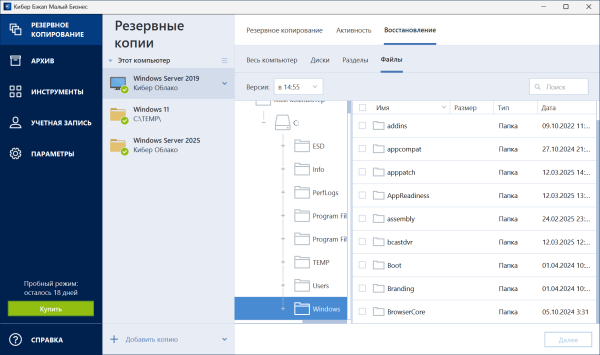
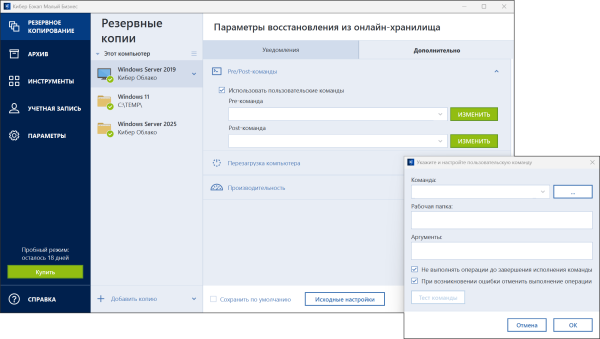
Data recovery. Like backup, this procedure in "Cyber Backup Small Business" is maximally simplified and automated, allowing data to be restored to both the original and new locations, whether it be another disk, computer, or server. It is also important to note that in case of an emergency, the recovery process can be initiated even if the operating system fails — for this, the "Recovery on Boot" feature and a bootable media creation wizard with an offline version of "Cyber Backup Small Business" on board are provided (more about these capabilities can be found a little further down the text). For experienced users and IT administrators, command and batch BAT/CMD file management is implemented, which will be executed automatically before and after the recovery procedure. This functionality may be useful, for example, if it is necessary to start or stop certain Windows processes and services or to scan data for malicious content before deploying the backup.
 |  | |
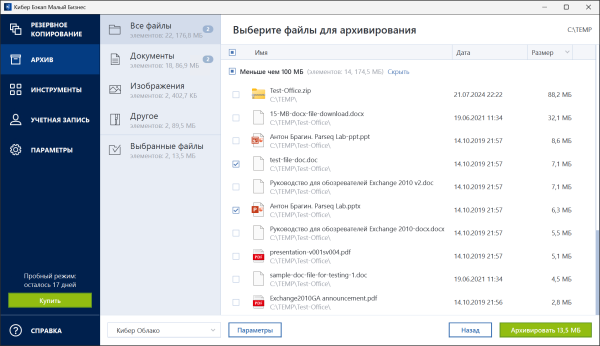
Data Archiving. A feature that analyzes the content of the installed system disk for large and rarely used files and allows them to be transferred to "Cyber Cloud", to a NAS device, or an external USB drive. You can select files and directories to archive and restrict access to them with a password for unauthorized users. After sending to the archive, local copies of the files are deleted, thereby freeing up space on the device. To simplify user interaction with the archived files and provide quick access to them, a special folder Cyber Drive is created in Windows Explorer containing links to archived objects. If you double-click the file link, it will open as if it were stored on the local disk. If the file is archived in "Cyber Cloud", it will first be reloaded onto the computer. Access to archived files in the cloud storage is available through "Cyber Backup Small Business" and the web interface of "Cyber Cloud" from any device, be it computers, laptops, tablets, or smartphones.
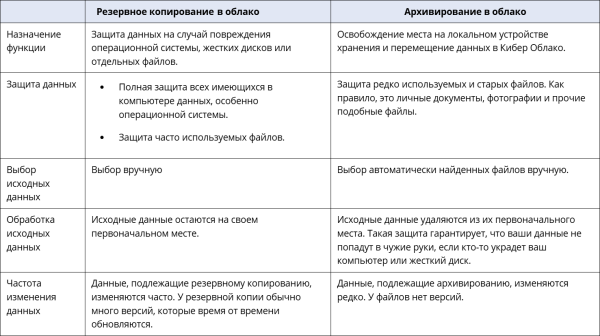
Data archiving in "Cyber Cloud" is similar to backup, but there are several differences. More about them can be found in the table below.
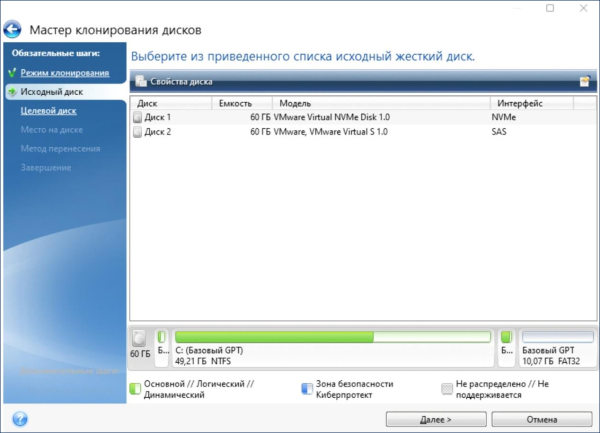
Cloning an active disk. One of the key features of the software package 'Cyber Backup Small Business'. With this function, you can literally copy all the contents of a disk to another storage device in just a few clicks. This may be necessary, for example, if you need to transfer the operating system, applications, and data to a new, larger-capacity disk while maintaining the computer/server's functionality. The cloning tool can also provide invaluable assistance when transferring the system from a hard disk to an SSD.
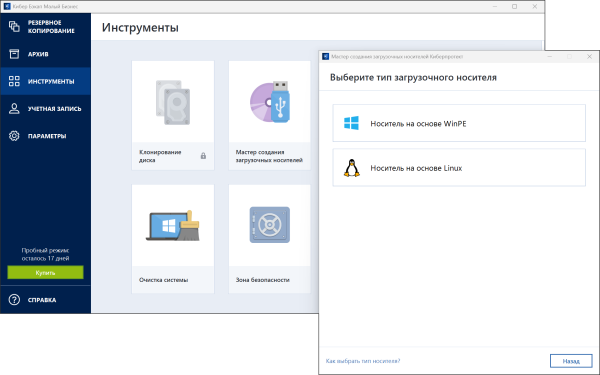
Creating a bootable media. The capabilities of 'Cyber Backup Small Business' allow you to create a bootable flash drive, external disk, or CD/DVD with a standalone version of the program, which can come in handy in case of critical operating system failures. This lifesaver will help boot the computing machine and restore the system with data from a backup located locally or in the cloud, including on specific hardware. Bootable media can be created based on Windows Preinstallation Environment (WinPE), Windows Recovery Environment (WinRE), and Linux. For better compatibility with hardware, the option to add necessary drivers is provided.
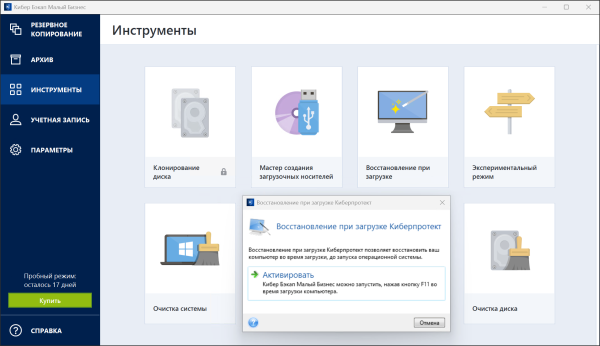
Boot recovery. In case a bootable media is not at hand, 'Cyber Backup Small Business' provides another option for reviving a workstation or server through the Cyberprotect Startup Recovery Manager tool. When activated, this tool allows you to boot by pressing the F11 key upon powering on the computer and restore the system from a backup located locally or in the cloud. An important point: when activated, the boot recovery function overwrites the master boot record (MBR) with its own boot code. If third-party boot managers are installed on the machine, they will need to be reactivated after boot recovery is enabled.
Experimental mode. Allows for performing any potentially harmful actions in Windows, such as changing system settings, installing OS updates, drivers, and unfamiliar applications, opening email attachments from unknown senders, or visiting web resources with potentially dangerous content. After performing the listed actions, the user decides whether to keep the changes or cancel them. If canceled, the system will revert to its original state. Experimental mode provides the ability to test changes in the OS without the risk of data loss or disruption of the computer's operation.
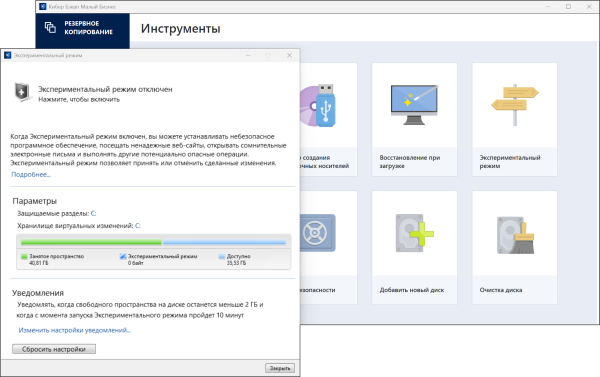
Experimental mode can function indefinitely, as it does not turn off during system reboots. If a restart occurs while operating in this mode, a dialog box will appear upon subsequent loading of the OS, offering two options: to stop operating in this mode and cancel changes or to continue working in this mode. This is an important note; there are a couple of other significant points: experimental mode cannot be activated with Windows core isolation enabled, and it may heavily use free disk space even when the computer is idle. This is due to background actions such as indexing and defragmenting files.
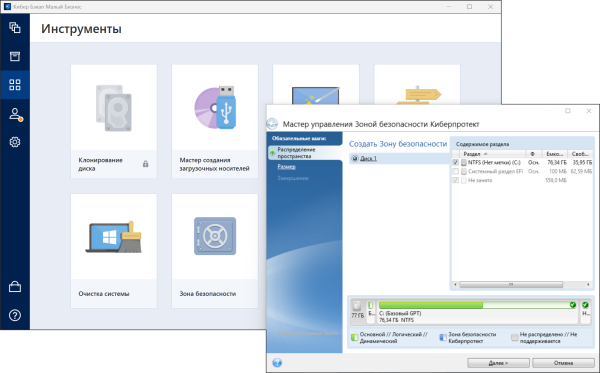
Security Zone. A special protected area on the disk that can be created and used for storing backups and confidential documents. If necessary, the security zone can be additionally protected with a password.
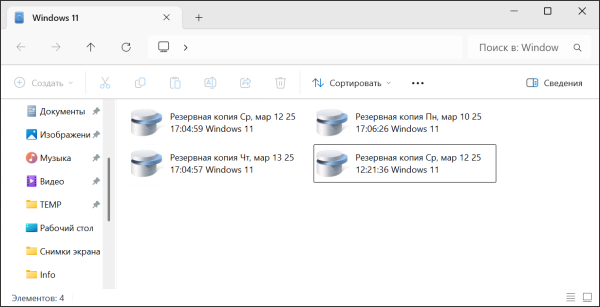
Connecting backups as virtual disks. A useful feature that allows quick access to data stored in TIBX format backups (the standard for solutions from 'Cyberprotect') without the need to restore them on the computer. Local backups containing partitions or entire disks can be connected. After connecting, a new disk appears in the system for each connected partition. The contents of the image can be viewed in 'read-only' mode using Windows Explorer and other file managers.
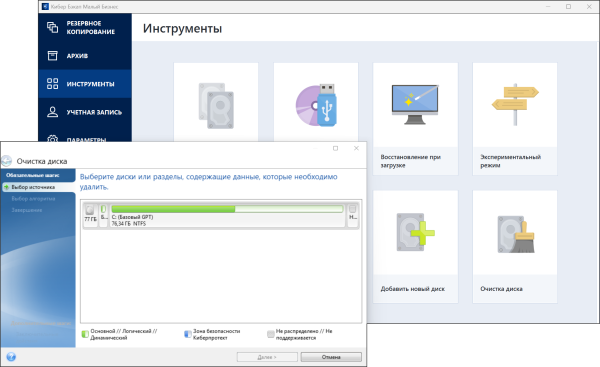
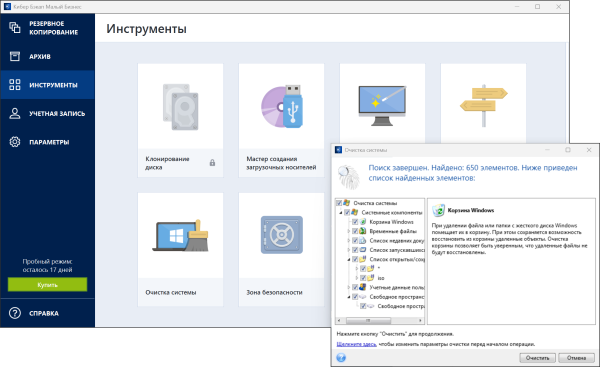
Security and privacy measures. They contain two utilities — "Disk Cleanup" and "System Cleanup." The first allows the destruction of data on selected disks and partitions without the possibility of recovery. The second guarantees the removal of all traces of activity on the computer, including user accounts, passwords, and other personal information. Both tools may be of interest to small businesses working with confidential documents.
 |  | |
Tools for working with the "Cyber Cloud"
Access to files, backups, and archives stored in the "Cyber Cloud" can be obtained in three ways: through the working environment of the "Cyber Backup Small Business" program, the web interface of the cloud storage, and the "Cyber Backup Mobile" app for Android devices. The last two options make interaction with the "Cyber Cloud" as simple and convenient as possible: you can remotely view the contents of backups with archives and selectively download necessary files and documents. SSL and TLS encryption protocols are used for connecting to the cloud storage, ensuring secure data transmission and preventing interception by malicious actors.
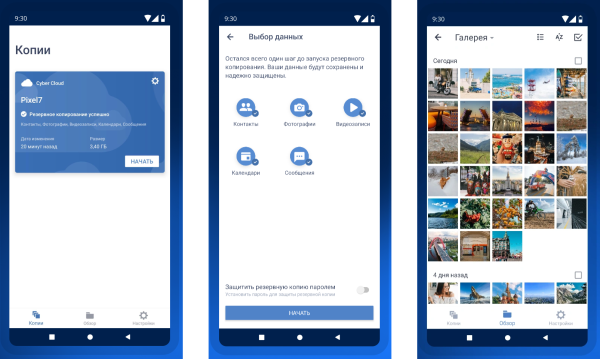
The "Cyber Backup Mobile" app deserves special mention. It allows you to not only view and restore data stored in the "Cyber Cloud," but also to create backups of contacts, messages, photos, videos, and calendars stored on your Android smartphone or tablet. Features such as password protection, mobile traffic control, and file restoration from backup on the same device or on a new one, even after it has been wiped, are available.
Cost of the solution
The cost of using the "Cyber Backup Small Business" data backup and recovery system varies depending on the number of supported devices and the volume of storage in the "Cyber Cloud." Potential product buyers can subscribe for one year for 1, 3, 5, or 10 devices (PCs or servers) with the option of connecting cloud storage of 500 GB, as well as 1, 3, or 5 TB. As a nice bonus, the application is provided. for Android.
To assess the capabilities of the software solution, the developer offers a 30-day trial version of 'Cyber Backup Small Business' with support for unlimited devices and 1 TB of cloud storage. More details about the pricing line can be found on the website. .
Conclusion
With the release of 'Cyber Backup Small Business', the developers of 'Cyberprotect' have introduced the most comprehensive set of solutions for data backup and recovery that cater to organizations of varying sizes. In addition to the mentioned product for small businesses, the company’s product portfolio includes 'Cyber Backup' (which allows centralized management of backups in IT infrastructures of any size; designed to protect operating systems, virtualization platforms, and applications, including databases and email services) and 'Cyber Backup Cloud' (suitable for enterprises aiming to minimize costs and simplify the backup process by placing IT infrastructure in a cloud environment and storing backups in the cloud). Additionally, the developer offers 'Cyber Backup Personal' for personal computer users, designed to protect personal and work data. This product allows for backups to be stored on local devices (external drives, flash drives, NAS, etc.) as well as in the cloud.
To avoid data loss in the event of an emergency, it is crucial to have backups. Using specialized software such as 'Cyber Backup Small Business' simplifies and automates this process. These advantages, combined with an impressive set of functionalities and a low cost, make it worth considering.
Source: 3dnews.ru
