

After 6 months of development, a significant release of the specialized Tor Browser 14.5 has been presented, continuing the functionality development based on the ESR branch of Firefox 128. The browser focuses on ensuring privacy and security, with all traffic being routed solely through the Tor network. It is impossible to connect directly through the current system's network connection (in the event of a browser compromise, attackers could access network system parameters, so to fully block potential leaks, products such as Whonix should be used). Tor Browser builds are prepared for Linux, Android, Windows, and macOS.
For additional protection, Tor Browser includes the 'HTTPS Only' setting, allowing encryption of traffic on all sites where possible. To reduce threats from JavaScript-based attacks and to block plugins by default, the NoScript extension is included. To combat traffic blockage and inspection, fteproxy and obfs4proxy are used. Alternative transports are offered for establishing an encrypted communication channel in environments that block any traffic except HTTP.
To prevent tracking of user movement and to limit the identification of visitor-specific characteristics, APIs such as WebGL, WebGL2, WebAudio, Social, SpeechSynthesis, Touch, AudioContext, HTMLMediaElement, Mediastream, Canvas, SharedWorker, WebAudio, Permissions, MediaDevices.enumerateDevices, and screen.orientation have been disabled or restricted, as well as telemetry sending tools, Pocket, Reader View, HTTP Alternative-Services, MozTCPSocket, 'link rel=preconnect', and libmdns has been modified.
In the new version:
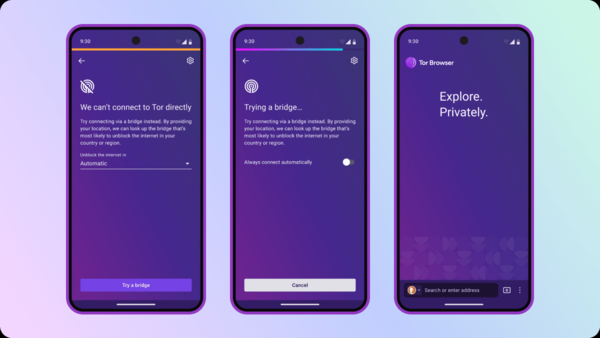
- The version for the Android platform has added the Connection Assist interface, which was previously only available in builds for Linux, Windows, and macOS. The interface allows for the automation of Tor network access configuration, tailored to the specific needs of individual users, without the need to manually activate bridge nodes or select alternative transports in case of connection issues. Technically, this new feature is implemented by utilizing a common backend for desktop editions and Android.

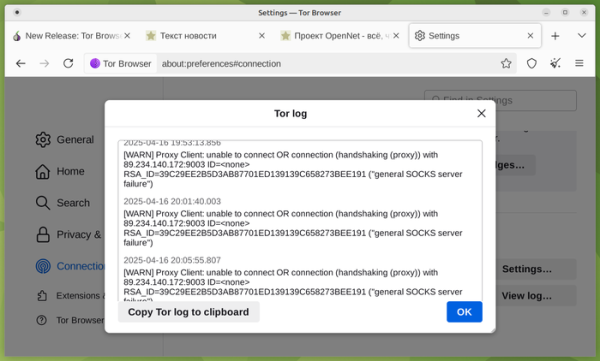
- In versions for desktop systems, enhanced tools for viewing the operations log, reflecting activity when connecting to Tor, as well as errors or warnings that occur during interaction with the network have been expanded. The information added to the log does not contain confidential data, such as visited sites, but can be useful for diagnosing issues. The information in the log window is now more visual and updates as new entries come in (no longer requiring the log window to be reopened for updating).

- The logic of the Connection Assist interface has been upgraded, now making fewer calls to the moat toolkit, which uses the 'domain fronting' technique, when diagnosing connection issues. Warnings about failures due to altered settings have been added, for example, when changing bridge nodes (previously, the fact of a failure was not shown to the user).
- In the Android version, exiting through the 'Quit' menu now triggers additional actions to terminate background processes and clear recently launched tasks.
- Desktop and Android versions have added localization for Belarusian, Bulgarian, and Portuguese languages. You can select the language in the settings "Settings > General > Language and Appearance > Language."
Source: opennet.ru
