

System76, the company behind the Pop!_OS Linux distribution, has released the seventh alpha version of the COSMIC desktop environment, written in Rust (not to be confused with the old COSMIC based on GNOME Shell). ISO images with the latest version of COSMIC, formed on top of the alpha builds for the upcoming Pop!_OS 24.04 release for NVIDIA (3.3 GB) and Intel/AMD (2.9 GB) systems, are available for testing. Ready packages for Fedora, NixOS, Arch Linux, openSUSE, Serpent OS, Redox, and CachyOS are also being prepared.
COSMIC is evolving as a universal project, not tied to a specific distribution and compliant with Freedesktop specifications. The Iced library is used for building the interface in COSMIC, which employs safe types, a modular architecture, and a reactive programming model, as well as providing an architecture familiar to developers with experience in the declarative interface-building language Elm. Several rendering engines support Vulkan, Metal, DX12, OpenGL 2.1+, and OpenGL ES 2.0+. Developers are provided with a ready-made set of widgets, the ability to create asynchronous handlers, and to use adaptive layouts for interface elements based on the window and screen size.
In addition to using Rust, notable features of COSMIC include hybrid tiled window layout modes and stacked window anchoring (grouping windows like browser tabs), which can be enabled in conjunction with virtual desktops. The project is also developing a compositor server cosmic-comp based on Wayland. The first stable release of COSMIC was initially planned for the first quarter of 2025, with no updates on the new timeline. It is expected that the next release will be designated as a beta version.
Key changes compared to the sixth alpha version of COSMIC:
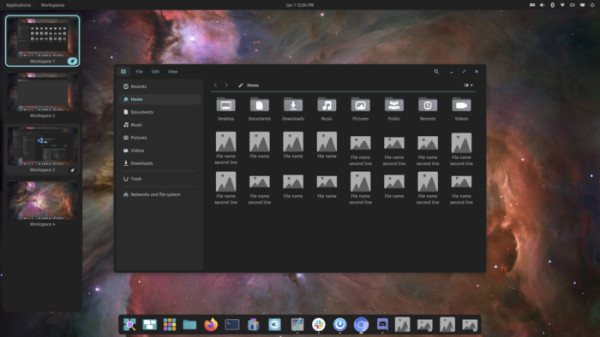
- The ability to regroup virtual desktops or move them to another screen through drag-and-drop. A feature for pinning virtual workspaces has been added, allowing users to keep a desired number of workspaces open, regardless of whether they are empty or not.

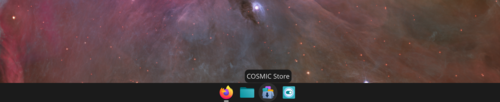
- Tooltips have been added that appear when hovering the cursor over items in the taskbar, virtual workspaces, application directory, and application menu.

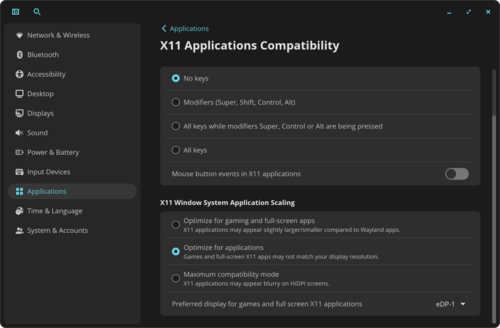
- Global keyboard shortcuts have been implemented to trigger actions in X11 applications, regardless of whether the application is focused or not. By default, this feature is disabled for privacy reasons, but options are available for handling external input events only when modifier keys (Ctrl, Shift, Alt) are pressed.

- Settings for fractional scaling have been added for X11 applications running under XWayland. The 'Optimize for applications' mode enhances the quality of the interfaces of programs that do not support fractional scaling. The 'Optimize for games and full-screen applications' mode allows the actual screen resolution to be used in applications, while a scaling level that differs from the applications supporting fractional scaling may be applied.
- Changes have been made to the keyboard shortcuts processing system:
- When switching using the combination "Super+arrow_key", the current workspace remains displayed as long as the Super key is held down.
- Virtual desktops now have higher priority compared to displays — navigation when moving windows or changing input focus first covers desktops on the current display, and then switches to the next display if available.
- Cyclic traversal of virtual desktops has been implemented (after the last one, it switches to the first).
- A new combination for switching between displays has been added: "Super+Shift+arrow_keys", to shift focus to another display — "Alt+Super+arrow_keys", and to move a window to another display — "Shift+Alt+Super+arrow_keys."
- To zoom in or out of the desktop, keyboard shortcuts "Super+" and "Super-" have been added.
- The file manager now includes an option for proactive input of file paths — after typing the first letter of a file or directory name in the address bar, autocomplete suggestions appear corresponding to existing files or directories. An option for opening files with one click has been added. Shortcuts for activating grid or list view modes for files have been added. It is now possible to jump to editing by clicking on a directory in the file path. An Open Folder dialog has been added for extracting files to a specified directory.
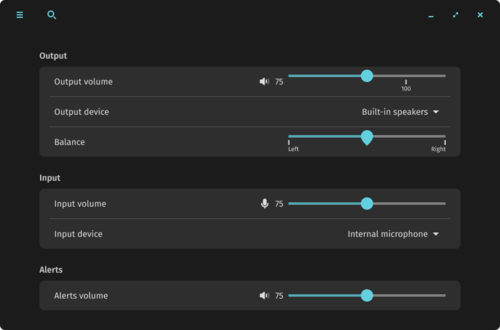
- The sound settings page has been updated to allow adjustment of the volume balance for the left and right ears.

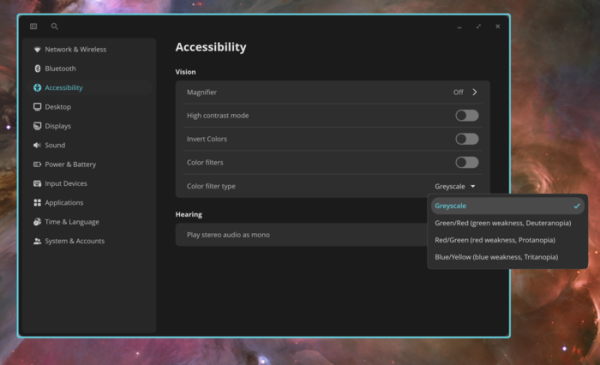
- The Accessibility applet has added options for enabling high contrast mode, inverting colors, color filters for the colorblind, and merging audio channels for individuals with hearing difficulties. The interface for increasing areas on the screen has been improved.

- Optimizations and fixes aimed at reducing CPU load have been implemented in various components.
- Support for Wayland protocols ext-workspace-v1 and ext-image-capture-v1 has been added. The protocol cosmic-workspace-v2 has also been added.
- Localization of program names has been implemented.
- The network connection applet has added support for EAP and PEAP authentication.
- The COSMIC Media Player has added an option to hide the title when the mouse is inactive.
- The option to set a fallback font has been provided.
Source: opennet.ru
