

The release of web browser Firefox 138 has occurred, and updates for previous long-term support branches — 115.23.0 and 128.10.0 — have been prepared. The Firefox 139 branch has entered beta testing, with a release scheduled for May 27.
Key innovations in Firefox 138:
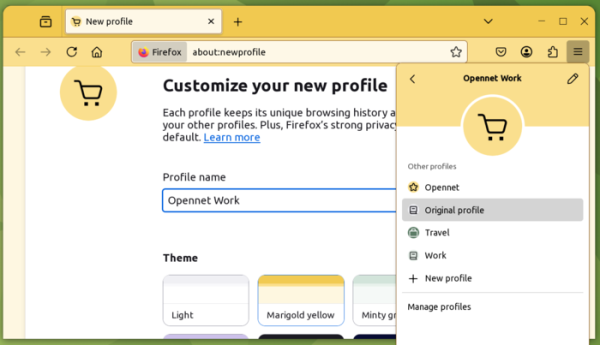
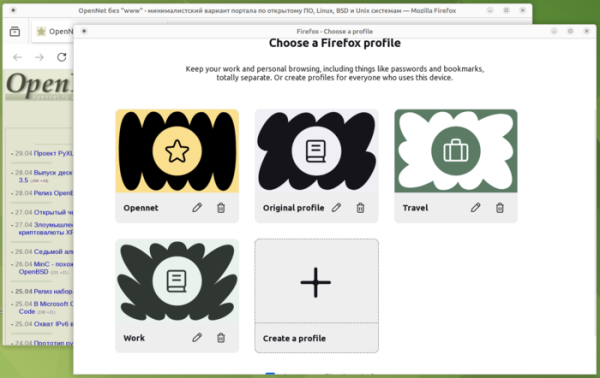
- A new profile management system has been introduced. In profile form, users can create completely independent browsing sessions with their own settings, history, bookmarks, add-ons, and internal databases. Each profile is stored in a separate subdirectory ‘~/.mozilla/firefox/’. You can assign a color scheme, icon, and name to each profile. Switching between profiles and creating new ones is done through a new section displayed at the top of the main menu.

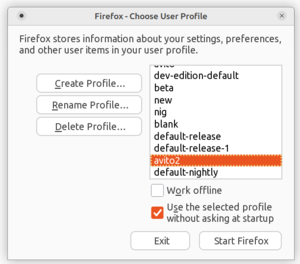
The new profile management interface is not yet enabled by default for everyone and will gradually become available to an increasing percentage of users. To force enable it, you can activate the option ‘browser.profiles.enabled’ on the about:config page. The session separation technology is similar to the old profiles, which were activated from the command line using the ‘-P’ option, but the interfaces and profile lists of the old and new systems do not overlap (the old interface, launched by the command ‘firefox --ProfileManager’, does not display new profiles, while the new one, accessible through the menu, does not show old profiles).
Old interface:

New interface:

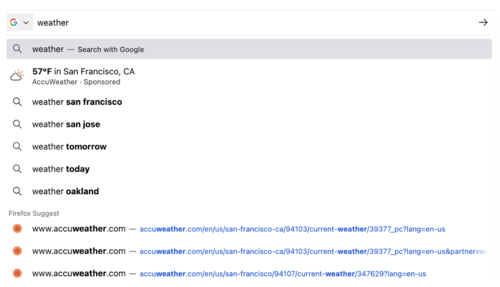
- The address bar now displays contextual suggestions with weather forecasts when entering words related to weather or city names. This feature is currently only available by default to users from the United States. It can be enabled through the setting ‘browser.urlbar.suggest.weather’ on the about:config page.

- A new option has been added to the context menu, displayed when right-clicking on tab buttons, allowing users to copy the link to the page shown in the tab.
- On launch in Windows 11, pop-ups and menus now display in a style that matches the aesthetics of the operating system.
- Improved autofill for address and credit card number fields. Autofill now correctly applies to forms that are dynamically updated as information is filled in (autofill will work in fields that appear only after entering other fields, for example, when an address field appears after filling in the city field).
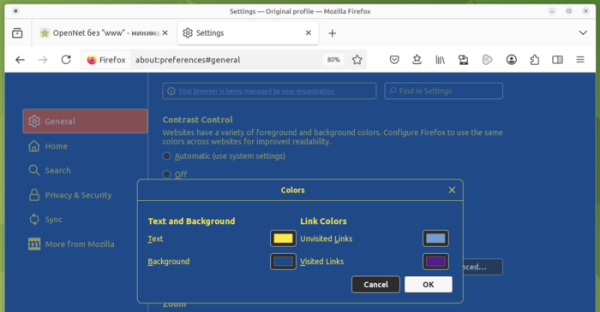
- The configurator has introduced the ability to override contrast colors. Instead of the colors used on websites for background and foreground, you can now set your own colors or use system contrast settings for web content.

- Support for integrity checks of imported JavaScript modules by hash has been added, using the new 'integrity' field in metadata for .
- The Error.isError method has been added, allowing you to check if a given value is an instance of the Error object.
- To enhance compatibility with other browsers, support for the Error.captureStackTrace function has been added.
- The size and style of the font in
elements have been unified, which are now independent of the use of
within
, - The 'import' expression has been updated to allow attributes that can set additional metadata when importing modules. With the attribute 'type: "json"', JSON modules can now be imported. import data from "https://example.com/data.json" with { type: "json" };
- A new property degradationPreference has been proposed for WebRTC applications, allowing you to prioritize frame rate or resolution in cases where reduced network bandwidth does not allow for all specified parameters to be met.
- In the returned proxy server The HTTP header "Clear-Site-Data" has added support for the "cache" directive, which allows the server to inform the client about the need to clear data related to the processed URL from the browser cache. For instance, clearance may be initiated when a user completes their session on the site to reduce privacy risks.
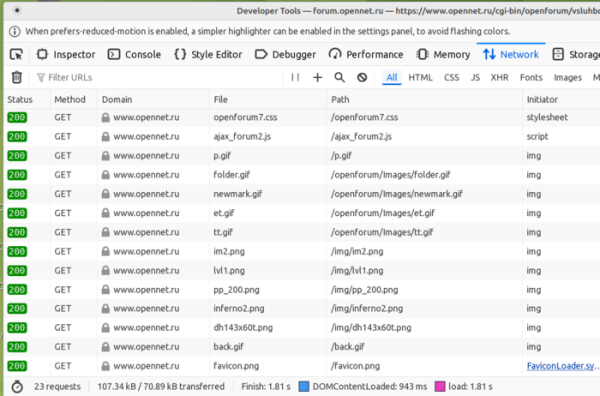
- In the web developer tools, a new "Path" column has been implemented in the Network panel, displaying the full path of the requested resource.

- In the version for the Android platform:
- On tablets, desktop mode is enabled by default, which can be disabled in the settings.
- Bookmark sorting support and the ability to pin folders to the top of the bookmarks list have been added.
- Support has been implemented for TLS certificates for client authentication on the server.
- The Share button can now be used to send uploaded files or links to other users.
- Support for sorting uploaded files by time and categories has been added.
In addition to new features and bug fixes, Firefox 138 has addressed 14 vulnerabilities. Six of these vulnerabilities are related to memory management issues, such as buffer overflows and access to already freed memory areas. These problems may potentially allow for the execution of malicious code when opening specially crafted pages. Additionally, a vulnerability in the 'copy as cURL' function in the web developer tools allows for custom commands due to inadequate escaping of special characters.
Source: opennet.ru
