

Google has released version 139 of the Chrome web browser. At the same time, a stable release of the free Chromium project, which serves as the basis for Chrome, is available. Chrome differs from Chromium by using Google logos, having a crash notification system, modules for playing DRM-protected video content, an automatic update installation system, constant Sandbox isolation, delivery of keys to Google APIs, and transmission of RLZ parameters during searches. For those needing more time to update, the Extended Stable branch is maintained separately for 8 weeks. The next Chrome 140 release is scheduled for September 2.
Key changes in Chrome 139:
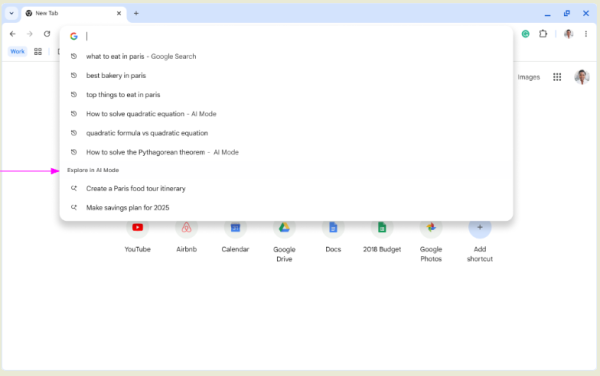
- An AI model has been added to generate search recommendations in the address bar and on the new tab page. A button labeled 'AI Mode' has been added to the address bar for the display of such AI recommendations, and AI-generated suggestions in the recommendations list are marked or highlighted in a separate section. This feature is currently active by default for only a portion of users.

- In centrally managed systems, the ability to create custom quick search shortcuts via the address bar has been expanded (a shortcut ‘@name’ can be created for searching a specific site). The new version includes an additional setting that allows users to override, delete, or disable shortcuts set by the administrator.
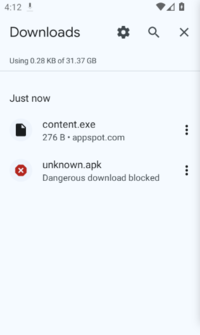
- In the Android version, Google Safe Browsing has implemented security checks for downloaded APK files in both standard and enhanced protection modes. The check is performed by contacting Google servers. If a file is deemed dangerous, a corresponding warning is displayed to the user, and access to the file is blocked (the interface includes a specific option to bypass this block).

- The ExtensionManifestV2Availability setting has been removed, which allowed reverting support for the second version of the Chrome manifest that defines the capabilities and resources available for extensions written using the WebExtensions API. Only extensions based on the third version of the manifest can now be used in the browser.
- In the official stable builds of Chrome, support for the command line options "--extensions-on-chrome-urls" and "--disable-extensions-except" has been discontinued, which allowed bypassing the blocking of risky extensions, such as those injected into the browser without the user's consent. Support for these options remains in Chromium and testing builds of Chrome.
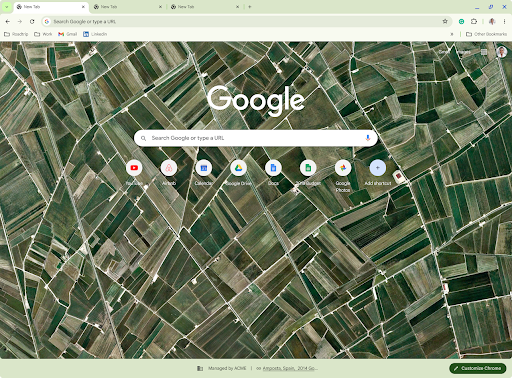
- A lower panel has been implemented on the new tab page, displaying information about extensions affecting the content of the new tab page, as well as details about the applied centralized management policies.

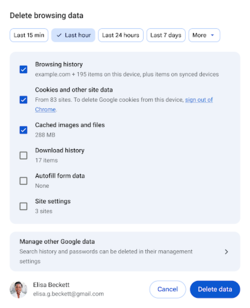
- A safeguard has been added to prevent accidental deletion of saved passwords when selecting the complete data clearing operation. If there are saved passwords, the browser will now direct the user to the password manager page, where they can meaningfully and individually delete passwords and passkeys.

- The ability to automatically revert to using the software rendering system SwiftShader for WebGL, which implements the Vulkan API, has been disabled. In the absence of a proper GPU-based backend, creating a WebGL context will now return an error rather than switching to SwiftShader. Discontinuing the use of SwiftShader will enhance security by eliminating the execution of JIT-compiled code in the process responsible for interacting with the GPU. On Linux and macOS platforms without a GPU, WebGL will no longer be usable. In Windows, SwiftShader support remains only for devices without a GPU or those with problematic GPUs that are blacklisted.
- Trust has been revoked for the certificate authorities Chunghwa Telecom and Netlock in the built-in root certificate storage (Chrome Root Store) due to violations of certificate authority requirements. Due to the lack of action to address identified deficiencies, TLS certificates issued by Chunghwa Telecom and Netlock after July 31, 2025, will now be regarded as untrustworthy in Chrome. Certificates issued before July 31 will continue to be perceived as normal.
- The Web Speech API has added support for speech recognition using engines available locally on the device. The site can request the availability of recognition engines for the necessary language, choose between local and cloud services, request the installation of necessary resources for local recognition, and ensure that recognition is performed on the user's device without sending data to external services.
- In CSS, in addition to setting the border radius with the border-radius property, a new property 'corner-shape' has been implemented to control the shape and curvature of the corners of rectangular elements. For example, with 'corner-shape', you can create smooth transitions from a square to a circle (squircle), create concave corners (scoop), apply a bevel (bevel), and make notches (notch), and also animate the changes in the shape of the corners.
- Support for the Custom Functions specification has been added, allowing the creation of custom functions for CSS that operate analogously to custom parameterized CSS properties. The main difference is that CSS properties can return only one fixed value, whereas CSS functions can return values based on other custom CSS properties, parameters, and conditions. A rule '@function' has been added for defining CSS functions. @function —negative(—value) { result: calc(-1 * var(—value)); } @function —shadow(—shadow-color <color> : inherit) { result: 2px 2px var(—shadow-color, black); }
- A new CSS property 'caret-animation' has been added to control the animation of cursor changes in input fields (for example, the blinking cursor can be replaced with a custom animation).
- To comply with the specification and improve compatibility with other browsers, a new CSS property 'font-width' has been added, which is analogous to the previously available property 'font-stretch'.
- When a Service Worker is blocked due to CSP (Content Security Policy) rules, an 'error' event is now sent asynchronously instead of generating a SecurityError exception immediately after calling the constructor 'new Worker(url)' or 'new SharedWorker(url)'.
- The ability to create a single web application that works with multiple top-level domains or different subdomains. To configure domain binding in the manifest, the field "scope_extensions" is provided. { "name": "Example", "display": "standalone", "start_url": "/index.html", "scope_extensions": [ { "origin": "https://*.example.com" }, { "origin": "https://example.co.uk" }, { "origin": "https://*.example.co.uk" } ] }
- The definition of all valid MIME types for JSON data specified in the WHATWG MIME Sniffing specification has been implemented. In addition to the traditional MIME types "application/json" and "text/json", support has been added for composite MIME types such as "text/html+json" and "image/svg+json".
- A "request-close" command has been added to the API Invoker Commands for forcefully closing the dialog based on the HTML element
- In WebGPU, support for 3D textures compressed using BC and ASTC formats has been added. An experimental (Origin Trial) compatibility mode has also been introduced, providing a streamlined WebGPU API suitable for use with legacy graphic APIs such as OpenGL and Direct3D11.
- For SVG elements (SVGScriptElement), support for the "async" attribute has been added for executing scripts in an asynchronous mode.
- To complicate passive identification of browser instances, the HTTP Accept-Language header now lists only the highest priority languages selected by the user, rather than all selected languages.
- An experimental (Origin trials) API Prompt has been added, providing calls for interacting with large language models that allow the use of text, images, and sound input in requests. The results are returned in a structured format that is easy to parse. Examples of use include generating descriptions of images, visual search, speech transcription, sound classification, generating text based on a prompt, and extracting information from text.
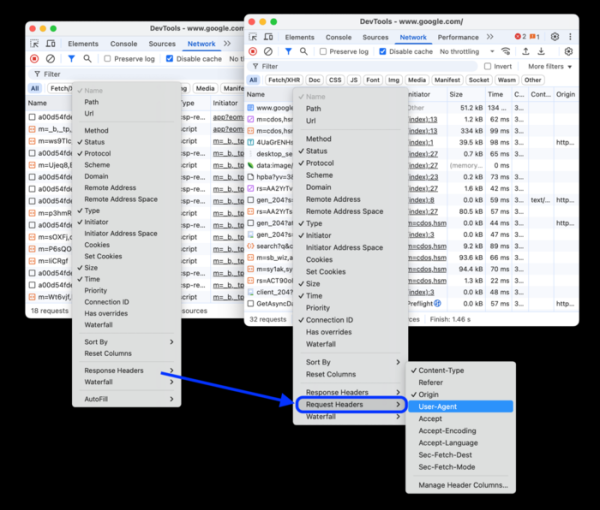
- In the web developer tools, efforts have been made to address known issues with functionality and user interface shortcomings. As a result of this work, the number of open issue notifications has been reduced by 27%. The built-in AI assistant has been updated to support the uploading of arbitrary images. In the network inspection panel, the ability to add columns to display the status of arbitrary HTTP headers has been implemented.

- Support for macOS 11 has been discontinued; now at least macOS 12 is required to operate.
- Support for platforms Android 8 (Oreo) and Android 9 (Pie) has been discontinued in the Android version.
In addition to new features and bug fixes, the new version addresses 12 vulnerabilities. Many of the vulnerabilities were identified through automated testing using AddressSanitizer, MemorySanitizer, Control Flow Integrity, LibFuzzer, and AFL. No critical issues allowing bypassing all browser security levels and executing code outside the sandbox environment have been found. As part of the vulnerability reward program for the current release, Google has paid out 8 rewards totaling $18,500 (one reward of $10,000, three of $2,000, two of $1,000, and one of $500). The amount of one reward has not yet been determined.
Additionally, it is worth noting the inclusion in the codebase used for the Chrome 140 release of the OverrideDefaultOzonePlatformHintToAuto mode, which activates automatic backend selection in the Ozone layer, abstracting interaction with the graphical subsystem. This change will enable the adaptive activation of the Wayland backend on systems supporting Wayland, without defaulting to the X11 backend. The automatic backend selection can also be manually enabled in Chrome 139 using the setting "chrome://flags/#ozone-platform-hint" or the command line flag "—ozone-platform-hint=auto."
Source: opennet.ru
