

The release of Zulip 11 has been announced, a server platform for deploying corporate messengers suitable for facilitating communication among employees and development teams. The project was originally developed by Zulip and opened after being acquired by Dropbox under the Apache 2.0 license. The server code is written in Python using the Django framework. The client software is available for Linux, Windows, macOS, Android, and iOS, and a built-in web interface is also provided.
The system supports both direct messaging between two individuals and group discussions. Zulip can be compared to the Slack service and can be viewed as an internal corporate equivalent of Twitter, used for communication and discussions on work matters within large employee groups. It provides tools for tracking participation and status across multiple discussions simultaneously, using a threaded message display model, which optimally balances room-specific interactions in Slack with a single public space like Twitter. The simultaneous threaded display of all discussions allows for encompassing all groups in one place while maintaining logical divisions between them.
Among Zulip's features, it also supports sending messages to users in offline mode (messages will be delivered once they come online), preserving the complete history of discussions on server and provides search tools for the archive, the ability to send files via drag-and-drop, automatic syntax highlighting for code blocks sent in messages, a built-in markup language for quick list and text formatting, tools for group notifications, the ability to create private groups, integration with Trac, Nagios, GitHub, Jenkins, Git, Subversion, JIRA, Puppet, RSS, Twitter, and other services, as well as features for attaching visual tags to messages.
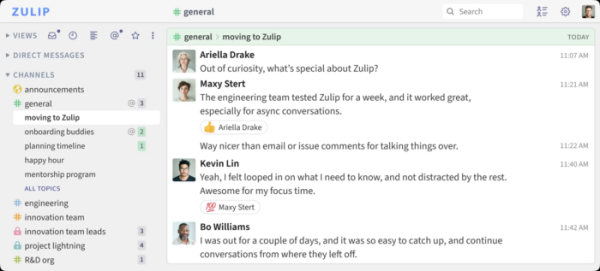
Key innovations:
- A feature has been added to remind users of already received and read messages after a specified time. Users can also attach any note to the reminder. This feature can be used as an alternative to marking messages as unread or starring them in situations where the user needs to postpone a message, for example, if there is no time to respond right now.
- Support for creating general channels has been added, where discussions are conducted in a common flow without topic separation.
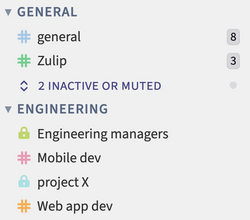
- The ability to organize chat channels into folders has been introduced. For example, chat channels related to projects can be grouped into separate folders to avoid mixing with other chats. Future releases plan to add separate access management for folders.

- Support for viewing the list of recent topics in chat channels has been added for quick assessment of ongoing discussions.
- The design of video and image thumbnails has been revamped. The size of thumbnails has increased, but they still remain secondary to the text in the message feed.
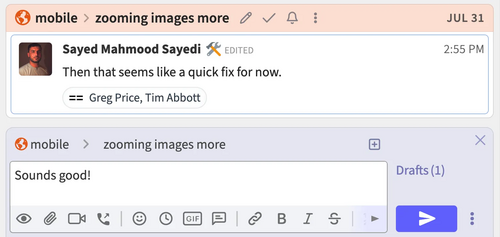
- Users can now write messages in different discussions without leaving the current chat (for instance, they can quickly write a personal message on a topic being discussed in the current chat).

- When pasting large text from the clipboard, users can now convert the pasted text into a file and send it as an attached text file.
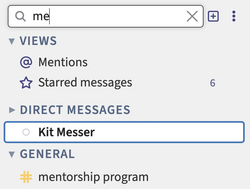
- A filter has been added to the top of the left panel to search for directly sent messages and chat channels. There is also the ability to filter topics based on the status of the discussed task (the ‘✔’/‘completed’ label).

- Support for marking all messages in paused or untracked topics as read has been added.
- The ability to manage all chat-specific notification settings from the personal notification settings panel has been provided. Among other things, you can set up custom notifications for any chat channel.
- The design of buttons and banners in the settings interface has been updated.
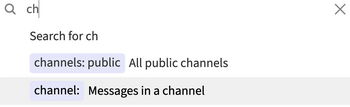
- Search recommendations are now displayed next to the search query input field.

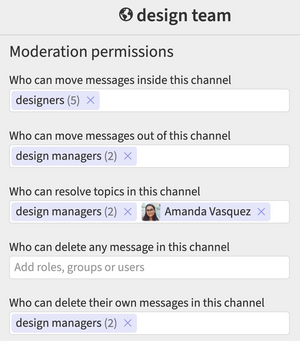
- For any combination of groups, roles, and users in each chat, permissions for deleting and moving topics, as well as marking topics as completed, have been enabled.
- A feature has been added to recover archived chats and deactivated groups.

- Support for customizing a welcome message sent to new users has been added.
- In server Support for end-to-end encryption (E2EE) push notifications for mobile applications has been added.
- Integration modules with OpenProject and OpenSearch have been added. Integration with GitHub, GitLab, and Jotform has been improved.
- Management through keyboard shortcuts has been ensured, regardless of the active keyboard layout and language.
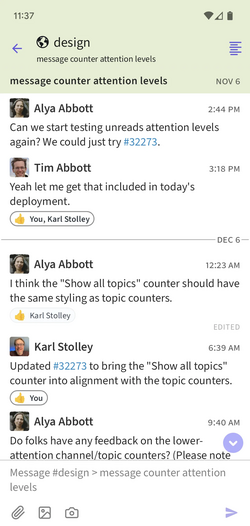
- A new mobile app for Android and iOS has been prepared, built using the Flutter framework (the old mobile app used React Native). The app is noted for its updated interface design and faster performance, but it currently lags behind the old app in terms of functionality (for example, end-to-end encryption for push notifications is missing).

Source: opennet.ru
