

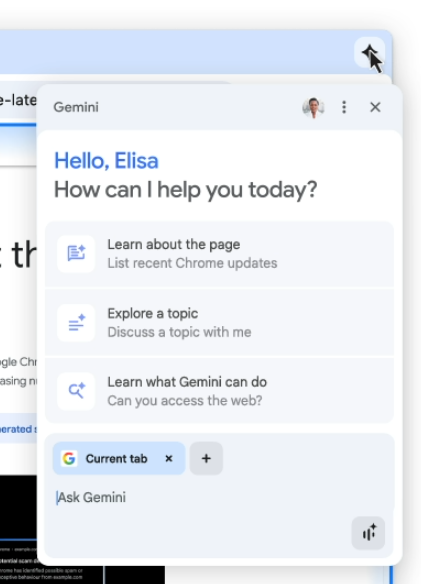
Google has announced the integration of ten new features related to the use of AI models into Chrome. The first feature is the integrated chat-bot Gemini, which can explain the content of the viewed page and answer related questions without switching from the current tab. A button has been added to the top right corner of the screen to call Gemini, which opens a dialog allowing users to ask questions in natural language and select tabs whose content the AI should consider when generating a response. Gemini has been activated since yesterday for macOS and Windows users in the US who use English.
Among other AI capabilities in Chrome:
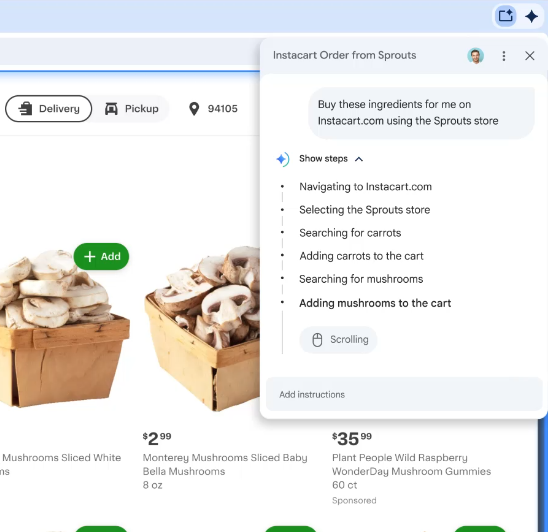
- The ability to use Gemini as an agent to carry out tasks on behalf of the user on websites. For example, upon seeing a recipe on a page, a user can ask Gemini to buy the ingredients from a specific online store, and it will find the items in the catalog, add them to the cart, and place the order. Actions are performed interactively with an explanation of each step and the option to intervene in the process. This feature will be activated in the coming months.

- The ability to summarize and compare information from several sites open in different tabs. For example, when planning a trip, Gemini can create an itinerary based on open tabs that contain information about booking tickets, reserving hotels, and attending events.
- Searching for pages that the user has viewed in the past. Instead of scrolling through navigation history, users can provide a general description of the content they are looking for, and Gemini will suggest which page it was mentioned on (for example, one could ask, 'on which site did I see a cherry pie recipe?').
- Integration of Gemini with Google services viewed in the browser, such as Google Calendar, YouTube, and Google Maps. Gemini can be used with these services without leaving the current tab to perform tasks such as scheduling meetings, obtaining information about locations, and searching for clips in videos.
- AI mode search from the address bar. To enter this mode, simply press the tab key before you start typing in the address bar. AI mode allows you to ask questions in natural language and receive answers based on aggregating information from the most relevant pages on the given topic. If needed, users can clarify information with follow-up questions. This feature will be activated by the end of the month for users in the USA and will later expand to other countries.
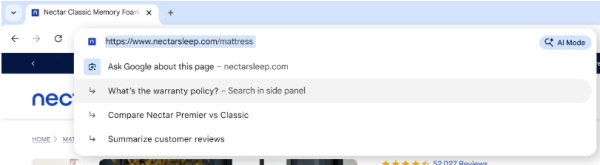
- The ability to ask questions about page content directly from the address bar. Among the recommendations shown in the address bar, Gemini can formulate relevant question options about the page content. This feature will be available in the coming weeks.

- In enhanced protection browser mode (Safe Browsing > Enhanced protection), warnings about fraudulent pages are issued, identified by the locally executing Gemini Nano model based on content analysis. Currently, warnings are provided for sites offering malicious software downloads, but future protection will expand to identify sites that display fake virus infection warnings or conduct fraudulent prize draws.
- Detection of spam and fraudulent notifications, with the option to view or unsubscribe from them. Similarly, the relevance of permission requests, such as access to the camera and microphone, has been added. The AI assesses user preferences and markers, such as site quality, to decide on displaying notifications in a less intrusive manner.
- An automated password change feature based on AI usage. If a password is found in known databases of compromised accounts, Chrome will display a warning with a suggestion to change the password during login attempts with that password. Upon agreement, the browser generates a strong password resistant to guessing, then automatically fills and submits the necessary web forms to change the password on supported sites like Coursera, Spotify, Duolingo, and H&M.
Source: opennet.ru
