

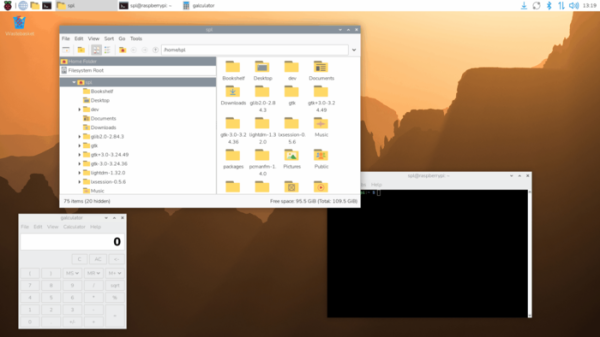
The Raspberry Pi project has released a new version of the Raspberry Pi OS distribution on November 24, 2025 (Raspbian). This distribution is based on the Debian 13 package base and includes around 35,000 packages in the repository. The desktop environment is based on the composite server labwc, which uses the wlroots library from the Sway project. Three builds have been prepared for download: a minimal version (494MB) for server systems, a basic desktop version (1.2GB), and a full version with an additional set of applications (1.9GB). The builds are available for both 32-bit and 64-bit architectures. Additionally, an update for the old version of Raspberry Pi OS (Legacy) has been created, built on the Debian 12 package base.
Key changes:
- Composite server labwc has been updated to version 0.9 (previously delivered version 0.8), which incorporates new capabilities from wlroots 0.19, such as the implementation of new Wayland protocols (ext-data-control, alpha-modifier, xdg-toplevel-icon, drm-syncobj, ext-image-copy-capture), support for Multi-GPU, and explicit buffer synchronization using DRM (Direct Rendering Manager) synchronization objects.
- The screen configurator has been updated to allow setting a scaling level for high pixel density (HiDPI) screens.
- The panel, file manager, and applications have added support for vector icons that are correctly displayed on screens of any pixel density.
- A menu editor, Alacarte, has been added to the main set.
- The Pulseaudio sound server has been removed from the distribution (only pipewire remains).
- Support for icons has been added to the task switcher interface used in Wayland-based sessions.
- The window decoration settings for Openbox have been unified with the settings for the labwc composite manager.
- The closing of popup windows with the calendar and volume slider has been ensured by clicking their icons.
- Support for changing the application themes based on the Qt6 library has been added, along with font selection for applications based on Qt5.
- The taskbar plugin for the configurator (Control Centre) has been removed.
- Updated versions of the Linux kernel 6.12.47, Chromium 142, and Firefox 145.
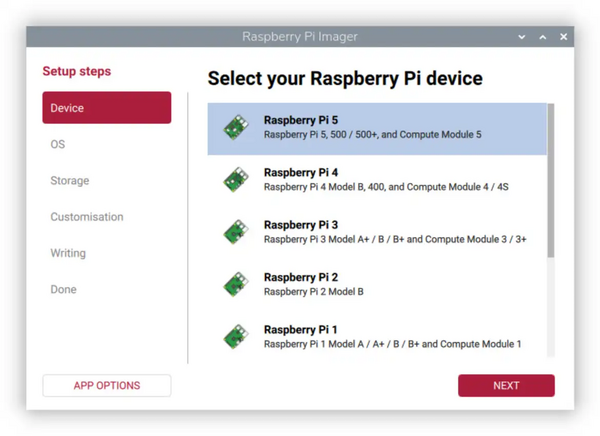
Simultaneously, the release of the Raspberry Pi Imager 2.0 toolkit has been presented, providing an interface for selecting and downloading system images from Raspberry Pi OS, writing to an SD card, and initial system setup. Among the changes:
- The user interface has been completely revamped, transforming it into a multi-step wizard with separate screens for selecting the Raspberry Pi device, choosing the operating system, identifying the storage, configuring the system, and writing the image.
- A sidebar has been added that lists the stages of installation and setup.
- The color scheme has been upgraded and the spacing between elements has been increased.

- A setup wizard for the Raspberry Pi Connect service has been implemented, designed for remote desktop access to the Raspberry Pi OS distribution through a web browser.
- Accessibility features have been improved, providing support for keyboard-only navigation without the use of a mouse.
Source: opennet.ru
