

The Document Foundation has released the office suite LibreOffice 26.2. Ready-to-use installation packages have been prepared for various Linux distributions, Windows, and macOS. In version 26.2, the project has dropped the 'Community' label (LibreOffice Community) and returned to simply being called LibreOffice.
Previously, the 'Community' label was added to emphasize that the build is supported by enthusiasts and not intended for enterprise use. Several years ago, the name LibreOffice Community was introduced for clearer differentiation from the enterprise products of the LibreOffice Enterprise family, for which partner companies provide commercial support, long-term updates (LTS), and additional features like SLA (Service Level Agreements). Ultimately, it was decided to remove the 'Community' label, as its presence during download was confusing and misleading for users—some thought it was only for non-commercial use, while it was freely available to everyone without exception, including corporate users.
The most notable changes:
- Support for importing and exporting documents in Markdown format has been added, as well as for pasting Markdown-formatted text via the clipboard. When importing Markdown documents, ODT/DOCX templates can be used to customize the appearance.
- Improvements have been made to the performance and responsiveness of the interface when opening, editing, and saving large files. The export of files in EPUB format has been significantly accelerated. The rendering of forms and SVG images with template filling has been sped up.
- Compatibility with documents created in proprietary office suites has been improved. Support for open standards has also been enhanced.
- In Linux, color selection dialogs provided by GTK and Qt libraries are used by default, instead of the LibreOffice-specific dialog. This behavior can be changed through the settings: 'Tools ▸ Options ▸ LibreOffice ▸ General'.
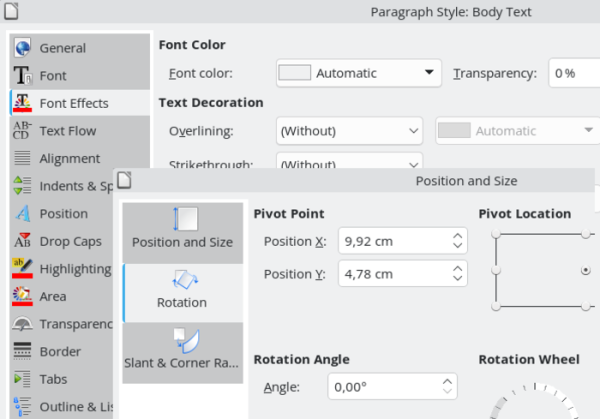
- Vertical tabs with icons have been implemented in all dialog windows.

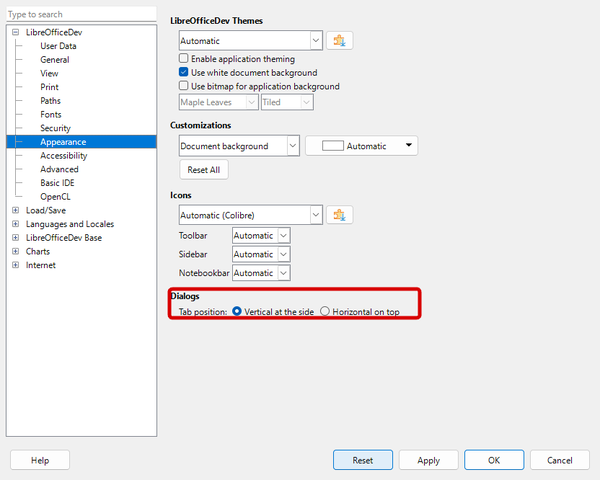
- An option has been added to use horizontal tabs instead of vertical ones in dialogs.

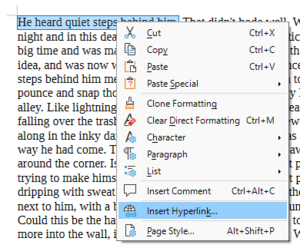
- The ability to insert hyperlinks via the context menu displayed for selected text has been added.

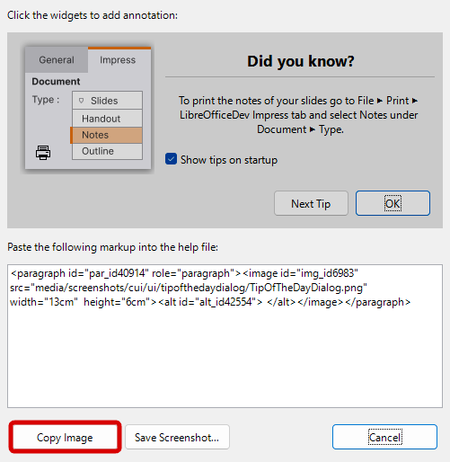
- In the screenshot creation dialog, the ability to copy the image to the clipboard has been added, rather than just saving it to a file.

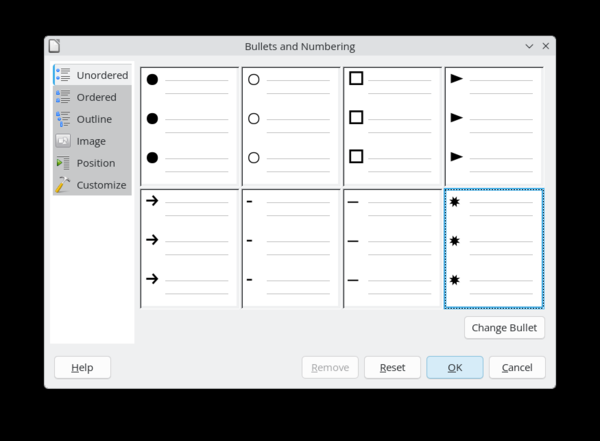
- A new set of symbols has been proposed for marking items in unordered lists. The image library for unordered lists has been updated.

- The IconView widget has replaced ValueSet in the theme selection dialog, the Layouts sidebar in Impress, and also in presets and shadow styles when customizing page border formatting.
- The dialogs for navigating to a specified page, slide, or spreadsheet sheet have been converted to operate in asynchronous mode.
- Support for embedded fonts in documents, the licenses of which prohibit editing, has been added (previously such fonts were ignored, but they can now be displayed when opening a document in read-only mode).
- Builds for Linux are now generated for systems with x86-64-v2 architecture or newer.
- On Windows and macOS platforms, instead of GDI and Aqua, the Skia library is used for rendering, which is employed in Google Chrome, Firefox, ChromeOS, Android, and Flutter, and supports rendering using GPU.
- Changes in Writer:
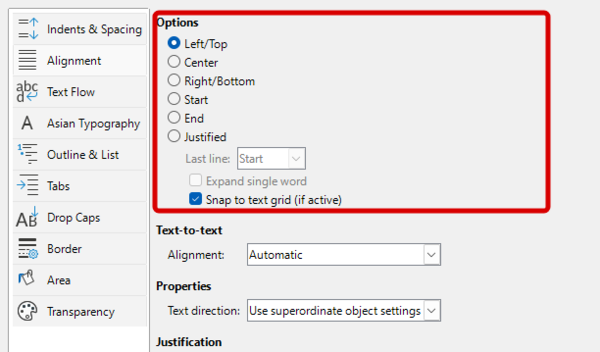
- Paragraph alignment modes at the start or end have been added, allowing paragraphs to be aligned according to text direction (left to right or right to left).

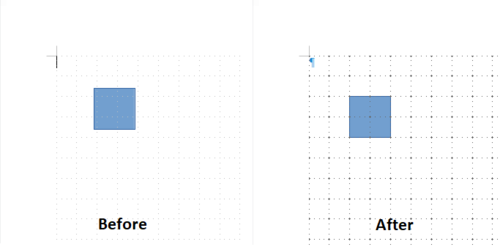
- A more prominent grid rendering has been ensured. The 'Snap to Grid' feature has implemented more precise alignment of objects to the grid.

- An option has been added to prevent dragging selected text in Drag & Drop mode ('Tools ▸ Options ▸ LibreOffice ▸ Writer ▸ Formatting Aids: Drag ‘n Drop').
- The display of floating tables along with paragraphs that have attributes preventing page breaks or mandating output on the same page with the following paragraph has been improved.
- When tracking changes, the preservation of information about the old text formatting for ODT and DOCX has been improved. Tracking of partially deleted paragraphs has also been enhanced.
- When inserting an image from the clipboard, automatic captioning under the image has been provided when 'AutoCaption' mode is enabled.
- Paragraph alignment modes at the start or end have been added, allowing paragraphs to be aligned according to text direction (left to right or right to left).
- Changes in the Calc spreadsheet application:
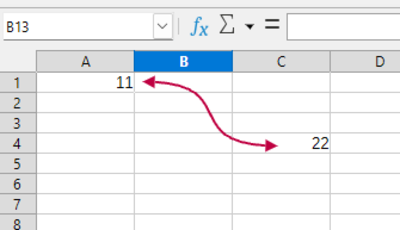
- Support for connector lines has been added.

- Support for the xmlMaps object has been added.
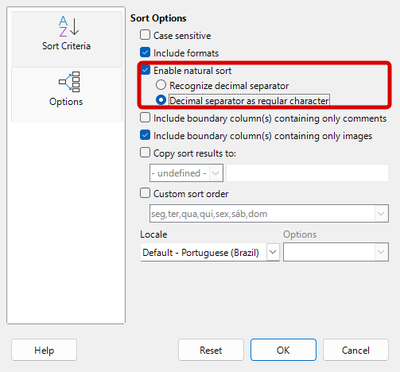
- The sorting dialog capabilities have been expanded. In natural sorting mode, an option has been added to treat the character separating the whole part of a number from the fractional part as a regular character, which allows for sorting IP addresses in systems with locales that use a period as a separator. The preservation and restoration of locale settings specified in the sorting dialog have been ensured. Setting the locale affects not only the choice of sorting algorithm but also locale-dependent sorting properties, such as the selection of the separator character.

- Support for the Biff12 clipboard format (Excel 2007+) has been added, allowing data to be transferred from Excel to Calc.
- When saving in XLSX format, the format from Excel 2010+ is used by default.
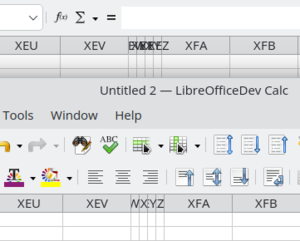
- The overlap of column headers for narrow columns has been eliminated.

- Scrolling performance in spreadsheets with a large number of hidden columns has been improved. Operations with tables containing numerous shapes have been accelerated. The removal of duplicates has been sped up. Export to SVG format with a high number of bitmaps has been optimized.
- Functionality has been added for automatically reflecting data in XML and JSON formats that have linkable value ranges (table data) into Calc sheets.

- Support for connector lines has been added.
- In the Impress presentation creation system, upon launching in Windows, support for the Microsoft Media Foundation API for audio and video playback has been implemented. MFPlay has been used for playback control.
- Support for multi-user mode has been implemented in Base.
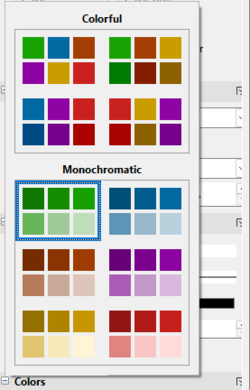
- In Chart, the rendering of 3D charts has been accelerated, and partial support for correct triple transformation of chart styles (OOXML → LO → OOXML) has been provided. A preview of color changes on the active chart is realized when hovering the mouse pointer over color palette elements in the sidebar.

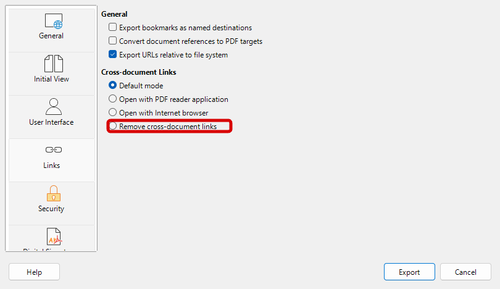
- Options for actions with external links have been added to the PDF export settings.

- The scripting system has been updated to Python 3.12. Python libraries for sqlite3, dbm, venv, and lzma are included.

Source: opennet.ru
