

The ninth release of the Orbitiny Desktop environment, built from scratch using the Qt framework, has been published. The project aims to merge some innovative ideas that have not been seen before in user environments with traditional elements, such as a plugin-supported panel, application menu, and a desktop where shortcuts can be placed. Currently, the focus is on launching in X-server based environments, but there is a possibility of adding Wayland support in the future. The code is written in C++ and is distributed under the GPL license.
Notable features specific to Orbitiny include: action invocation through screen gestures (drawing a specific shape with the mouse in a blank area of the desktop); icons with labels (displayed for new, modified, empty, or moved files through the clipboard, as well as empty directories); the ability to insert a file simultaneously into multiple selected directories; support for placing desktop content in any directory (not just in $HOME/Desktop); and the use of separate desktop directories for each virtual desktops monitor. A list of typical features of Orbitiny can be found in the previous announcement.
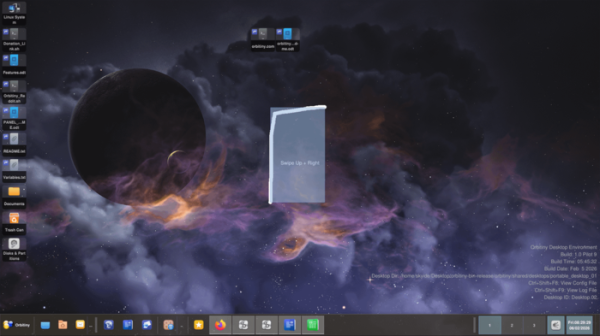
Among the changes:
- An 'Append to Clipboard' option has been added to the context menu that appears when right-clicking on a file or directory. This allows users to attach the path of the selected file to the existing file paths in the clipboard, so they can later copy the files with the 'Paste' operation.
- A 'Paste to Image' option has been added to the context menu for attaching an image from the clipboard to a selected image file (vertically following the existing image).
- The context menu now includes 'Add to Paste Basket' and 'Paste to Basket' options. The first option allows users to add selected directories to a basket of directories, while the second enables pasting files from the clipboard into the created basket of directories.
- The 'Image Join' operation has been implemented, allowing users to drag and drop one or more images onto another image to merge them into a single file. After dragging, a menu appears that lets the user choose horizontal or vertical attachment of the images.
- An interface for adjusting screen and monitor settings has been added, including screen resolution and layout for multi-monitor configurations.
- An interface for managing screen brightness has been introduced.
- An orbitiny-screenshot-grabber utility has been added for creating screenshots.
- The functionality for copying files (Orbitiny File Copier) and displaying file properties (Orbitiny File Properties) has been moved to separate applications, which can be invoked from scripts to copy a group of files while showing a progress indicator and displaying file property information.
- In control panel An option has been added to toggle between list view and grid view of icons.
- The action handler in Drag & Drop mode now supports creating a shortcut to open a URL in a web browser when dragging a URL to the panel.
- The Application Menu, Drawer Menu, and Places Menu applets have been updated to allow menu items to be launched by pressing the Enter key, along with automatic highlighting of items during search.
- The 'Launcher', 'Quick Launch', and 'Drawer' applets now include an option to launch with root privileges.
- Default shortcuts for 'Linux System', 'Disks', and 'Trash' have been added to the desktop.
- Porting from Qt 5.15.2 to Qt 6.10.1 has been completed.
Source: opennet.ru
