

The release of the web browser Firefox 148 has occurred, and updates for previous long-term support branches—140.8.0 and 115.33.0 (the last in the 115.x series)—have been formed. In the coming hours, the Firefox 149 branch will enter beta testing, with the release scheduled for March 24.
Key Features in Firefox 148 (1, 2, 3):
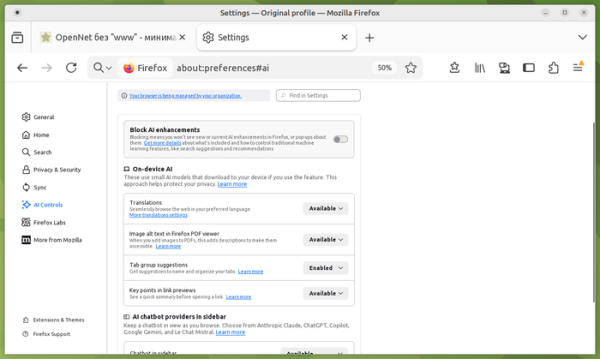
- A previously promised section "AI Controls" has been added to the settings for managing AI usage. Users can disable all AI features at once or selectively activate only the necessary functionalities. For selective disabling, AI-related options include translation to another language, image text recognition in images and scanned PDF documents, recommendations and labels for tab grouping, generating a brief page summary when previewing links, and an interface for interacting with chatbots. Each feature can be enabled, disabled, or blocked. When blocked, locally installed AI models are removed, and interface elements are hidden.

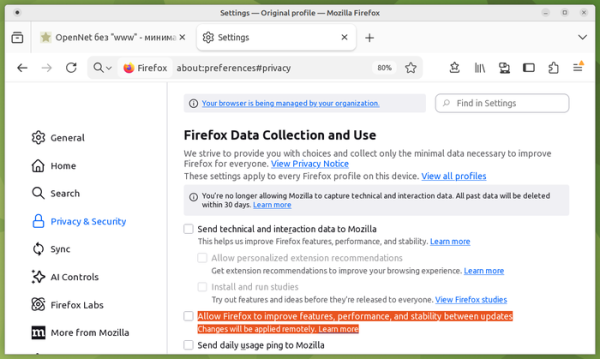
- A separate option has been added to settings for the unscheduled remote application of patches and changes between releases. Previously, this capability was tied to enabling telemetry and participating in experimental feature testing (Privacy & Security > Firefox Data Collection > Install and Run Studies), but starting with Firefox 148, it can be enabled independently.
- Background images chosen for the page displayed when opening a new tab are now applied for both default new tabs and container new tabs.
- For Windows 10 and 11 users, the Firefox Backup feature has been added, allowing users to create backups of browser-stored data such as bookmarks, settings, and passwords. Data selected by the user for clearing upon closing the browser is not included in the backup. The created backup can be used to restore the state after reinstalling the operating system or on another computer.
- Web compatibility has been ensured for the initial document 'about:blank', which is now formed synchronously and is not replaced in an asynchronous mode by a second empty document generated by the parser when navigation starts on the page (such replacement could create a race condition, sometimes leading to the loss of changes made via JavaScript immediately after calling window.open()).
- Support for the WebGPU API has been added to the Service Worker mechanism, allowing WebGPU operations to run in the background, such as in extensions or when performing shared tasks across different tabs of the same site.
- JavaScript has added the Iterator.zip() and Iterator.zipKeyed() methods for merging multiple arrays. These methods allow the creation of a new iterator based on several iterators, where each element is either an array or an object with the values of the iterators at the same position. const str1 = 'abc'; const str2 = '1234'; const it = Iterator.zip([Iterator.from(str1), Iterator.from(str2)]); for (const [char1, char2] of it) { console.log(`${char1} — ${char2}`); } // Outputs: // a — 1 // b — 2 // c — 3 const table = { name: ['Caroline', 'Danielle', 'Evelyn'], age: [30, 25, 35], city: ['New York', 'London', 'Hong Kong'], }; for (const { name, age, city } of Iterator.zipKeyed(table)) { console.log(`${name}, aged ${age}, lives in ${city}.`); } // Outputs: // Caroline, aged 30, lives in New York. // Danielle, aged 25, lives in London. // Evelyn, aged 35, lives in Hong Kong.
- The Trusted Types API has been implemented, developed to protect against DOM manipulation that leads to cross-site scripting (DOM XSS). For example, incorrect handling of user-provided data in eval() blocks or '.innerHTML' insertions can result in executing JavaScript code in the context of a specific page. Trusted Types require the use of special TrustedHTML objects instead of raw strings in dangerous calls such as element.innerHTML, document.write(), and setTimeout(). In turn, TrustedHTML objects are created by developer-written functions that perform validation and sanitization of data.
- The API Sanitizer has been added, providing methods for manipulating HTML and removing HTML elements from content that affect rendering and execution. For safe insertion of HTML content, the method element.setHTML() has been proposed, which is similar to element.innerHTML but protects against cross-site scripting (XSS). For safe parsing of HTML, the method document.parseHTML() has been implemented. The API can be useful for cleaning incoming external data and removing HTML tags that could be used to perform XSS attacks. const unsanitizedString = "abc alert(1) def"; const sanitizer1 = new Sanitizer({ elements: ["div", "p", "button", "script"], }); const target = document.getElementById("target"); target.setHTML(unsanitizedString, { sanitizer: sanitizer1 });
- Support has been added for the property "location.ancestorOrigins", which contains a list of origins of all parent elements of the document associated with the specified Location object. In practice, this property can be used, for example, to determine if the document was loaded via an iframe on another site.
- The Navigation API has added the NavigationPrecommitController object with the method addHandler(), allowing the connection of a handler that triggers during navigation at the "post-commit" stage, when the new URL is already displayed in the address bar.
- A CSS property position-try-order has been added, defining the priority for selecting fallback positions when an element with anchor positioning does not fit on the screen. This property is part of the CSS Anchor Positioning set, allowing control over the display of elements pinned to the location of other elements, without using JavaScript, for example, for attaching to elements that trigger popovers similar to tooltips.
- The shape() function has been added in CSS, allowing for the creation of shapes using the CSS properties clip-path and offset-path. The shape() function supports shape creation commands equivalent to the path() function but allows for the use of standard CSS syntax.
- In the Firefox version for Android, the toolbars have been redesigned, content settings for the toolbars have been improved, and an option has been added for quickly copying visible link text without opening the page.
In addition to new features and bug fixes, Firefox 148 has addressed 60 vulnerabilities (six times more than in the previous release). 48 vulnerabilities stem from memory management issues such as buffer overflows and accessing already freed memory areas. These issues can potentially lead to the execution of malicious code when opening specially crafted pages. Five vulnerabilities allow bypassing the sandbox isolation due to improper boundary checks and integer overflow in the graphics component.
Source: opennet.ru
