

Google has stated that it has implemented a new process for installing unverified third-party applications on Android, taking into account community feedback. This process will take effect after the mandatory registration of developers and applications is introduced in certified Android builds. The method introduces a 24-hour waiting period after enabling the developer option that allows the installation of apps from manually downloaded APK files created by developers who have not registered their packages with Google or verified their personal information.
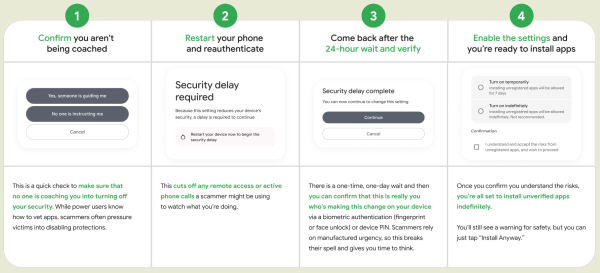
The algorithm for installing manually downloaded packages will involve the following actions:
- Enabling the developer mode in settings — you need to tap on the build number in the About Phone section 7 times. After this, a section with developer options will appear in the settings where you have to select 'Allow Unverified Packages.' This step will help prevent accidental installations and complicate the methods used by scammers to quickly install malicious packages sent to users.
- Confirming that the user understands the risks and is acting on their own initiative, not following advice or persuasion from outsiders.
- Restarting the smartphone and entering their unlock code. This step will prevent remote control over the installation process and not allow for continuous monitoring of the user's actions on the phone.
- The ability to install the manually downloaded package will be activated after 24 hours, giving the user time to recognize the situation if they are under the influence of scammers. After 24 hours, the user must return to the settings and confirm that they intentionally activated the mode for installing third-party packages using a PIN code or biometric authentication.
- After confirmation, two options will be offered: an indefinite ability to install applications from unverified developers or permission valid for only 7 days (after which the confirmation process will need to be repeated).
- When installing an unverified application, the user will see a warning about the risks involved, which they must acknowledge by clicking the ‘Install Anyway’ button.
In addition to the new method, the existing option to install applications using the ‘adb’ (Android Debug Bridge) tool will remain available, requiring the device to be connected to an external computer and developer mode to be enabled. There will also be an option for enthusiasts and students to register for free type accounts that work without identity verification but require registration of each device in the Android Developer Console where the application may be installed, limited to 20 devices.
Recall that Google is moving to use registered applications from verified developers on certified Android devices. To verify, developers must register for a fee ($25) with the Android Developer Console if they are not already registered with Google Play, providing information such as full name, residential address, email, phone number, and a photo of an identity document. Organizations will require website verification and provide an international business identifier (DUNS). After registration, the developer must add their applications and confirm their authorship by providing the complete package names and signing keys. Verification will become mandatory in Brazil, Indonesia, Singapore, and Thailand in September 2026 and will expand to other countries in 2027.
Source: opennet.ru
