

The release of the web browser Firefox 149 has taken place, along with updates for the previous long-term support branches—140.9.0 and 115.34.0. The Firefox 150 branch will enter beta testing in the coming hours, with the release scheduled for April 21.
Key features in Firefox 149 (1, 2, 3):
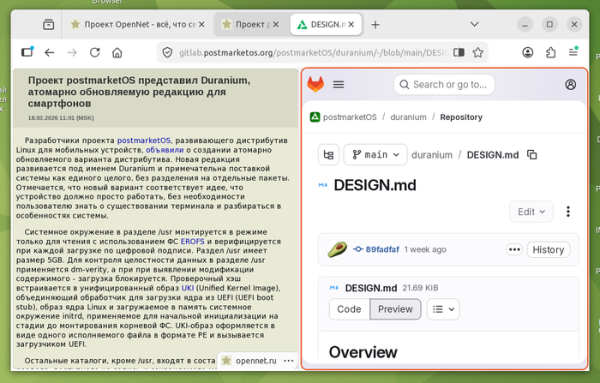
- Support for Split View mode has been added, allowing users to view the contents of two tabs side by side in one window. This mode is activated via the 'Add Split View' button in the context menu shown when right-clicking on tabs. When this button is clicked, the window content is split into two parts, and the content of the new tab page opens on the right side. If an option for a group of two tabs is selected, those tabs will immediately be displayed next to each other. The size of the left and right viewing areas can be adjusted by dragging the divider with the mouse. The active tab is highlighted with a red border during simultaneous viewing.

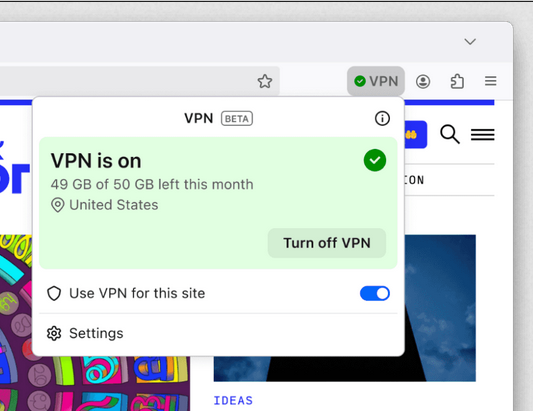
- Included is a free VPN service Firefox VPN (not to be confused with Mozilla VPN), which allows access to websites not directly but through intermediate proxy servers in different countries, hiding IP address the user. There is an option to enable it VPN only for selected sites. To activate the VPN, a Mozilla account registration is required. Initially, the VPN service is available to users from the USA, France, Germany, and the UK. The VPN service has a limit of 50 gigabytes of traffic per month.

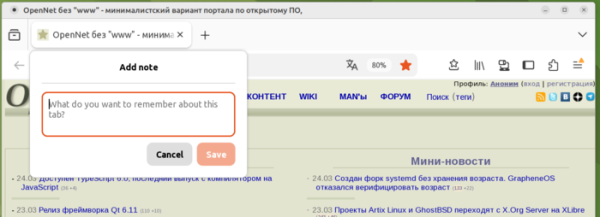
- A Tab Notes feature has been added to attach arbitrary notes to tabs. The button to add notes is located in the context menu and is also displayed on the thumbnail that appears when hovering over a tab. To enable it, you can use the setting 'browser.tabs.notes.enabled' on the about:config page or the option in the Firefox Labs section on the settings page (about:preferences#experimental).

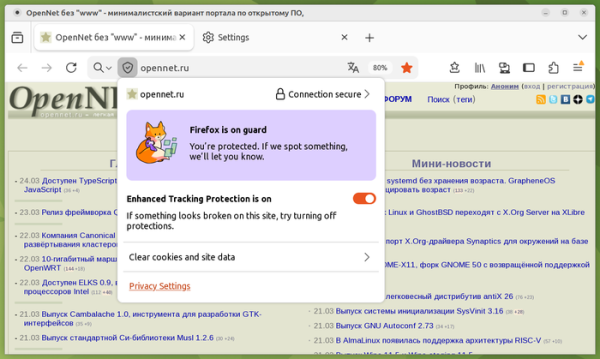
- A TrustPanel has been introduced, triggered by clicking the shield icon in front of the address bar, combining previously displayed separate panels for privacy and security settings.

- Protection against sites with malicious intent sending background notifications for advertising, spam, and phishing has been added. Notifications are now automatically blocked, and permissions granted are revoked for any sites marked malicious by the SafeBrowsing service.
- Hardware acceleration has been utilized to speed up PDF rendering.
- The toolbar configurator (Customize Toolbar) has been updated with an option to add a Share button to send the current tab to other users and devices using the system sharing services provided by Windows and macOS.
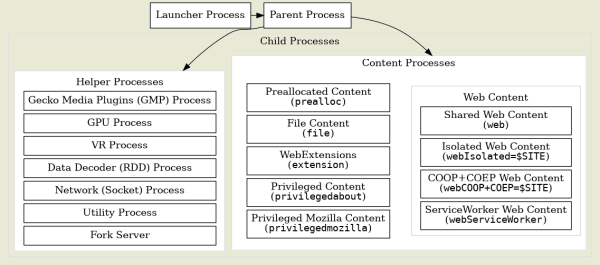
- To reduce the attack surface, stricter requirements have been imposed on JavaScript files that can be executed in the parent process responsible for launching child processes and essential browser functionality such as the interface, profiles, process management, and navigation.

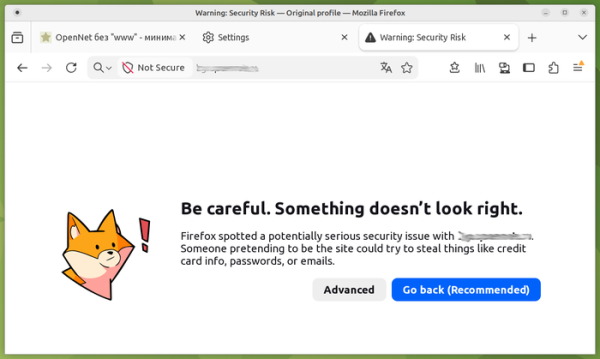
- The design of the pages shown when errors occur while attempting to open sites has been revamped.
- On the Linux platform, the default GTK3 dialog has now been replaced with the XDG portal org.freedesktop.portal.FileChooser, providing a more functional interface for file selection.
- The reliability of loading using the HTTP/3 protocol has been improved for unstable network connections.
- On the Windows platform, the Windows.Devices.Geolocation API has been used for accessing location information instead of the old API from Windows 7.
- The implementation of the JPEG XL image format decoder has been transitioned to use the jxl-rs library, written in Rust. Support for JPEG XL is currently disabled by default and requires activation of the 'image.jxl.enabled' option on the about:config page.
- In the web developer tools, a button has been added to the storage inspection panel to remove all records in the selected storage. In the styles panel, next to each CSS element associated with the computed value shown in the 'Computed' section, an icon has been added to navigate to that element in the 'Rules' section.
- The ability to invoke the browser-provided implementation of the dropdown menu using the showPicker() method has been added to display autocomplete suggestions for the text field based on options defined in the block.
- The CSS property 'shape-outside' has been updated to support the functions rect() and xywh() for defining text wrapping areas. Previously, these functions were only supported in the CSS properties clip-path and offset-path.
- To select a font with additional mathematical symbols, the CSS property 'font-family' now includes support for the value 'math', which is also used by default for font rendering in the content of the
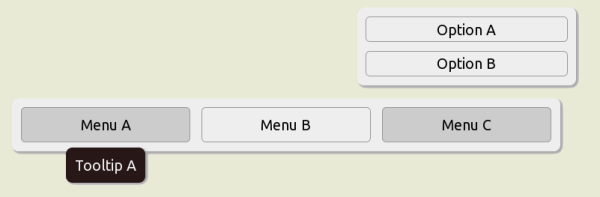
- HTML elements now support the attribute 'popover="hint"', allowing the display of automatically hidden tooltips without causing other types of popover blocks to be hidden.

- Support for pseudo-classes ':playing', ':paused', ':seeking', ':muted', ':buffering', ':stalled', and ':volume-locked' has been added for multimedia elements (
- A compliant implementation of the API HTMLMediaElement.captureStream() has been enabled, allowing the capture of content rendered by HTMLMediaElements (for example, content output through video and audio tags).
- The Reporting API has been added to gather information on various capabilities and issues, such as violations of CSP (Content Security Policy), Permissions-Policy, Integrity-Policy, Cross-Origin-Embedder-Policy, as well as the use of deprecated functionality.
- The CloseWatcher API has been implemented to monitor Close requests in web applications and respond to their arrival (for instance, a handler can be created for the back button press on Android smartphones). Close requests are generated when attempting to close modal (
- In the Firefox for Android version, navigation improvements have been made, and the toolbar, tab list, and menu have been updated. The ability to close popover elements and dialogs using the system back button has been added. A setting 'media.peerconnection.ice.obfuscate_host_addresses' has been added for obfuscating host names identified through mDNS, which helps hide internal address information when using WebRTC.
In addition to new features and bug fixes, Firefox 149 addresses 70 vulnerabilities. 55 of these vulnerabilities were caused by memory management issues, such as buffer overflows and access to already freed memory areas. These problems could potentially allow an attacker to execute code by opening specially crafted pages.
Source: opennet.ru
