

The release of the web browser Firefox 150 has taken place, and updates for the previous long-term support branches — 140.10.0 and 115.35.0 — have been formed. The Firefox 151 branch will enter beta testing in the coming hours, with its release scheduled for May 19.
Key innovations in Firefox 150 (1, 2, 3):
- A total of 359 vulnerabilities have been fixed (56 vulnerabilities are aggregated under CVE-2026-6784, 155 under CVE-2026-6785, 110 under CVE-2026-6786, and the remaining under separate CVEs). 345 vulnerabilities were caused by memory handling issues such as buffer overflows and accessing already freed memory areas. These problems could potentially allow for the execution of malicious code when specially crafted pages are opened. Most issues were identified through code review by AI models.
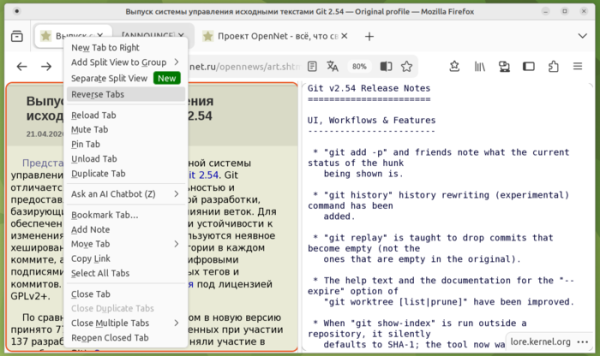
- A button for quickly opening the link's content in Split View mode, which allows side-by-side viewing of two tabs in a single window, has been added to the context menu that appears when right-clicking on a link. After invoking Split View mode from the context menu, users can select a second tab through a search of open tabs. The tab context menu has also been updated with a 'Reverse Tabs' button, allowing users to swap tabs in the left and right blocks of Split View.

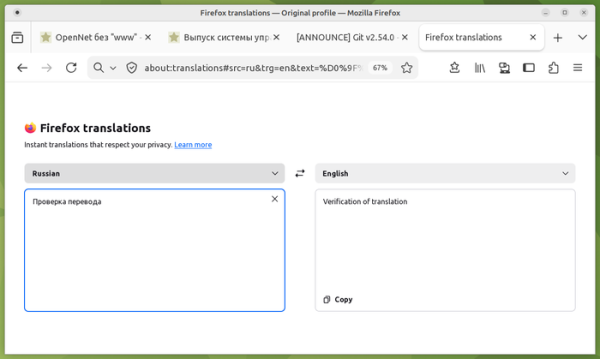
- A utility page about:translations has been proposed, providing a separate interface for translating text from one language to another. Translation occurs in real time as text is entered. To quickly access this page, users can use a prompt that appears when they begin typing the word 'translate' in the address bar.

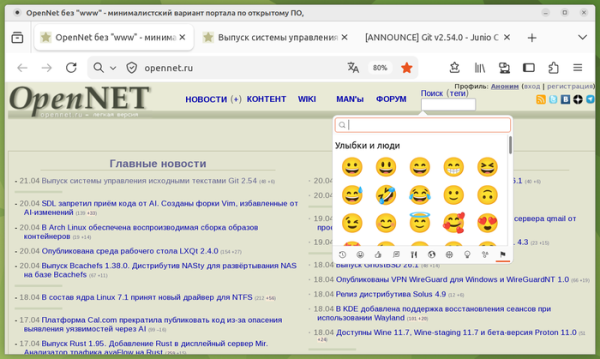
- On the Linux platform, the default Emoji selection interface provided by the GTK library has been implemented. The interface is invoked by double-pressing Ctrl+'.' in text input fields.
- RPM packages have been created for Red Hat Enterprise Linux, Fedora, openSUSE, and other distributions that use the RPM package manager.
- The ability to share information about multiple tabs via the clipboard has been provided: if several tabs are selected in the panel and 'Share → Copy X links' is chosen from the context menu, the titles and URLs of the selected tabs will be placed in the clipboard.
- The built-in PDF viewer has added features for rearranging, copying, pasting, deleting, and exporting pages from a PDF document.
- All users can now apply the LNA (Local Network Access) specification to restrict access to the local system (loopback, 127.0.0.0/8) or internal network (192.168.0.0/16, 10.0.0.0/8, etc.) when interacting with public websites. To access internal resources, users must grant the web application special permissions, as such activity is exploited by attackers to carry out CSRF attacks on routers, access points, printers, corporate web interfaces, and other devices and services that accept requests only from the local network. Additionally, scanning internal resources can be used for indirect identification or information gathering about the local network. Previously, such protection only applied when enhanced tracking protection (ETP, Enhanced Tracking Protection => Strict) was enabled.
- New profile management system implemented in Windows builds, allowing users to save profiles to a file and supporting the use of Firefox for isolated web applications.
- A new option has been added to settings (Settings > Tabs > Drag tabs) to disable the creation of tab groups when dragging one tab over another for those who prefer to manage grouping only through the context menu.
- Integrated free VPN-service Firefox VPN is now available to users in Canada, in addition to users from the US, France, Germany, and the UK. The service allows accessing websites not directly, but through intermediate proxies-servers in different countries, hiding the user's IP address. There is an option to enable VPN only for selected sites. To activate the VPN, users must register an account with Mozilla. The VPN service has a limit of 50 gigabytes of traffic per month.
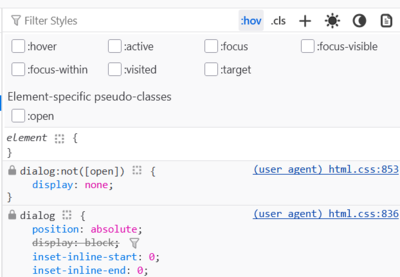
- In the web development tools, a separate section has been added to the CSS panel with pseudo-classes specific to elements, such as the pseudo-class ":open" used for expandable elements like <dialog>, and ":visited" — used for elements <a> and <area>.

The network activity tracking panel now includes an indication of secure connections established using certificates issued by certificate authorities that are not present in Mozilla's root certificate database.
- The ariaNotify API has been implemented, allowing web applications for people with visual impairments to present notifications through a screen reader.
- The <media> element has implemented support for pseudo-classes (such as «:playing», «:paused», etc.) to change styles based on playback state.
- A highlightsFromPoint() method has been added, returning an array of HighlightHitResult objects containing information about the content highlighted using the CSS Custom Highlight API for the specified position on the page.
- CSS now supports applying the light-dark() function to images to adapt to light or dark mode settings. The function can specify two images that will be selected based on the light or dark mode. light-dark( url(«light-icon.png»), url(«dark-icon.png») );
- The color-mix() CSS function now supports mixing an arbitrary number of color values (previously only allowed mixing two colors). color-mix(in oklab, teal 20%, olive 30%, blue 50%)
- For images loaded while scrolling the page (loading=lazy), where options are defined through the srcset property, support for the sizes=auto attribute has been implemented. This value allows the browser to automatically select the appropriate image from the srcset set based on the width available for the img element.
- Work has been done in the Firefox version for Android to improve stability, smoothness, and responsiveness during navigation.
Source: opennet.ru
