

Mozilla has introduced a list of features under development for future releases of Firefox. Among the proposed changes to be added to Firefox are:
- Power Saving Mode, which identifies tabs running resource-intensive operations and automatically limits their resources to prolong battery life. An interface for tracking resource consumption by tabs in the Android version.
- Smart Window mode with a separate space for AI interaction, complementing the existing standard web navigation mode and private browsing mode. This mode goes beyond the chatbot already offered in Firefox, which is embedded in a sidebar, allowing personalized interaction with the AI assistant and assistance during web browsing.
- The ability to customize keyboard shortcuts and bind your own hotkey options to actions in the browser.
- Expanding the built-in browser capabilities for editing PDF documents. Features under development include splitting documents, merging multiple PDF files, and reorganizing contents.
- Embedding the Multi-Account Containers add-on functionality with the implementation of context containers, which can be used for flexible isolation of arbitrary sites. Containers allow for the isolation of different types of content without creating separate profiles, enabling the separation of information among different groups of pages. For example, separate, isolated areas can be created for personal communication, work, shopping, and banking operations, or to organize simultaneous use of different user accounts on one site. Each container uses separate storage for Cookies, Local Storage API, indexedDB, cache, and OriginAttributes content. When using Mozilla VPN different VPN servers can be utilized for each container.
- Adding a built-in VPN in the mobile versions.
- Quick Answers mode, allowing users to ask questions by voice without leaving the browser and receive an AI-generated answer along with sources for further exploration of the topic.
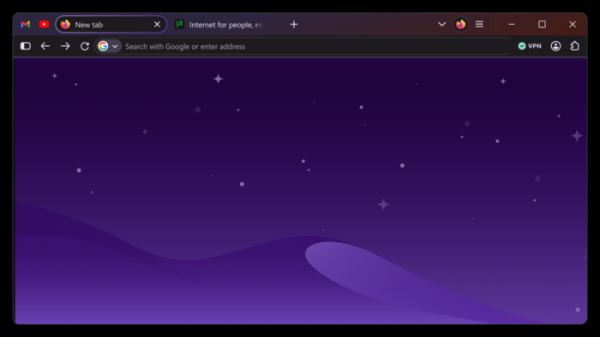
- Firefox Interface Upgrade. The new Nova design features significantly rounded tab buttons and the address bar, as well as the grouping of the top area with the tab bar, navigation pane, sidebar, content area of web pages, and page elements shown when opening a new tab. The color palette has been modified to include shades of purple and lighter warm tones. There is a glowing effect around the active tab button. Different blocks are highlighted by their color shades with gradients. The spacing between all interface elements has been redesigned. The toolbar includes separate buttons to enter private browsing mode and use the built-in VPN. Access to tab grouping, vertical tabs, and side-by-side viewing of two tabs has been simplified.

- Tools for sharing collections of links from bookmarks or grouped tabs.
- Enhancements to the address bar and search panel for easier access to search functions.
- Streamlining the auto-complete input system.
- Opening documents and miscellaneous content in Picture-in-Picture mode.
- Adding a quick cookie clearance button for private browsing on the page.
- Displaying warnings when opening sites known to have been hacked, resulting in data leaks and user database exposure.
- Enhancements to prevent user tracking using indirect identification methods.
- Support for HDR video.
Source: opennet.ru
