

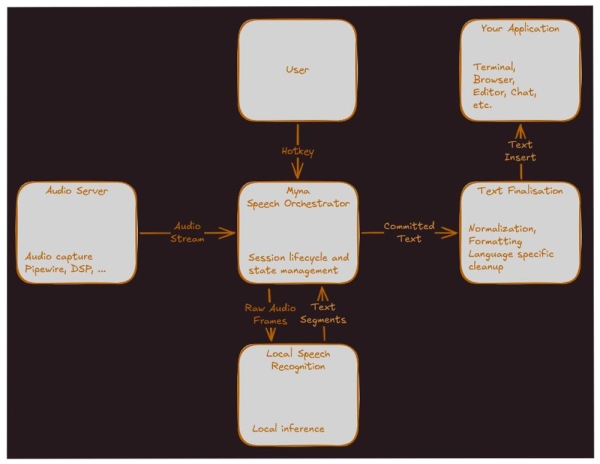
Canonical has introduced a project Myna — a new speech-to-text conversion system for Ubuntu Desktop. The project aims for built-in dictation: the user presses a hotkey, speaks, and the recognized text appears in the active application. The announcement emphasizes that Myna should feel like a natural part of the Ubuntu desktop while also respecting user privacy. The list of supported input languages at the time of the publication is not disclosed.
The first goal of the project is Ubuntu 26.10. At this stage, Canonical is not trying to create a full-fledged voice assistant or a desktop control system by voice. The developers intentionally limited the scope of the first version to basic, reliable dictation: press a key combination, say the text, and get the result in the current input field. The initial tested environment is Ubuntu Desktop on Wayland with GNOME, but the architecture is planned to remain open enough for future support of other environments.
Myna is designed for local speech recognition. After installing the necessary models, an internet connection is not required for dictation to work; the microphone is only used after explicit user activation, audio is processed in memory and then discarded, and recordings are not sent to external services. The project specification also states that the solution should avoid saving audio by default and should not silently switch to a cloud service.
The code and documentation for Myna are published in the Canonical repository on GitHub. The project is described as a lightweight speech-to-text application for Ubuntu Desktop and is released under the GPL-3.0 license. At the same time, the project is in its early stages: there are currently no published releases in the repository, and the architectural specification has a status of Proposed.
Key features and characteristics of Myna
Push-to-talk dictation. The user holds down a customizable hotkey, speaks, and the system inserts the recognized text into the chosen input field. Dictation ends when the key is released.
Local speech recognition. Recognition is performed on the user's machine using a local inference stack. This reduces dependency on the cloud and allows operation without a network after model installation.
Private audio processing. The microphone is activated only during the user dictation session. Audio should not be recorded to disk by default; a limited buffer in memory is used, which is cleared after the session ends.
Visual activity indicator. During recording and transcription, the user should see a clear status indicator. The specification mentions statuses such as Recording, Transcribing, Finalizing, and Error.
Insertion of only confirmed text. In the initial implementation, intermediate recognition hypotheses should not be inserted directly into the application. Only the confirmed final text is sent to the target field.
Post-processing of text. Raw transcription may undergo normalization, punctuation placement, capitalization, formatting, and conversion of spoken forms into written ones, for example, 'twenty two' → '22'.
Choice of dictation language. The system should support a customizable dictation language, defaulting to the user's interface language if a suitable model is available for it.
Model quality profiles. The specification provides for different model profiles: a light option with lower resource consumption, a balanced default profile, and a higher quality, but heavier option.
Safe operation with input focus. The target for text insertion is selected at the beginning of the session. If the window focus changes during dictation, the system should not silently send text to another application.
Blocking in secure fields. Dictation should be blocked in password fields, authentication windows, and other secure places if the application or toolkit can determine this.
Integration with Wayland/GNOME. The first version is focused on Wayland and GNOME. IBus is considered for initial text insertion, and in the future, a more native Wayland approach through input-method/text-input protocols is planned.
User settings. The planned settings interface should include enabling/disabling STT, selecting a hotkey, dictation language, microphone, model profile, post-processing options, and activity indicator.
In the first iteration, the following features remain outside the project: keyword wake-up, continuous background listening, cloud recognition, voice assistant, voice commands, desktop control, speech translation, speaker identification, automatic language detection, and dictation history. In other words, Canonical starts not with an 'AI assistant,' but with a more grounded feature: local voice text input in standard Ubuntu applications.
Source: linux.org.ru
