

The release of Archinstall 4.4 has been published, which has been an option in the Arch Linux installation ISO images since 2021. Archinstall operates in console mode and can be used instead of the default manual installation mode of the distribution. The code for Archinstall is written in Python and is distributed under the GPLv3 license.
Archinstall provides both dialog (guided) and automated operating modes. In automated mode, there is the capability to use scripts to deploy standard configurations. The installer also supports installation profiles, such as the ‘desktop’ profile for selecting a desktop environment (KDE, GNOME, Awesome) and installing the necessary packages for its operation, or the ‘webserver’ and ‘database’ profiles for choosing and installing components for web servers and DBMS. Six years ago, an attempt was made to create a version of Archinstall with a graphical installation interface, but it did not progress.
In the new version:
- Automatic adjustment of the console font is provided based on the selected language. The 'Locales' menu has been added with the option for manual font selection.
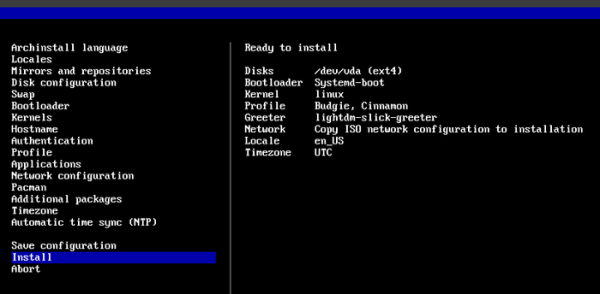
- A final confirmation request has been added before the installation begins, displaying a summary of the selected parameters.

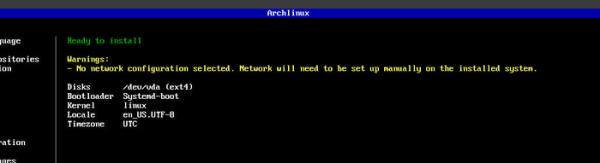
- An optional feature for color coding readiness for installation has been implemented: errors with the bootloader and configuration problems are highlighted in red, warnings that do not block installation in yellow, and a green label indicates readiness for installation.

- A share-log command has been added to upload the install.log to the paste.rs service. Before performing the operation, a confirmation prompt is displayed, showing the contents of the log so the user can evaluate what is about to be sent.
- An option has been added to use only the IWD package for Wi-Fi connectivity, without installing NetworkManager and its related dependencies. This allows for the creation of minimalist configurations based on
seatd. - The mkosi tooling has been used to create test system images, which works faster and generates smaller images compared to mkarchiso.
- Settings have been provided to enable the display of the Plymouth splash screen and to select a theme for it.
- A profile has been added for setting up a custom environment based on composite server Niri and the Dank Material Shell.
Source: opennet.ru
