

Google has published the release of the web browser Chrome 150. At the same time, a stable version of the open-source project Chromium, which serves as the basis for Chrome, is also available. The Chrome browser differs from Chromium by using Google logos, having a crash notification system, modules for playing DRM-protected video content, automatic update installation, constant Sandbox isolation, supplying keys to Google API, and passing RLZ parameters during searches. For those who need more time for updates, an Extended Stable branch is separately supported for 8 weeks. The next release of Chrome 151 is scheduled for July 28.
Key changes in Chrome 150 (1, 2, 3, 4):
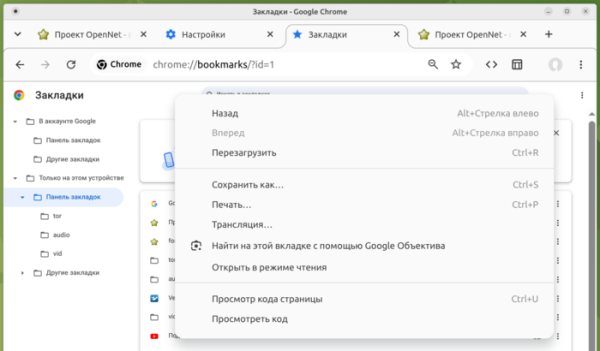
- The first results of the initiative to refresh the user interface across different operating systems and eliminate excess elements have been proposed. New icons with smoother edges and animation effects for buttons, such as the main menu and page reload buttons, have been introduced. The structure of context menus has been simplified by removing rarely used or duplicate items. More modern designs have been implemented for the configurator, download manager, and bookmarks navigation page.

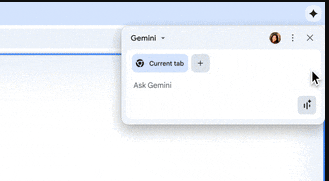
- Development of the AI mode has continued, allowing interaction with the AI agent from the address bar or from the page shown when opening a new tab. The new version has added the ability to connect Chrome to the AI agent Gemini Spark for autonomous actions within the currently active tab while solving tasks that require interaction with web content (clicking buttons, following links, filling out forms, etc.). Additionally, contextual recommendations for utilizing Gemini while browsing have been added; for example, when opening a long article, Chrome will suggest summarizing the information using Gemini, and when editing text in a form, it will recommend checking or correcting the text via Gemini.

- Some users are utilizing a unified simplified interface for linking to their Google account and synchronizing data such as saved passwords and bookmarks. Synchronization is integrated with account login and is not presented as a separate feature in the settings. Users can connect Chrome to their Google account and use it to store passwords, bookmarks, browsing history, and tabs. Data for address autofill and input prediction is no longer synchronized between devices and is only stored on the local system.
- Some users who have activated the Enhanced Safe Browsing mode have the 'HTTPS-First' feature enabled, which automatically redirects HTTP requests to HTTPS. To ensure functionality with sites that do not support HTTPS, a fallback to HTTP is implemented if the HTTPS request fails after redirection or if there are certificate issues. When attempting to open a site via HTTP, a special warning is displayed. In Chrome 154, this mode is planned to be enabled by default for all publicly accessible websites hosted outside intranet networks, such as 192.168.0.1 and 10.0.0.0/8.
- Support for the flag kExtensionManifestV2Disabled has been removed, which allowed the installation of add-ons using the second version of the Chrome manifest from the Chrome Web Store. In the next release, Chrome 151, the AllowLegacyMV2Extensions parameter will be removed, which previously allowed developers to manually load add-ons based on the second version of the manifest in developer mode. The marked flags allowed a workaround to install the uBlock Origin add-on.
- Web Worker handlers created using the 'data:' URI (for example, through 'new Worker( domainThis change allows blocking the use of Web Workers not loaded from server, but created on the fly via 'data:', from accessing sensitive data during XSS attacks.
- Protection against attacks manipulating the limit on the maximum number of connections to the proxy as a hidden communication channel between JavaScript code running in different tabs has been implemented. For example, an attacker can occupy all available connections to the proxy, leaving only one socket unoccupied and then analyze its availability when accessing a static resource — if the socket is not occupied, the resource from the checked site is served from the cache, meaning the user has already loaded it before. The limit on the maximum number of connections to the proxy TCP sockets is now randomized.
- Applying SVG filters to foreign (cross-origin) or sandboxed iframe blocks, as well as to plugins (e.g., built-in PDF viewers), is prohibited. This restriction helps protect against attacks from side channels, like GPU.zip, and attacks of the SVG Clickjacking class, where SVG filters are used to overlay transparent content on other content to insert an invisible button, for instance, over the close window button of an advertisement.
- For isolated web applications (PWA, Progressive Web App), the ability to migrate to a new subdomain within one base domain (for example, replacing drive.example.com with fileman.example.com) without user intervention has been provided. Previously, a PWA was tied to the original domain, and changing the subdomain during rebranding or restructuring required a manual reinstallation.
- Support for the digital signature generation algorithm ML-DSA (CRYSTALS-Dilithium), resilient against quantum computer cracking, is enabled by default in TLS.
- The Android version includes support for the FIDO Alliance Credential Exchange standard, allowing the import and export of saved passwords and biometric identification parameters using end-to-end encryption on the client side, for example, for secure transfer between Google Password Manager and third-party password managers.
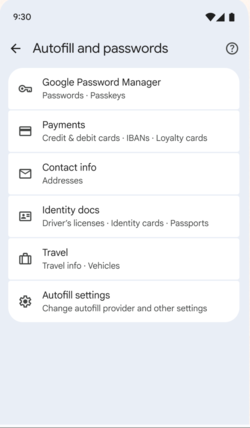
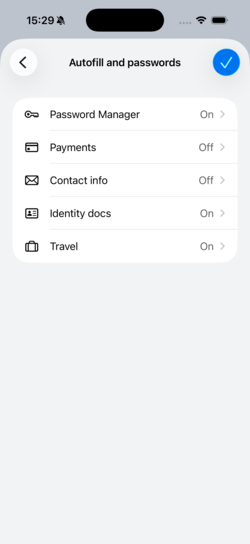
- The Android version features a new unified interface for managing saved passwords and form autofill data. The idea is to allow users to access information about various classes of sensitive data saved by the browser, such as passwords, biometric authentication data, addresses, and passport information, all at once.


- The CSS property 'text-fit' has been added to automatically scale the font size so that the text fits the width of the parent container (for example, when you need to fit a heading into a designated area without wrapping text to another line or adjusting the font for different screen resolutions).
- The CSS property 'background-clip' has been updated to support the 'border-area' parameter, simplifying the creation of gradient borders by restricting the element's background drawing to the area occupied by the border.
- A new CSS function, image(), has been introduced to generate an image filled with a specified color.
- In the Origin Trials mode, testing has begun on the EVP (email verification protocol) for automatic cryptographic email ownership confirmation without the need to send one-time confirmation codes to the email.
- An HTML attribute 'focusgroup' has been added for declarative management of keyboard input focus switching within composite components like menus without using JavaScript. For instance, after exiting a group of elements with the Tab key and returning, the browser will return focus to the last active element rather than the first item in the list.
- Improvements have been made to the tools for web developers. New capabilities for inspecting and debugging the WebMCP toolkit have been added, which is used for integrating websites with AI agents through the MCP protocol. The styles panel now allows in-place editing of the rules for '@container', '@counter-style', and '@function'.
In addition to new features and bug fixes, the new version has addressed 433 vulnerabilities. Many of these vulnerabilities were discovered through automated testing using tools like AddressSanitizer, MemorySanitizer, Control Flow Integrity, LibFuzzer, and AFL. Twenty issues have been assigned a critical severity level, meaning they allow bypassing all levels of browser protection and executing code on the system beyond the sandbox environment. Fourteen critical issues are due to use-after-free memory access, three result from insufficient validation of untrusted input, two are due to buffer overflows, and one is related to type confusion. Under the bug bounty program for this release, Google has paid out $319,000 (including one reward of $250,000 for CVE-2026-14382 in the ANGLE library, three rewards of $10,000, $2,500, $2,000, and $1,000, two rewards of $3,000, and single rewards of $8,000, $5,000, and $4,000).
Source: opennet.ru
