

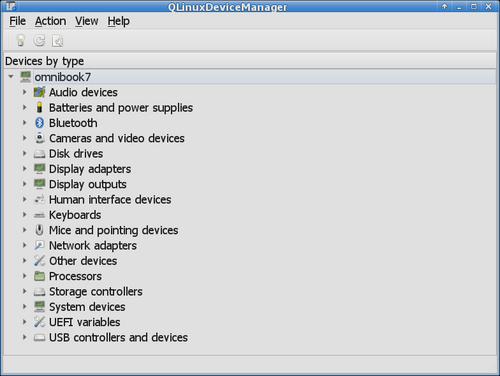
The release of QLinuxDeviceManager 1.3 has been announced—a graphical device manager for Linux that combines a Windows-style interface with detailed hardware diagnostics capabilities. Unlike standard system information viewers, the program not only identifies installed devices and the drivers in use but also reveals the actual speed of PCIe device connections, allows for checking the health of SSDs, examines UEFI variables, displays characteristics of USB connections, and provides comprehensive details about monitors, batteries, and network interfaces. The code is written in C++ using Qt6 and is distributed under the GPLv3 license. An AppImage format build is available.
The program is aimed at users who find the device name and driver version insufficient but do not want to gather information piecemeal using lspci, lsusb, smartctl, ethtool, dmidecode, and other console utilities. The application features several ways to group hardware: by type, connection, drivers, and resources. For each device, there is a properties window where the information is divided into thematic tabs. A separate System Information section contains general information about the system, processor, memory, motherboard, and firmware.
System interfaces of Linux are used to obtain information about the hardware. Management of drivers and configuration changes for devices is intentionally not implemented—the application operates strictly in read mode. AI was utilized in the development process, while architectural decisions, functionality requirements, and testing remained the responsibility of the author.
Key features of QLinuxDeviceManager include:
- PCI Express diagnostics. It displays the current connection speed and the number of PCIe lanes used, as well as the claimed maximum specifications of the device. For example, it can identify that a graphics card is operating in x8 mode instead of x16 or using a slower generation of PCIe. Additional information about support and allocated sizes for Resizable BAR is also provided.
- Detailed diagnostics for SSDs and HDDs. Version 1.3 significantly expands SMART support. In addition to temperature and overall health of the drive, information is available on the amount of data written and read, uptime, number of power cycles, unsafe shutdowns, SSD wear indicators, remaining reserve, and error counters.
- The installed RAM volume is displayed, including memory not accessible to the operating system, module characteristics, manufacturer, speed, and information on whether the memory is soldered or replaceable.
- For connected USB devices, the displayed information includes USB standard version, negotiated speed of the connection, power consumption information, current draw, voltage, remote wake-up support, interfaces, and the drivers in use.
- Extended information about batteries is available, allowing you to see not only the charge level but also the design and current total capacity, assess wear level, find out the number of charging cycles, voltage, current, power consumption, and other specifications provided by the hardware.
- Displays the manufacturer and model of the monitor, physical dimensions, supported features, current resolution, refresh rate, color depth, scaling, and image rotation. Access to available parameters is supported in both X11 and Wayland.
- Besides (the key to connect to is specified, and iroh finds the associated host and establishes an encrypted connection using the QUIC protocol). Direct P2P connections are established whenever possible, but if not, it falls back to using relays, which are also employed for host discovery by keys. You can run your own relay or connect to public relays supported by the community., masks, MTU, and MAC addresses, including information on overridden addresses, the current speed of the Ethernet connection, duplex mode, auto-negotiation, and supported operating modes are available.
- The system boot mode (BIOS/UEFI), Secure Boot status, information about registered MOK certificates is shown, as well as the ability to view available firmware variables and their contents in hexadecimal format.
- Device connections and disconnections are automatically tracked via udev. There is an event log for the current session, along with options to display hidden, virtual, and internal devices.
- In addition to regular name searches, a deep search mode has been implemented, allowing devices to be found by identifiers, properties, and allocated resources. For example, the hardware can be filtered by hardware identifier without manually browsing the entire device tree.
Source: opennet.ru
